

PlayerEx Mod za Minecraft 1.16.5, 1.19.2
Dodaje atribute, nivoe i poene veština. RPG tema.
 Fabric
 Forge
O PlayerEx modu
11. avgust 2023: Pravim pauzu od modovanja. Vratiću se, ali nisam siguran kada. I dalje ću se truditi da odgovaram na komentare kada budem mogao. Napominjem da će podrška biti pružena samo za najnoviju verziju. Takođe, više ne razvijam za Forge; ovaj mod sada koristi Fabric.
Opis

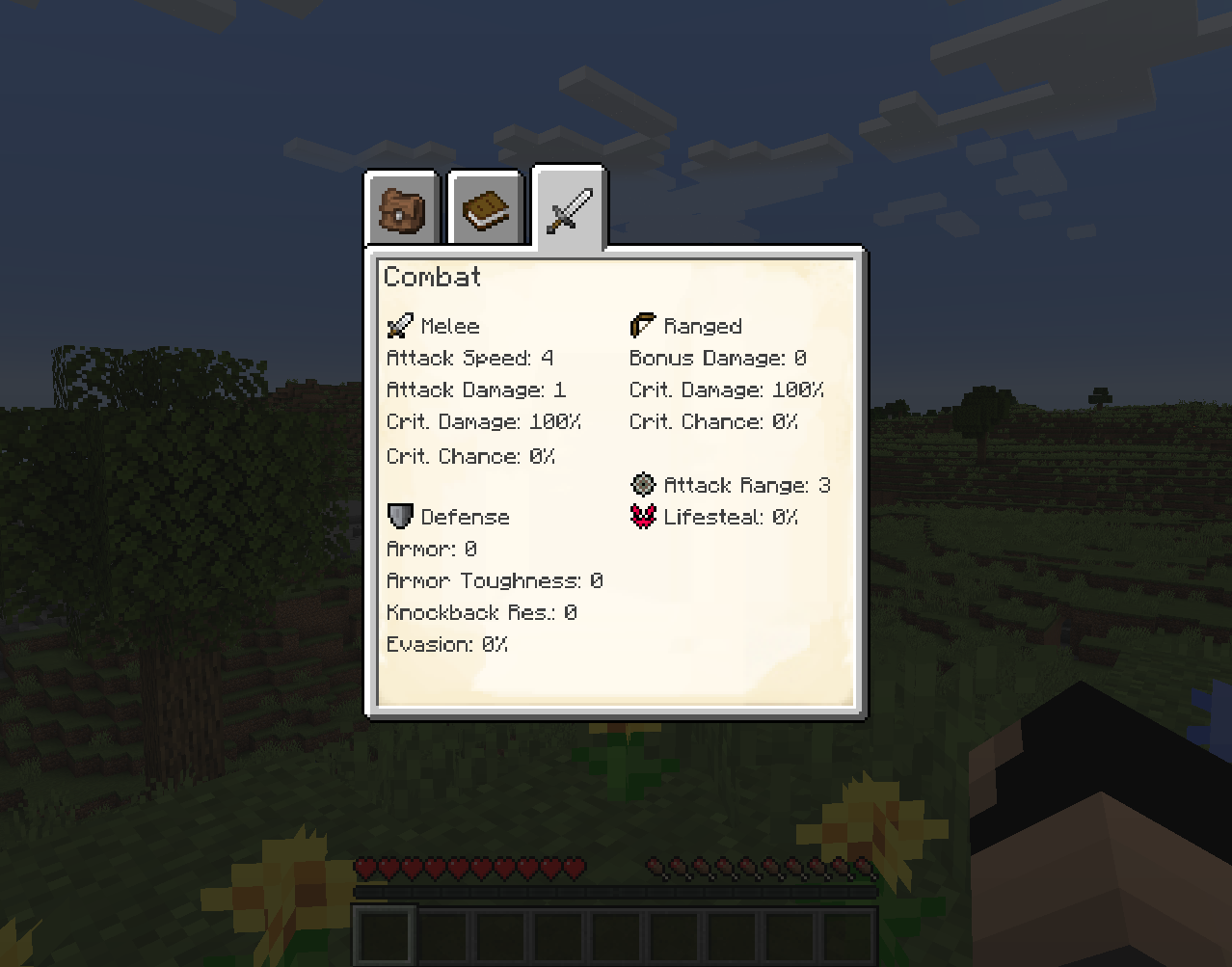
PlayerEx registruje potpuno funkcionalne atribute RPG tematskog tipa u igru i podrazumevano ih dodaje igraču (ovi atributi mogu se dodati i drugim živim bićima). Dodati su i nivoi, poeni veština i podesivo napredovanje kroz nivoe. Najnovija iteracija pokreće se uz pomoć Data Attributes, odakle dolazi najveći deo mogućnosti konfiguracije - molim vas da se sa tim upoznate pre nego što dođete ovde da pitate kako da konfigurišete stvari.
Za detaljniju dokumentaciju o ponuđenom sadržaju i mehanikama, između ostalog, molim vas pročitajte wiki.
Tražite stari HUD? Sada je dostupan kao samostalan mod ovde.
Dostupan je i dodatni mod: RelicEx; ovaj mod nudi neke predmete za proširenje PlayerEx atributa. Neki video snimci koji ljubazno prikazuju PlayerEx:
- Od Mischief of Mice (Forge)
- Od bstylia14 (Forge)
- Od AsianHalfSquat (Fabric)
Napomene i smernice
- Poslednja verzija objavljena za Forge bila je v1.1.8.
- Uvek koristite najnoviju verziju.
- Molim vas da obrišete konfiguracione datoteke pre ažuriranja na drugu verziju, jer se konfiguracione datoteke menjaju između glavnih verzija kako se implementira više mogućnosti konfiguracije.
- Modpakovima je dozvoljeno.
- Ovaj mod dolazi sa (jar-in-jar) Cardinal Components (Base, Entity i Chunk moduli), TextPlaceholderAPI, OfflinePlayerCache i exp4j (navedeni su autori).
Kako instalirati PlayerEx
With Millida Launcher
Install Millida Launcher
The launcher is free: download it at millida.net/launcher and sign in with any nickname.
Click “Install” on this page
The launcher opens and installs the mod for Minecraft 1.16.4–1.19.2 on Fabric or Forge automatically.
Launch the game
A profile with it appears in the launcher: click “Play”.
Manually
Install Fabric or Forge
The loader must match the game version of the mod file, for example Minecraft 1.19.2. After installing it, a separate profile appears in your launcher.
Download the file for your version
In the version list above, pick the file playerex-3.5.4+1.19.2.jar (607 KB) for your game version and loader.
Put it in the mods folder
The folder is inside .minecraft (Windows: %appdata%\.minecraft\mods). If it does not exist, create it.
Launch the loader profile
Open “Mods” in the main menu: PlayerEx should be in the list.
Minecraft 1.19.2 runs on Java 17: with a different Java version the game may close right after launch.
Verzije
Sa zavisnostima
| Minecraft | Loader | Fajl | Datum | Akcije |
|---|---|---|---|---|
| 1.19.2 | Fabric | 3.5.4+1.19.2607 KB 1 | ||
| 1.16.5 | Forge | playerex-1.1.8-1.16.5.jar131 KB 3 |
Česta pitanja
Which Minecraft versions does PlayerEx work on?
There are files for 1.19.2, 1.16.5, 1.16.4. The newest is 1.19.2.
Is PlayerEx for Forge or Fabric?
There are files for Fabric: 1.19.2 and for Forge: 1.16.4–1.16.5. There are no files for NeoForge: a mod for another loader will not start.
Does PlayerEx need other mods?
The author lists no required dependencies: the Fabric or Forge loader is enough.
Which Java does PlayerEx need?
Minecraft 1.19.2 runs on Java 17. If the game closes right after launch, the usual cause is the wrong Java version in the profile settings.
Where can I download PlayerEx safely?
On this page: the file playerex-3.5.4+1.19.2.jar (607 KB) is stored on Millida’s server, with no link shorteners. SHA-1 checksum: 48e9ef1dc6aafb45e9aa7c5d9ab2fe588f297d7c.
Recenzije
Budi prvi koji će oceniti PlayerEx


