

Pack Analytics Mod za Minecraft 1.20.1, 1.21.1
Prikuplja metrike broja igrača za autore modpack-ova.
 NeoForge
 Fabric
 Forge
ForgeO Pack Analytics modu

Jednostavan mod koji prikuplja anonimne metrike broja igrača za autore modpakova, šalje ih na centralizovani veb server i čuva u InfluxDB radi lakšeg pregleda istorijskih podataka u Grafani.



Ovaj mod se integriše sa Better Compatibility Checker i koristiće broj verzije iz vaše BCC konfiguracije ako je to moguće.
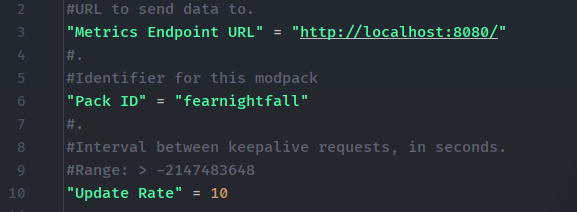
URL krajnje tačke za metrike je podesiv, kao i ID paketa i brzina kojom se šalju keepalive zahtevi.
Primer servera možete naći ovde na GitHub-u, koji samo prikuplja trenutnu statistiku korišćenja za svaki ID modpaka i opciono je šalje u Grafanu.
Napomena: ovaj mod ne šalje informacije o igračima, korisnička imena ili ID-ove. Samo povremeno šalje jednostavan zahtev "igram", sa verzijom modpaka koju koristite, radi praćenja igrača na mreži.
Kako instalirati Pack Analytics
With Millida Launcher
Install Millida Launcher
The launcher is free: download it at millida.net/launcher and sign in with any nickname.
Click “Install” on this page
The launcher opens and installs the mod for Minecraft 1.20–1.21.1 on Fabric, Forge or NeoForge automatically.
Launch the game
A profile with it appears in the launcher: click “Play”.
Manually
Install Fabric, Forge or NeoForge
The loader must match the game version of the mod file, for example Minecraft 1.21.1. After installing it, a separate profile appears in your launcher.
Download the file for your version
In the version list above, pick the file packanalytics-neoforge-1.0.5-1.21.1.jar (706 KB) for your game version and loader.
Put it in the mods folder
The folder is inside .minecraft (Windows: %appdata%\.minecraft\mods). If it does not exist, create it.
Launch the loader profile
Open “Mods” in the main menu: Pack Analytics should be in the list.
Minecraft 1.21.1 runs on Java 21: with a different Java version the game may close right after launch.
Verzije
Sa zavisnostima
| Minecraft | Loader | Fajl | Datum | Akcije |
|---|---|---|---|---|
| 1.21.1 | NeoForge | PackAnalytics Neoforge 1.0.5 for 1.21.1706 KB | ||
| 1.21.1 | Fabric | PackAnalytics Fabric 1.0.4 for 1.21.11.3 MB | ||
| 1.20.1 | Forge | PackAnalytics Forge 1.0.4 for 1.20.1706 KB |
Česta pitanja
Which Minecraft versions does Pack Analytics work on?
There are files for 1.21.1, 1.20.1, 1.20. The newest is 1.21.1.
Is Pack Analytics for Forge or Fabric?
There are files for Fabric: 1.21.1, for Forge: 1.20–1.20.1 and for NeoForge: 1.21.1.
Does Pack Analytics need other mods?
The author lists no required dependencies: the Fabric, Forge or NeoForge loader is enough.
Which Java does Pack Analytics need?
Minecraft 1.21.1 runs on Java 21. If the game closes right after launch, the usual cause is the wrong Java version in the profile settings.
Where can I download Pack Analytics safely?
On this page: the file packanalytics-neoforge-1.0.5-1.21.1.jar (706 KB) is stored on Millida’s server, with no link shorteners. SHA-1 checksum: 2bd790f7347c95f6227d0030cfa335a5422f1997.
Recenzije
Budi prvi koji će oceniti Pack Analytics


