

More Overlays Updated Mod za Minecraft 1.21.1, 1.16.5
Dodaje NEI-oliki sloj svetlosti za spawn mobova, sloj granica chunkova i JEI sloj za pretragu predmeta. (ažurirano za 1.15.2, 1.16.5, 1.18.2, 1.19, 1.20 i 1.21)
 NeoForge
 Forge
 Fabric
O More Overlays Updated modu
[ ](https://www.curseforge.com/minecraft/mc-mods/more-overlays)This mod adds some of the overlays back from NEI and is available for:
(1.15.2, 1.16.1 - 1.16.5, 1.17.1, 1.18, 1.19, 1.20, Client-Side Only!).
More Overlays was originally developed by FeldiM245 and is currently maintained and expanded upon by RiDGo8 under the name More Overlays Updated. The mod is currently available for Forge, Fabric and NeoForge.
For Minecraft version 1.14 and below check out the original mod by FeldiM245:
Overlays:

Light Overlay / Mob spawns:
F7 : Enable Light Level / Mob spawns Overlay Shows a yellow X on blocks where monsters can spawn at night or a red X where monsters can always spawn.
#### Chunk Boundaries:
F9 : Enable Chunk Boundaries Overlay Has three modes: 1st mode: It shows red lines in the corners and a yellow line in the middle of the chunk. 2nd mode: It also shows a green grid on the edges of the chunk. 3rd mode: The green grid outlines a Minecraft region and displays the corresponding region save file in the top left corner.

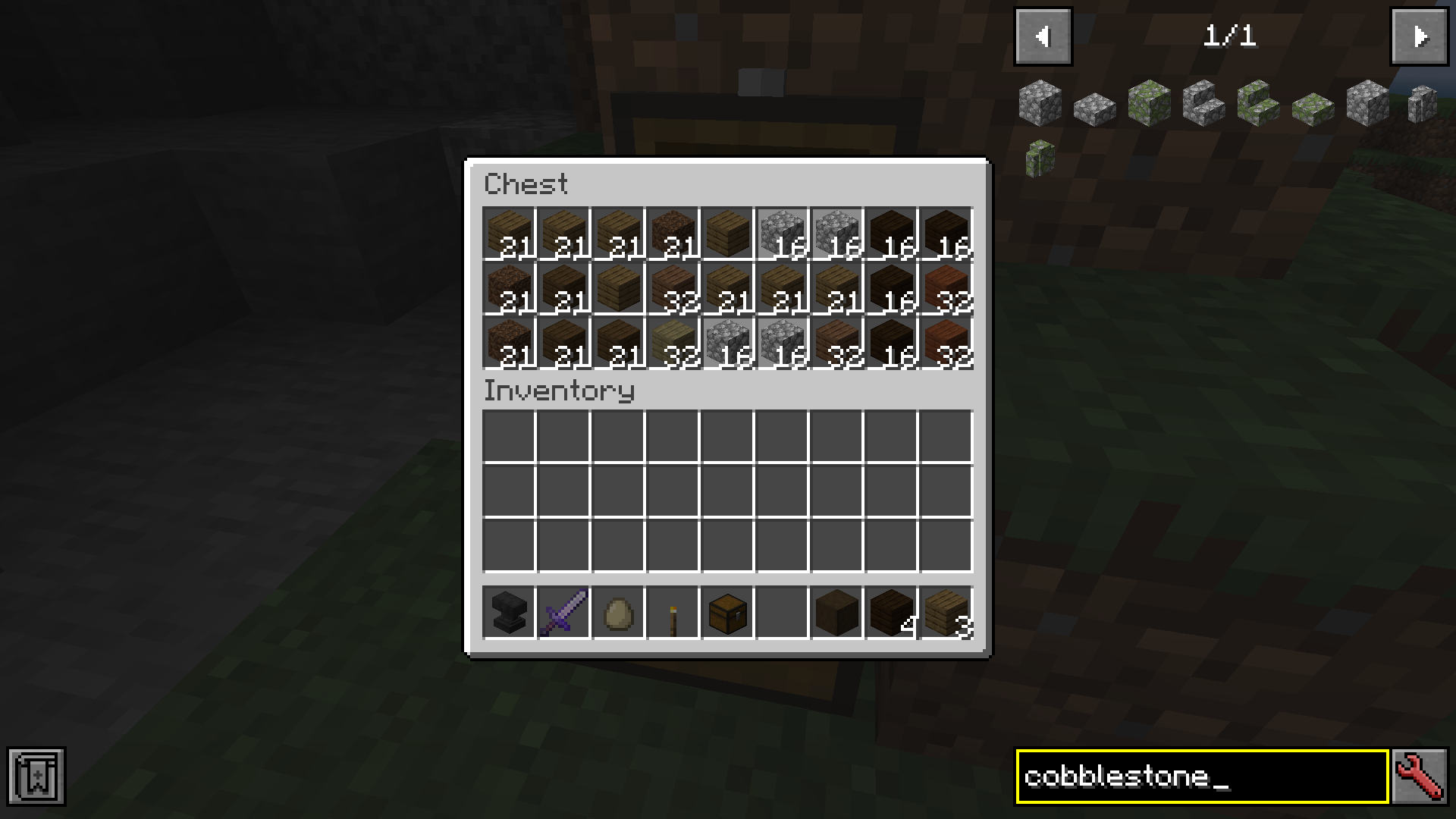
Inventory Item Search (only if JEI is installed)
Double-click on the JEI Search Field for Item Search (Just like in NEI) If it is enabled you can search in JEI for items and all items in the currently open inventory that doesn't match the filter will get blacked out. Since 1.15 you can also search for custom named items.
Forge and NeoForge
You can change the config from the Main Screen: Mods -> MoreOverlays -> Config or by editing config/moreoverlays.toml
Fabric
The config file for Fabric not available currently but will be added in the future.
Integration
This mod integrates with some other mods to fix bugs or add features. JustEnoughItems (by mezz): Item Search only works when JEI is installed since it uses the search algorithm from JEI to highlight items.
I allow distribution of my mod in modpacks. Would be nice if you give credits
Reuploading the file is allowed ( But only if the download is free, because commercial use of this mod is against the Minecraft EULA, but you can use my code for anything you want) Please try to keep the files on your website updated and don't lie about the Mod and Minecraft Version. (If there is no file for MC 1.13 don't write in the Tile "More Overlays 1.12 / 1.13" )
Kako instalirati More Overlays Updated
With Millida Launcher
Install Millida Launcher
The launcher is free: download it at millida.net/launcher and sign in with any nickname.
Click “Install” on this page
The launcher opens and installs the mod for Minecraft 1.16.2–1.21.1 on Fabric, Forge or NeoForge automatically.
Launch the game
A profile with it appears in the launcher: click “Play”.
Manually
Install Fabric, Forge or NeoForge
The loader must match the game version of the mod file, for example Minecraft 1.21.1. After installing it, a separate profile appears in your launcher.
Download the file for your version
In the version list above, pick the file moreoverlays-1.24.2-mc1.21.1-neoforge.jar (110 KB) for your game version and loader.
Put it in the mods folder
The folder is inside .minecraft (Windows: %appdata%\.minecraft\mods). If it does not exist, create it.
Launch the loader profile
Open “Mods” in the main menu: More Overlays Updated should be in the list.
More Overlays Updated works on the player’s side only: there is no need to install it on a server.
Minecraft 1.21.1 runs on Java 21: with a different Java version the game may close right after launch.
Verzije
Sa zavisnostima
| Minecraft | Loader | Fajl | Datum | Akcije |
|---|---|---|---|---|
| 1.21.1 | NeoForge | 1.21.1110 KB | ||
| 1.21.1 | NeoForge | 1.21.193.9 KB | ||
| 1.21 | Forge | 1.2193.4 KB | ||
| 1.21 | NeoForge | 1.2193.7 KB | ||
| 1.21 | Fabric | 1.2167.4 KB | ||
| 1.16.5 | Forge | 1.16.587.3 KB | ||
| 1.18.2 | Forge | 1.18.295.8 KB | ||
| 1.19.2 | Forge | 1.19.294.6 KB |
Šta je potrebno za pokretanje
- Just Enough Items (JEI)opciono
Česta pitanja
Which Minecraft versions does More Overlays Updated work on?
There are files for 1.16.2–1.21.1, 8 versions in total. The newest is 1.21.1.
Is More Overlays Updated for Forge or Fabric?
There are files for Fabric: 1.21, for Forge: 1.16.2–1.21 and for NeoForge: 1.21–1.21.1.
Does More Overlays Updated need other mods?
The author lists no required dependencies: the Fabric, Forge or NeoForge loader is enough.
Do I need to install More Overlays Updated on a server?
No. More Overlays Updated works on the player’s side only: there is no need to install it on a server.
Which Java does More Overlays Updated need?
Minecraft 1.21.1 runs on Java 21. If the game closes right after launch, the usual cause is the wrong Java version in the profile settings.
Where can I download More Overlays Updated safely?
On this page: the file moreoverlays-1.24.2-mc1.21.1-neoforge.jar (110 KB) is stored on Millida’s server, with no link shorteners. SHA-1 checksum: 21e8bd61c5e146a9574266015d3f64621c2d9e18.
Recenzije
Budi prvi koji će oceniti More Overlays Updated


