

Modpack Configuration Checker Mod za Minecraft 1.12.2, 1.21
Mod koji omogućava kreatorima modpack-ova da prikažu zasluge modpack-a i provere da li je modpack pravilno podešen.
 Forge
Forge Fabric
O Modpack Configuration Checker modu
Molim vas prijavite sve greške u issue tracker-u ovde
Modpack Configuration Checker
Modpack Configuration Checker je visoko podesiv mod koji omogućava kreatorima modpack-ova da prilagode Minecraft kako bi bolje podržali modpack-ove. Omogućava funkcije kao što su prikazivanje web stranica pri pokretanju do funkcija kao što je provera da li je korisnik modpack-a dodelio dovoljno RAM-a modpack-u. Ovaj mod značajno proširuje broj opcija koje autor modpack-a ima.
Mod se lako može podesiti iz igre (uputstva ispod). Međutim, bez konfiguracije Modpack Configuration Checker proverava da li je najmanje 2gb RAM-a dodeljeno modpack-u, što znatno povećava performanse i minimizuje padove igre.
Neke od funkcija koje mod nudi:
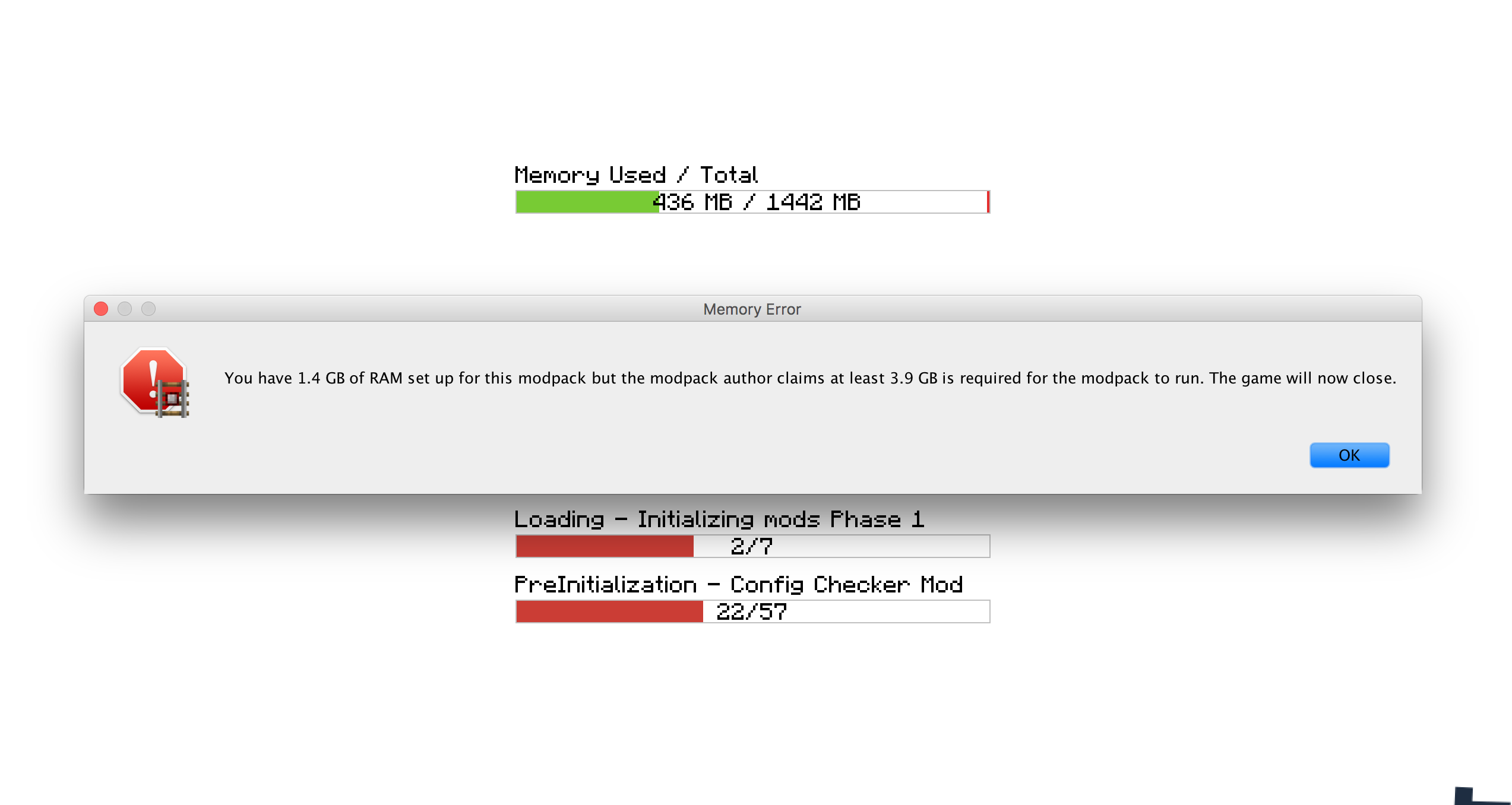
- Postavljanje potrebne količine RAM-a koja je neophodna za rad modpack-a. Ako ovaj uslov nije ispunjen, korisnik se obaveštava i igra se zatvara.
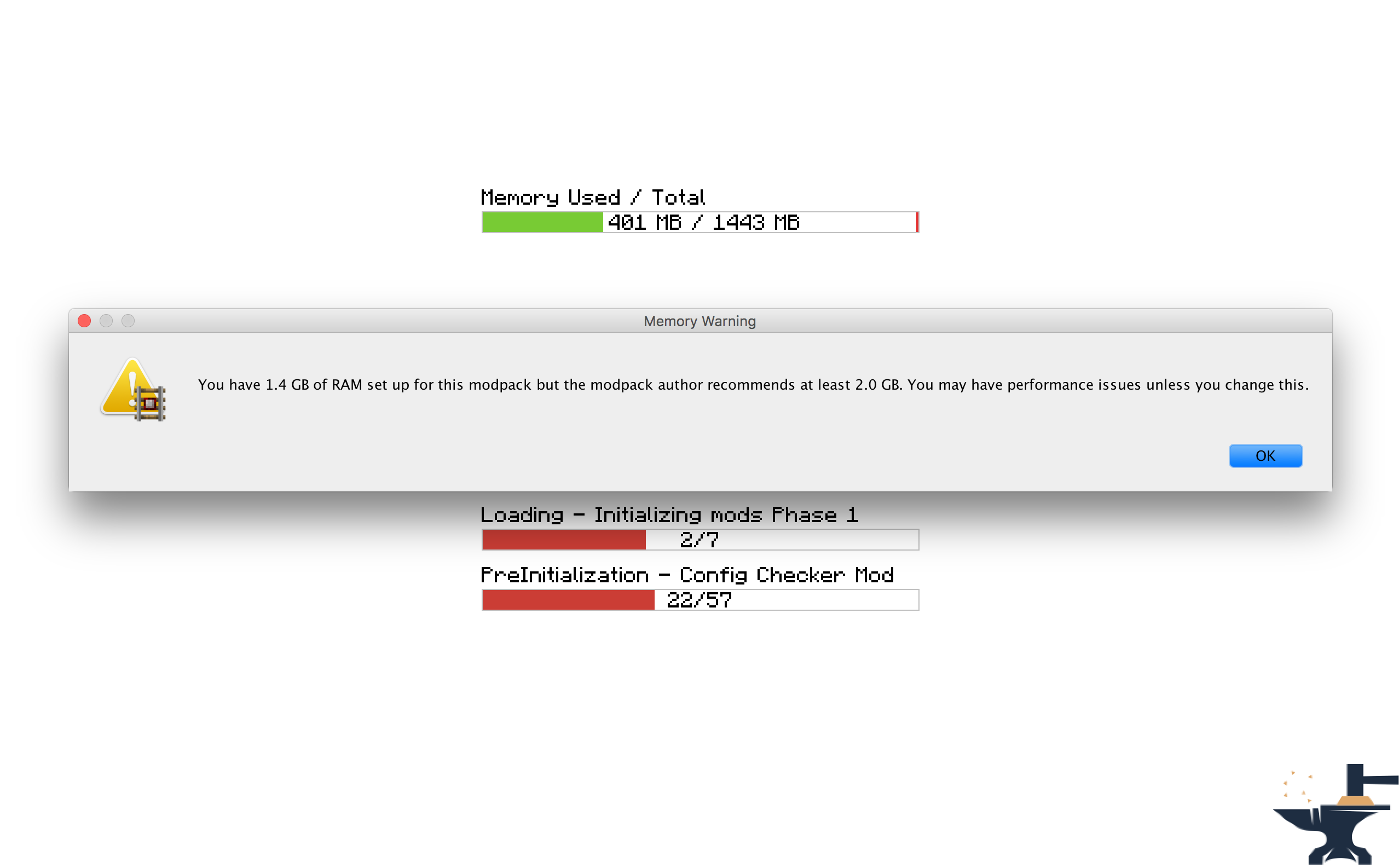
- Postavljanje preporučene količine RAM-a koja se preporučuje za rad modpack-a. Ako ovaj uslov nije ispunjen, korisnik se obaveštava.
- Postavljanje web stranice koja se otvara pri pokretanju igre. Korisno za otvaranje web stranice modpack-a ili stranica za podršku.
- Postavljanje prilagođene poruke koja se prikazuje dok se igra učitava, na primer za prikaz zasluga.
- Postavljanje prilagođenih poruka koje se prikazuju kada RAM zahtevi nisu ispunjeni. Korisno za usklađivanje mod-a sa osećajem vašeg paketa.
- Mogućnost promene da li se okviri sa porukama prikazuju iznad drugih prozora.
- Postavljanje prilagođenih poruka dobrodošlice koje se pojavljuju u chatu kada se igra učita.
Licenca
Slobodno koristite ovaj mod u bilo kom modpack-u i objavljujte na drugim forumima. Samo se pobrinite da postavite link nazad ovde. Pogledajte punu licencu ovde
Snimci ekrana
Kako podesiti (Minecraft 1.13 +
Toplo preporučujem da uključite ovaj mod u svoj modpack: https://www.curseforge.com/minecraft/mc-mods/configured.
Ovo će omogućiti konfiguraciju iz igre, što će vam znatno olakšati posao.
Korak 1) Kliknite na dugme 'Mods' na glavnom meniju.
Korak 2) Izaberite 'Modpack Config Checker sa liste modova sa leve strane.
Korak 3) Kliknite na dugme 'Config' u donjem levom uglu.
Napomene
- Ako niste sigurni šta neko podešavanje radi, prelaskom miša preko njega prikazaće se kratak opis koji bi trebalo da razjasni stvari. Međutim, ako i dalje niste sigurni, eksperimentišite!! Ili ako više volite, pošaljite mi PM ili ostavite komentar na ovoj temi. Biće mi zadovoljstvo da vam objasnim bilo koju mehaniku mod-a.
Ručna konfiguracija (1.13.x - 1.20.x)
Ručna konfiguracija (Nalazi se u fascikli igre na: Config\concheckrmd-client.toml)
Ovaj odeljak vam pokazuje kako da ručno podesite mod bez opcionog GUI-ja. Otvorite konfiguracionu datoteku u notepad-u ili tekst editoru.
Verzija konfiguracione datoteke sa označenim bojama. Ovo će vam pokazati koje vrednosti mogu, a koje ne mogu da se menjaju.
Legenda boja
PLAVO: Boolean (što znači da mogu da se menjaju samo na 'true' ili 'false')
CRVENO: String (što znači da mogu da se menjaju na bilo koji tekst. npr: 'Hello World')
Zeleno: Integers (što znači da mogu da se menjaju na bilo koji broj. npr: '512')
["Customisable Chat Greeting Message"] The color of the message to be displayed in chat. Allowed Values: Blue, Green, Red, Aqua, Yellow, White, Black, Grey, Purple, DarkBlue, DarkGreen, DarkRed, DarkPurple "3) Greeting Message Color" = "Yellow" The text to be displayed in chat. "2) Greeting Message Text" = "Hello there! Welcome to my modpack." Customisable message that will be displayed in chat when a world is loaded. "1) Display Chat Greeting Message?" = true
["Customisable Start Message"] Customisable message that will appear each time the game starts. This is useful for displaying credits. "1) Display message box?" = true Will the window show on top of all other windows? Recommended to keep set to True. "2) Display message box topmost?" = true The text that will be displayed in the message box. "3) Message Box Text" = "Hello Modpack Users! Made by mattr"
["Customisable First Start Message"] A message box that will be displayed when the game is started for the first time. This is useful for displaying instructions. "1) Display message box?" = true Will the window show on top of all other windows? Recommended to keep set to True. "2) Display message box topmost?" = true The text that will be displayed in the message box. "3) Message Box Text" = "Welcome. Thank you for starting my mofdpack for the first time!"
["Open A Website when the Game Starts"] Opens a webpage when the game starts. This is useful for modpack support. "1) Display Website when game starts?" = true The URL of the website that will be displayed. This can be formatted like: http://google.com, www.google.com or google.com. "2) Website URL" = "minecraft.curseforge.com/projects/config-checker"
["Amount of RAM Recommended for Game to Start"] The amount of RAM recommended for stable gameplay. Range: 128 ~ 51200 "1) Ram Recommended (IN MB)" = 12048 If the player has less than the recommended amount of RAM assigned to the modpack then a warning will be displayed when the game is started. "2) Check RAM meets recommendation?" = true The custom message to be displayed if you have set the previous setting to 'True'. Will display custom message instead of the default text. "5) Custom Message" = "You should assign more RAM to experience better performance." Will the window show on top of all other windows? I highly recommend this is left as true. "3) Display message box topmost?" = true Customise the text that appears in the warning message. Will display custom message instead of the default text. "4) Customise low RAM Warning?" = false
["Recommended RAM Chat Message"] The amount of RAM recommended for stable gameplay. Range: 128 ~ 51200 "1) Ram Recommended (IN MB)" = 51200 If the player has less than the recommended amount of RAM assigned to the modpack then a warning will be displayed in chat when a world is loaded. "2) Check RAM meets recommendation?" = true Customise the text that appears in the warning message. Will display custom message instead of the default text. "3) Customise low RAM Warning?" = true The custom message to be displayed in chat if you have set the previous setting to 'True'. Will display custom message instead of the default text. "4) Custom Message" = "You should assign more RAM to experience better performance."
["Amount of RAM Required for Game to Start"] If the player has less than the required amount of RAM assigned to the modpack then they will be alerted as the game starts and the game will close. "2) Check RAM meets requirement?" = true The amount of RAM required for the game to run. Range: 128 ~ 51200 "1) Ram Required (IN MB)" = 1024 The custom message to be displayed if you have set the previous setting to 'True'. Will display custom message instead of the default text. "5) Custom Message" = "You need more RAM. The game will close." Will the window show on top of all other windows? I highly recommend this is left as true. "3) Display message box topmost?" = true Customise the text that appears in the error message. Will display custom message instead of the default text. "4) Display custom text in messagebox?" = false
["Game Launch Time Limit"] If the game exceeds the launch timeout then a message box will be displayed and the game will close. "2) Check game meets launch timeout?" = false The custom message to be displayed if you have set the previous setting to 'True'. Will display custom message instead of the default text. "5) Custom Message" = "The game has taken too long too start to start this modpack. This is probably due to insufficient system resources. The game will now close." The maximum amount of time the game will be allowed to spend booting. (IN SECONDS) Range: 5 ~ 5400 "1) Launch Timeout (IN SECONDS)" = 30 Will the window show on top of all other windows? I highly recommend this is left as true. "3) Display message box topmost?" = true Customise the text that appears in the error message. Will display custom message instead of the default text. "4) Display custom text in error message?" = false
Kako podesiti (Minecraft 1.11 + 1.12)
Od verzije 1.6 mod se sada može potpuno podesiti iz igre. To znači da više nije potrebno ručno menjati nijednu konfiguracionu datoteku, što mod čini MNOGO lakšim za korišćenje. Ekranu za konfiguraciju možete pristupiti prateći ove korake:
Korak 1) Kliknite na dugme 'Mods' na glavnom meniju.
Korak 2) Izaberite 'Modpack Config Checker sa liste modova sa leve strane.
Korak 3) Kliknite na dugme 'Config' u donjem levom uglu.
Napomene
- Ako niste sigurni šta neko podešavanje radi, prelaskom miša preko njega prikazaće se kratak opis koji bi trebalo da razjasni stvari. Međutim, ako i dalje niste sigurni, eksperimentišite!! Ili ako više volite, pošaljite mi PM ili ostavite komentar na ovoj temi. Biće mi zadovoljstvo da vam objasnim bilo koju mehaniku mod-a.
- Napravio sam alat za migraciju koji znači da će se sva vaša podešavanja preneti u ažurirane verzije mod-a. Ovo obezbeđuje nesmetan prenos, tako da neće biti uticaja na prosečnog korisnika. Ako se otkrije stara konfiguraciona datoteka, igra će vam automatski dati opciju da uvezete vaša stara podešavanja. Potrošio sam mnogo vremena na ovu funkciju, što znači da ima veoma veoma visoku stopu uspeha.
- Konfiguracija u igri je dostupna samo na 1.11.2 i novijim verzijama (za sada). To je zbog veće složenosti ovog podešavanja na starijim verzijama forge-a. Ako koristite nižu verziju Minecraft-a, moraćete da koristite legacy config, što je objašnjeno ispod. Ako bude dovoljno interesovanja, možda ću u budućnosti preneti na 1.10.2 ili 1.7.10, ali za sada ove verzije više neće biti ažurirane.
Legacy Config (Minecraft 1.10 i starije) (Nalazi se u fascikli igre na: Config/concheckrmd.cfg)
Verzija konfiguracione datoteke sa označenim bojama. Ovo će vam pokazati koje vrednosti mogu, a koje ne mogu da se menjaju.
Legenda boja
PLAVO: Boolean (što znači da mogu da se menjaju samo na 'true' ili 'false')
CRVENO: String (što znači da mogu da se menjaju na bilo koji tekst. npr: 'Hello World')
Zeleno: Integers (što znači da mogu da se menjaju na bilo koji broj. npr: '512')
Konfiguraciona datoteka
"custom greeting message" {
B:"1. Display custom greeting message when joining a world?"=false
Poruka koja će se prikazati u chatu kada se igra učita. Prikazaće se samo ako je 'Display custom greeting message when joining a world?' jednako true [default: Hello there! Welcome to my modpack.]
S:"2. Custom greeting message text"=Hello there! Welcome to my modpack. }
"custom messagebox" { B:"1. Show custom messagebox when game loads?"=false B:"2. Display message box on top of all other windows?"=true
Unesite tekst za popup. Prikazaće se samo ako je 'Show custom messagebox when game loads?' jednako true [default: Hello World!!]
S:"3. Custom Messagebox text"=Hello World!! }
"display webpage" { B:"1. Open web browser to URL when game loads?"=false
Unesite URL koji će se otvoriti. Prikazaće se samo ako je 'Open web browser to URL when game loads?' jednako true [default: http://minecraft.curseforge.com/projects/config-checker]
S:"2. URL to webpage"=minecraft.curseforge.com/projects/config-checker }
"ram recommendation" { I:"1. Ram Recommended (IN MB)"=2048 B:"2. Check RAM meets recommendation?"=true B:"3. Display message box on top of all other windows?"=true B:"4. Display custom text in message box if RAM recommendations not met?"=false
Unesite prilagođeni tekst koji će se prikazati ako RAM preporuka nije ispunjena. Prikazaće se samo ako je 'Display custom text in message box if RAM recommendation not met?' jednako true [default: You should add more RAM.]
S:"5. Custom recommendation text"=You should add more RAM. B:"6. Display warning in game chat if RAM recommendation not met?"=true B:"7. Customise game chat RAM recommendation message?"=false
Unesite prilagođeni tekst koji će se prikazati u chatu igre ako RAM preporuka nije ispunjena. Prikazaće se samo ako je 'Customise game chat RAM recommendation message?"' jednako true [default: [WARNING] You should assign more RAM to this modpack.]
S:"8. Custom chat message"=[WARNING] You should assign more RAM to this modpack. }
"ram requirement" { I:"1. Ram Required (IN MB)"=1024 B:"2. Check RAM meets requirement?"=false B:"3. Display message box on top of all other windows?"=true B:"4. Display custom text in message box if RAM requirement not met?"=false
Unesite prilagođeni tekst koji će se prikazati ako RAM zahtev nije ispunjen. Prikazaće se samo ako je 'Display custom text in message box if RAM requirement not met?' jednako true [default: You need more RAM.]
S:"5. Custom requirement text"=You need more RAM. }
Kako instalirati Modpack Configuration Checker
With Millida Launcher
Install Millida Launcher
The launcher is free: download it at millida.net/launcher and sign in with any nickname.
Click “Install” on this page
The launcher opens and installs the mod for Minecraft 1.12–1.21 on Fabric or Forge automatically.
Launch the game
A profile with it appears in the launcher: click “Play”.
Manually
Install Fabric or Forge
The loader must match the game version of the mod file, for example Minecraft 1.21. After installing it, a separate profile appears in your launcher.
Download the file for your version
In the version list above, pick the file Modpack Configuration Checker-1.21.x-v1.9.5-forge.jar (146 KB) for your game version and loader.
Put it in the mods folder
The folder is inside .minecraft (Windows: %appdata%\.minecraft\mods). If it does not exist, create it.
Launch the loader profile
Open “Mods” in the main menu: Modpack Configuration Checker should be in the list.
Minecraft 1.21 runs on Java 21: with a different Java version the game may close right after launch.
Verzije
Sa zavisnostima
| Minecraft | Loader | Fajl | Datum | Akcije |
|---|---|---|---|---|
| 1.20.6 | Fabric | Modpack Configuration Checker-1.20.6-v1.9.8-fabric.jar84 KB | ||
| 1.21 | Forge | Modpack Configuration Checker-1.21.x-v1.9.5-forge.jar146 KB | ||
| 1.12.1 | — | Modpack Configuration Checker-1.12.2-v1.9.5.jar154 KB | ||
| 1.14.4 | — | Modpack Configuration Checker-1.14.x-v1.7.1.jar135 KB |
Česta pitanja
Which Minecraft versions does Modpack Configuration Checker work on?
There are files for 1.21, 1.20.6, 1.14.4, 1.12.2, 1.12.1, 1.12. The newest is 1.21.
Does Modpack Configuration Checker need other mods?
The author lists no required dependencies: the Fabric or Forge loader is enough.
Which Java does Modpack Configuration Checker need?
Minecraft 1.21 runs on Java 21. If the game closes right after launch, the usual cause is the wrong Java version in the profile settings.
Recenzije
Budi prvi koji će oceniti Modpack Configuration Checker


