
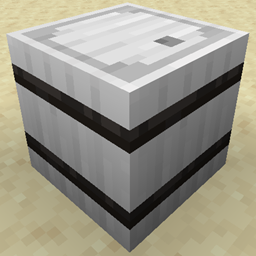
Metal Barrels Mod za Minecraft 1.20.1, 1.16.5
Kao Iron Chests ali su burad i bolji
 Fabric
 NeoForge
 Forge
ForgeO Metal Barrels modu
Ovaj mod dodaje dodatne burad u igru koja mogu da čuvaju više predmeta.
Funkcionišu kao njihovi vanilla parnjaci tako što mogu da se otvore sa čvrstim blokom na vrhu i ne izazivaju probleme sa fps-om u velikim količinama, za razliku od kovčega.
Bakar čuva 45 stackova
Gvožđe čuva 54 stackova
Srebro čuva 72 stackova
Zlato čuva 81 stack
Dijamant čuva 108 stackova
Obsidian čuva 108 stackova, ali ima otpornost na eksplozije od 30 hiljada, što ga čini otpornim na većinu eksplozija
Kristal čuva 108 stackova, ali se vrh 8 predmeta mogu videti unutra (Napomena: za razliku od ostalih buradi, veliki broj ovih sa predmetima unutra će negativno uticati na fps, ne preporučujem ih za projekte velikih razmera)
Od verzije 1.1+. sada postoje predmeti za nadogradnju koji mogu da se koriste za nadogradnju već postavljenih buradi bez njihovog razbijanja, sadržaj neće biti uništen niti ispušten ako se koriste.
Od verzije 1.4+, nadogradnje će sada raditi i na gvozdenim kovčezima i nadograđuju se u svoje odgovarajuće predmete.
Trougao za nadogradnju
Pomozite da podržite ovaj i druge modove
Kako instalirati Metal Barrels
With Millida Launcher
Install Millida Launcher
The launcher is free: download it at millida.net/launcher and sign in with any nickname.
Click “Install” on this page
The launcher opens and installs the mod for Minecraft 1.16.2–26.1.2 on Fabric, Forge or NeoForge automatically.
Launch the game
A profile with it appears in the launcher: click “Play”.
Manually
Install Fabric, Forge or NeoForge
The loader must match the game version of the mod file, for example Minecraft 26.1.2. After installing it, a separate profile appears in your launcher.
Download the file for your version
In the version list above, pick the file metalbarrels-fabric-26.1.2-0.jar (230 KB) for your game version and loader.
Put it in the mods folder
The folder is inside .minecraft (Windows: %appdata%\.minecraft\mods). If it does not exist, create it.
Launch the loader profile
Open “Mods” in the main menu: Metal Barrels should be in the list.
Verzije
Sa zavisnostima
| Minecraft | Loader | Fajl | Datum | Akcije |
|---|---|---|---|---|
| 26.1.2 | Fabric | metalbarrels-fabric-26.1.2-0.jar230 KB | ||
| 26.1.2 | NeoForge | metalbarrels-neoforge-26.1.2-0.jar233 KB | ||
| 1.20.1 | Forge | MetalBarrels-forge-1.20.1-3.jar181 KB 1 | ||
| 1.16.3 | — | metalbarrels-3.3a.jar139 KB |
Česta pitanja
Which Minecraft versions does Metal Barrels work on?
There are files for 26.1.2, 1.20.1, 1.16.5, 1.16.4, 1.16.3, 1.16.2. The newest is 26.1.2.
Is Metal Barrels for Forge or Fabric?
There are files for Fabric: 26.1.2, for Forge: 1.20.1 and for NeoForge: 26.1.2.
Does Metal Barrels need other mods?
The author lists no required dependencies: the Fabric, Forge or NeoForge loader is enough.
Where can I download Metal Barrels safely?
On this page: the file metalbarrels-fabric-26.1.2-0.jar (230 KB) is stored on Millida’s server, with no link shorteners. SHA-1 checksum: bdf88a837c824c5828df53bd75236681d00c5eec.
Recenzije
Budi prvi koji će oceniti Metal Barrels


