
Luggage Mod za Minecraft 1.20.1, 1.21.1
Rekreacija OpenBlocks Luggage za moderne verzije
 NeoForge
 Forge
Forge Fabric
 Quilt
QuiltO Luggage modu
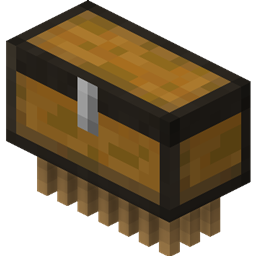
Jednostavan mod za rekreiranje Luggage entiteta iz OpenBlocks-a u modernim verzijama MC-a.
- Baš kao u OpenBlocks-u, Luggage te prati uokolo, skuplja predmete sa zemlje i čuva ih u svom inventaru. Možeš da otvoriš njegov inventar desnim klikom na njega.
- Shift desni klik na Luggage omogućava ti da pokupiš entitet kao predmet, što ti omogućava da ih lako skladištiš. Inventar, napunjeno stanje i ime se čuvaju u predmetu.
- Luggage je besmrtan, tako da ne moraš da brineš o gubljenju svojih predmeta.
- Ako tvoj Luggage na neki način bude udaren gromom, postaće napunjen i udvostručiti svoj prostor u inventaru. Ova promena se odražava na teksturi i za entitet i za predmet.
- Da li te tvoj Luggage više ne prati? Da li si izgubio trag gde je Luggage otišao i neće se teleportovati nazad do tebe? Da li se zaglavio duboko u pećini i ne možeš lako da ga izvučeš? Pa, ne traži dalje od funkcije zvižduka! Jednostavno pritisni taster za zvižduk (podrazumevano vezan za ) i sve dok je Luggage u učitanim čankovima, teleportovaće se nazad do tebe.
Forge verzije su označene kao releases, Fabric verzije su označene kao betas. To je samo da bi obe bile vidljive svima.
Molimo prijavite sve probleme na koje naiđete na issue tracker (link je iznad). Hvala!
Kako instalirati Luggage
With Millida Launcher
Install Millida Launcher
The launcher is free: download it at millida.net/launcher and sign in with any nickname.
Click “Install” on this page
The launcher opens and installs the mod for Minecraft 1.19.2–1.21.1 on Fabric, Forge, NeoForge or Quilt automatically.
Launch the game
A profile with it appears in the launcher: click “Play”.
Manually
Install Fabric, Forge, NeoForge or Quilt
The loader must match the game version of the mod file, for example Minecraft 1.21.1. After installing it, a separate profile appears in your launcher.
Download the file for your version
In the version list above, pick the file luggage-1.21-1.6.12.jar (166 KB) for your game version and loader.
Put it in the mods folder
The folder is inside .minecraft (Windows: %appdata%\.minecraft\mods). If it does not exist, create it.
Launch the loader profile
Open “Mods” in the main menu: Luggage should be in the list.
Minecraft 1.21.1 runs on Java 21: with a different Java version the game may close right after launch.
Verzije
Sa zavisnostima
| Minecraft | Loader | Fajl | Datum | Akcije |
|---|---|---|---|---|
| 1.21.1 | NeoForge | Luggage 1.6.12 - NeoForge 1.21166 KB | ||
| 1.20.1 | Forge | Luggage 1.6.1 - Forge 1.20172 KB | ||
| 1.19.2 | Fabric, Quilt | Luggage 1.5.2 - Fabric296 KB |
Česta pitanja
Which Minecraft versions does Luggage work on?
There are files for 1.21.1, 1.20.1, 1.20, 1.19.2. The newest is 1.21.1.
Is Luggage for Forge or Fabric?
There are files for Fabric: 1.19.2, for Forge: 1.20–1.20.1, for NeoForge: 1.21.1 and for Quilt: 1.19.2.
Does Luggage need other mods?
The author lists no required dependencies: the Fabric, Forge, NeoForge or Quilt loader is enough.
Which Java does Luggage need?
Minecraft 1.21.1 runs on Java 21. If the game closes right after launch, the usual cause is the wrong Java version in the profile settings.
Where can I download Luggage safely?
On this page: the file luggage-1.21-1.6.12.jar (166 KB) is stored on Millida’s server, with no link shorteners. SHA-1 checksum: 83db4b12f9c673b9a1990531d3a0d182d46301e4.
Recenzije
Budi prvi koji će oceniti Luggage


