
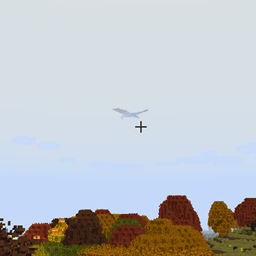
ISeeDragons Mod za Minecraft 1.12.2
Popravlja razdaljinu prikazivanja zmaja u RLCraft i starijim verzijama Ice and Fire
- preuzimanja
- 1 preuzimanja
- pregleda
- 12 pregleda
- Ažurirano
- Ažurirano 18.10.2026
- 1.12.2
 Forge
Forge
O ISeeDragons modu
ISeeDragons Ok... Zmajevi u RLCraft-u su teški... Ali moraju li da imaju lični uređaj za nevidljivost koji se aktivira kada su samo 64+ bloka udaljeni od igrača?!
Ovaj mod ispravlja neke velike greške u Ice and Fire 1.7.1 (staroj verziji), korišćenje sa Ice and Fire 1.8.x može izazvati nedefinisano ponašanje (greške, padove, itd)! Namenjen je za korišćenje u RLCraft modpack-u!
Karakteristike:
- Ispravlja daljinu renderovanja Ice and Fire zmajeva (podesivo, može raditi sa drugim modovanim entitetima)
- Ispravlja to što se Ice and Fire zmajevi ne bude kada su udareni
- Ispravlja to što igrači mogu da pobegnu iz zmajevih čeljusti pomoću shift/dismount
- Ispravlja popravku oklopa Ice and Fire morske zmije
- Ispravlja Dragonbone Axe
- Smanjuje čestice od zmajeva koji razbijaju blokove da bi se sprečilo kašnjenje (podesivo)
- Ponovo dodaje OreDictionary unose za Ice and Fire predmete (Ice and Fire i dalje zatrpava log, TODO: ukloniti i zatrpavanje loga)
- Prilagođeni predmeti za popravku mogu se podesiti za alate koji već nemaju predmet za popravku (podesivo)
- Predmetima se može dodeliti prilagođena dodatna šteta nedistvim neprijateljima (podesivo)
Ovaj mod treba instalirati i na klijentu i na serveru, ali većina ispravki će raditi ako je instaliran samo na serveru (instalacija na klijentu nije strogi uslov).
RLCraft modpack: https://www.curseforge.com/minecraft/modpacks/rlcraft Ice and Fire mod: https://www.curseforge.com/minecraft/mc-mods/ice-and-fire-dragons
Da biste instalirali ovaj mod, stavite jar fajl u mods fasciklu vaše Minecraft instance fascikle. Lokacija Minecraft instance fascikle zavisi od toga koji launcher koristite!
Izvorni kod: https://github.com/xcube16/ISeeDragons
Kako instalirati ISeeDragons
With Millida Launcher
Install Millida Launcher
The launcher is free: download it at millida.net/launcher and sign in with any nickname.
Click “Install” on this page
The launcher opens and installs the mod for Minecraft 1.12.2 on Forge automatically.
Launch the game
A profile with it appears in the launcher: click “Play”.
Manually
Install Forge
The loader must match the game version of the mod file, for example Minecraft 1.12.2. After installing it, a separate profile appears in your launcher.
Download the file for your version
In the version list above, pick the file ISeeDragons-1.2.1.jar (64 KB) for your game version.
Put it in the mods folder
The folder is inside .minecraft (Windows: %appdata%\.minecraft\mods). If it does not exist, create it.
Launch the loader profile
Open “Mods” in the main menu: ISeeDragons should be in the list.
Minecraft 1.12.2 runs on Java 8: with a different Java version the game may close right after launch.
Verzije
Sa zavisnostima
| Minecraft | Loader | Fajl | Datum | Akcije |
|---|---|---|---|---|
| 1.12.2 | Forge | ISeeDragons-1.2.163.7 KB 1 | ||
| 1.12.2 | Forge | ISeeDragons-0.1224.4 KB | ||
| 1.12.2 | Forge | ISeeDragons6.7 KB |
Česta pitanja
Which Minecraft versions does ISeeDragons work on?
Only Minecraft 1.12.2: there are no files for other versions.
Is ISeeDragons for Forge or Fabric?
Only for Forge: 1.12.2. There are no files for Fabric or NeoForge: a mod for another loader will not start.
Does ISeeDragons need other mods?
The author lists no required dependencies: the Forge loader is enough.
Which Java does ISeeDragons need?
Minecraft 1.12.2 runs on Java 8. If the game closes right after launch, the usual cause is the wrong Java version in the profile settings.
Where can I download ISeeDragons safely?
On this page: the file ISeeDragons-1.2.1.jar (64 KB) is stored on Millida’s server, with no link shorteners. SHA-1 checksum: 0f8c5fee7eb2b76ab4a01adb08b63147f5a2a2fe.
Recenzije
Budi prvi koji će oceniti ISeeDragons


