
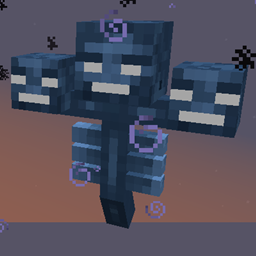
Hardcore Wither Mod za Minecraft 1.10.2
Wither-ova težina se prilagođava igračima
O Hardcore Wither modu
Što se više Wither-a boriš, borba postaje teža, a nagrade slađe.
Wither-i koji se pojavljuju oko tebe dobijaju sve teže specijalne sposobnosti. Ako se Wither pojavi sa više igrača u blizini, uzima se u obzir njihovo iskustvo sa Wither-ima.
Postoji nekoliko specijalnih sposobnosti (pojačano zdravlje), od kojih je većina namenjena da se otkrije na teži način. Sve sposobnosti mogu se onemogućiti/podesiti u konfiguracijama. Svaka sposobnost takođe može biti konfigurisana da bude na crnoj listi za upotrebu po dimenziji ako se tamo ne ponaša dobro.
Preporučuje se ako igraš sa Runic Dungeons:
Onemogući Teleport sposobnost u runic dungeons dimenziji npr. S:blacklistDims="34"
Postoje planovi za više specijalnih sposobnosti u budućnosti, predlozi su dobrodošli (poželjno je da se prijave problemi u repozitorijumu).
Postoji i način da se dobiju Tinkers' Construct Green Heart Canisters ako je taj mod prisutan (može se onemogućiti u konfiguracijama).
Omogućava da Nether Stars budu pod uticajem Looting enchant-a. (po konfigurisanoj stopi).
Slobodno koristi u modpack-ovima; obaveštenje je cenjeno, ali nije obavezno.
Minecraft Forum Thread
Kako instalirati Hardcore Wither
With Millida Launcher
Install Millida Launcher
The launcher is free: download it at millida.net/launcher and sign in with any nickname.
Click “Install” on this page
The launcher opens and installs the mod for Minecraft 1.7.10–1.10.2 automatically.
Launch the game
A profile with it appears in the launcher: click “Play”.
Manually
Download the file for your version
In the version list above, pick the file hardcoreWither-1.10.2-2.2.3-beta-4bd2a01-universal.jar (138 KB) for your game version.
Put it in the mods folder
The folder is inside .minecraft (Windows: %appdata%\.minecraft\mods). If it does not exist, create it.
Launch the loader profile
Open “Mods” in the main menu: Hardcore Wither should be in the list.
Minecraft 1.10.2 runs on Java 8: with a different Java version the game may close right after launch.
Verzije
Sa zavisnostima
| Minecraft | Loader | Fajl | Datum | Akcije |
|---|---|---|---|---|
| 1.10.2 | — | 1.10.2-2.2.3-beta138 KB | ||
| 1.10.2 | — | 1.10.2-2.1.2-alpha136 KB | ||
| 1.7.10 | — | 1.7.10-1.1.383.1 KB |
Česta pitanja
Which Minecraft versions does Hardcore Wither work on?
There are files for 1.10.2, 1.7.10. The newest is 1.10.2.
Which Java does Hardcore Wither need?
Minecraft 1.10.2 runs on Java 8. If the game closes right after launch, the usual cause is the wrong Java version in the profile settings.
Where can I download Hardcore Wither safely?
On this page: the file hardcoreWither-1.10.2-2.2.3-beta-4bd2a01-universal.jar (138 KB) is stored on Millida’s server, with no link shorteners. SHA-1 checksum: 483ce92e96cfa57e0a0882668a05697d7a725202.
Recenzije
Budi prvi koji će oceniti Hardcore Wither


