
 Fabric
 Quilt
 NeoForge
 Forge
Funkcionalnost
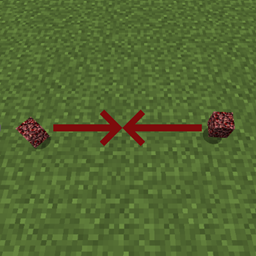
Ovaj mod dodaje dve opcije konfiguracije za kontrolu načina na koji se ispušteni predmeti spajaju na zemlji. To može značajno poboljšati performanse u oblastima sa mnogo ispuštenih predmeta, kao što su krateri od eksplozija ili farme. Ovaj mod može biti instaliran na serveru bez potrebe da ga igrači instaliraju. Takođe može da se koristi u singleplayer-u.
Konfiguracija
Mod ima sledeće opcije konfiguracije: (Za Forge: U verzijama 1.15+, ova podešavanja konfiguracije se nalaze u fascikli serverconfig u fascikli vašeg sveta)
radius - Ovo je vrednost od 0.5 do 500 i definiše veličinu oblasti u kojoj će ispušteni predmet tražiti druge ispuštene predmete sa kojima će se spojiti. Primer: Ako se ovo postavi na 5.0, pretraga će se vršiti u oblasti od 5 blokova (u svim pravcima) oko ispuštenog predmeta. "0.5" je vanilla ponašanje. Imajte na umu da ovo ponašanje ne uzima u obzir zidove. checkY - Postavite ovo na true ako želite da ispušteni predmeti proveravaju i iznad i ispod sebe, postavite na false ako ne želite. "false" je vanilla ponašanje.
Tagovi
Postoje i dva taga za predmete koji mogu dodatno da kontrolišu ponašanje određenih predmeta:
- getittogetherdrops:donotcombine - Predmeti koji su dodati u tag se uopšte ne spajaju
- getittogetherdrops:ignored - Predmeti u ovom tagu će biti ignorisani od strane moda, i kao takvi će se vratiti na vanilla ponašanje. Ovaj tag ima prednost nad getittogetherdrops:donotcombine
Prikaz
Dozvoljeno vam je da koristite ovaj mod u bilo kom modpack-u.
Pridružite mi se na Discord-u! https://discord.gg/kgZUAxK
Pratite me na Twitter-u za ažuriranja moda i druge zanimljivosti! https://twitter.com/bl4ckscor3
Kako instalirati Get It Together, Drops!
With Millida Launcher
Install Millida Launcher
The launcher is free: download it at millida.net/launcher and sign in with any nickname.
Click “Install” on this page
The launcher opens and installs the mod for Minecraft 1.18.1–26.3 on Fabric, Forge, NeoForge or Quilt automatically.
Launch the game
A profile with it appears in the launcher: click “Play”.
Manually
Install Fabric, Forge, NeoForge or Quilt
The loader must match the game version of the mod file, for example Minecraft 26.3. After installing it, a separate profile appears in your launcher.
Download the file for your version
In the version list above, pick the file getittogetherdrops-fabric-26.1.1-1.5.1.jar (81 KB) for your game version and loader.
Put it in the mods folder
The folder is inside .minecraft (Windows: %appdata%\.minecraft\mods). If it does not exist, create it.
Launch the loader profile
Open “Mods” in the main menu: Get It Together, Drops! should be in the list.
Verzije
Sa zavisnostima
| Minecraft | Loader | Fajl | Datum | Akcije |
|---|---|---|---|---|
| 26.1.1 | Fabric, Quilt | getittogetherdrops-fabric-26.x-1.5.1.jar81.1 KB 25 | ||
| 26.1.1 | NeoForge | getittogetherdrops-neoforge-26.x-1.5.jar79.7 KB 3 | ||
| 1.20.1 | Forge | getittogetherdrops-forge-1.20.1-1.3.jar7.7 KB 1 | ||
| 1.18.1 | — | getittogetherdrops-1.18-1.1.jar7.2 KB |
Česta pitanja
Which Minecraft versions does Get It Together, Drops! work on?
There are files for 1.18.1–26.3, 7 versions in total. The newest is 26.3.
Is Get It Together, Drops! for Forge or Fabric?
There are files for Fabric: 26.1.1–26.3, for Forge: 1.20–1.20.1, for NeoForge: 26.1.1–26.3 and for Quilt: 26.1.1–26.3.
Does Get It Together, Drops! need other mods?
The author lists no required dependencies: the Fabric, Forge, NeoForge or Quilt loader is enough.
Where can I download Get It Together, Drops! safely?
On this page: the file getittogetherdrops-fabric-26.1.1-1.5.1.jar (81 KB) is stored on Millida’s server, with no link shorteners. SHA-1 checksum: 585b823a54bab112cdc905689513a2f31500c80e.
Recenzije
Budi prvi koji će oceniti Get It Together, Drops!


