
Entity Culling Mod za Minecraft 1.12.2
Preskače renderovanje skrivenih entiteta
- preuzimanja
- 7 preuzimanja
- pregleda
- 33 pregleda
- Ažurirano
- Ažurirano 17.10.2026
- 1.12.2
 Forge
Forge
O Entity Culling modu
Entity Culling - 1.16.5 - 2.1.4 i novije verzije su kompatibilne samo sa Optifine G8! Entity Culling - 1.16.5 - 2.1.3 i starije verzije su kompatibilne samo sa Optifine G7! Entity Culling - 1.12.2 - 2.0.8 i novije verzije su kompatibilne samo sa Optifine G5! Entity Culling - 1.12.2 - 2.0.7 i starije verzije su kompatibilne samo sa Optifine F5!
Ovaj mod zahteva MixinBootstrap (curseforge, modrinth) i RenderLib (curseforge, modrinth) da bi radio (samo MC 1.12.2)! Mixin 0.7-0.8 Compatibility (curseforge, modrinth) može biti koristan kada drugi mod koristi stariju verziju mixina i zbog toga ne možete da pokrenete igru (samo MC 1.12.2).
Entity Culling je klijentski mod za performanse koji ima za cilj da preskoči renderovanje skrivenih (tile-)entiteta. U vanilla verziji, on jednostavno renderuje sve (tile-)entitete koji se nalaze u vidnom polju igrača. To znači da može postojati stotine (tile-)entiteta koji vam jedu fps iako ih ne možete ni videti jer su skriveni iza zida.
Uklanjanje skrivenih entiteta Podrazumevano, ovaj mod koristi OpenGL implementaciju occlusion culling-a koja vam daje pixel-perfect bounding box culling sa samo jednim frejmom kašnjenja i veoma malim opterećenjem.
Ako vaš hardver ne podržava OpenGL 4.3, onda ovaj mod koristi raytraced implementaciju culling-a. Raytraced culling je više CPU intenzivan dok je OpenGL culling više GPU intenzivan, pa u zavisnosti od vašeg hardvera možda ćete želeti da preferirate jedan u odnosu na drugi. Ovo može rezultovati ogromnim poboljšanjem FPS-a kada je mnogo (tile-)entiteta na ekranu ali nisu vidljivi jer su zaklonjeni.
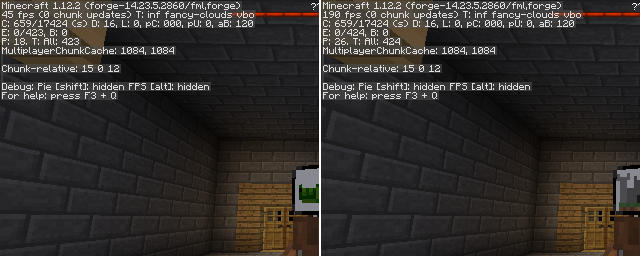
Test sa EntityCulling-1.12.2-6.0.2 unutar Chocolate Quest Repoured tamnice sa oko 200 entiteta na ekranu pokazuje ogromna poboljšanja!
Kako instalirati Entity Culling
With Millida Launcher
Install Millida Launcher
The launcher is free: download it at millida.net/launcher and sign in with any nickname.
Click “Install” on this page
The launcher opens and installs the mod for Minecraft 1.12.2 on Forge automatically.
Launch the game
A profile with it appears in the launcher: click “Play”.
Manually
Install Forge
The loader must match the game version of the mod file, for example Minecraft 1.12.2. After installing it, a separate profile appears in your launcher.
Download the file for your version
In the version list above, pick the file EntityCulling-1.12.2-6.5.0.jar (62 KB) for your game version.
Put it in the mods folder
The folder is inside .minecraft (Windows: %appdata%\.minecraft\mods). If it does not exist, create it.
Launch the loader profile
Open “Mods” in the main menu: Entity Culling should be in the list.
Minecraft 1.12.2 runs on Java 8: with a different Java version the game may close right after launch.
Verzije
Sa zavisnostima
| Minecraft | Loader | Fajl | Datum | Akcije |
|---|---|---|---|---|
| 1.12.2 | Forge | EntityCulling-1.12.2-6.5.0.jar62.4 KB 6 | ||
| 1.12.2 | — | EntityCulling-1.12.2-6.3.1.jar64.4 KB 1 | ||
| 1.12.2 | — | EntityCulling-1.12.2-6.0.2.jar54.1 KB |
Česta pitanja
Which Minecraft versions does Entity Culling work on?
Only Minecraft 1.12.2: there are no files for other versions.
Is Entity Culling for Forge or Fabric?
Only for Forge: 1.12.2. There are no files for Fabric or NeoForge: a mod for another loader will not start.
Does Entity Culling need other mods?
The author lists no required dependencies: the Forge loader is enough.
Which Java does Entity Culling need?
Minecraft 1.12.2 runs on Java 8. If the game closes right after launch, the usual cause is the wrong Java version in the profile settings.
Where can I download Entity Culling safely?
On this page: the file EntityCulling-1.12.2-6.5.0.jar (62 KB) is stored on Millida’s server, with no link shorteners. SHA-1 checksum: cf4a4a6b11b1721fbda1edeb32bdc3b1ac3a8560.
Recenzije
Budi prvi koji će oceniti Entity Culling


