
Dynamic Trees - Defiled Lands Mod za Minecraft 1.20.1
Mod za kompatibilnost između Dynamic trees i Defiled Lands
- preuzimanja
- 3 preuzimanja
- pregleda
- 15 pregleda
- Ažurirano
- Ažurirano 25.10.2026
- 1.20.1
 Forge
Forge
Dynamic Trees | Defiled Lands | Defiled Lands Preborn
Pregled
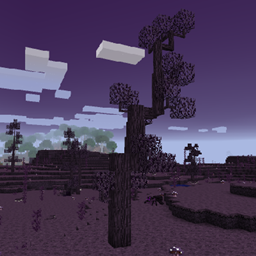
Ovaj mod čini Defiled Lands kompatibilnim sa Dynamic Trees, dodajući dinamički rastuće verzije svih njegovih drveća i potpuno ih zamenjujući tokom generisanja sveta.
Za 1.20.1 koristili smo Defiled Lands Preborn. U tim verzijama drveće, njihovo ponašanje i njihovo generisanje mogu se prilagoditi i podesiti korišćenjem Tree Packs.
Karakteristike
Uključeno drveće:
- Tenebra Tree
Generisanje sveta:
Svi Defiled Lands biomi imaju dinamičko drveće
Drugi dodaci
Dynamic Trees dodaci za druge modove mogu se naći na Dynamic Trees curseforge stranici.
Predlozi i zahtevi:
Da biste zatražili novi mod za kompatibilnost, uradite to ovde!! https://github.com/orgs/DynamicTreesTeam/discussions/categories/compatibility-addon-suggestions
Zahtevi
- Dynamic Trees
- Defiled Lands (za 1.12)
- Defiled Lands Preborn (za 1.20.1)
Licenciranje i mod paketi
Možete ovo koristiti u bilo kom mod paketu koji želite! Nema potrebe da pitate. Ovaj mod ima MIT licencu i njegov izvorni kod je javan na github-u.
Kako instalirati Dynamic Trees - Defiled Lands
With Millida Launcher
Install Millida Launcher
The launcher is free: download it at millida.net/launcher and sign in with any nickname.
Click “Install” on this page
The launcher opens and installs the mod for Minecraft 1.20.1 on Forge automatically.
Launch the game
A profile with it appears in the launcher: click “Play”.
Manually
Install Forge
The loader must match the game version of the mod file, for example Minecraft 1.20.1. After installing it, a separate profile appears in your launcher.
Download the file for your version
In the version list above, pick the file DynamicTreesDefiledLands-1.20.1-1.1.0.jar (843 KB) for your game version.
Put it in the mods folder
The folder is inside .minecraft (Windows: %appdata%\.minecraft\mods). If it does not exist, create it.
Launch the loader profile
Open “Mods” in the main menu: Dynamic Trees - Defiled Lands should be in the list.
Minecraft 1.20.1 runs on Java 17: with a different Java version the game may close right after launch.
Verzije
Sa zavisnostima
| Minecraft | Loader | Fajl | Datum | Akcije |
|---|---|---|---|---|
| 1.20.1 | Forge | DynamicTreesDefiledLands-1.20.1-1.1.0.jar843 KB 3 |
Recenzije
Budi prvi koji će oceniti Dynamic Trees - Defiled Lands


