

Dark Paintings Mod za Minecraft 1.20.1, 1.19.2
Dodaje nove slike u Minecraft
 NeoForge
 Fabric
 Forge
Forge Quilt
QuiltO Dark Paintings modu
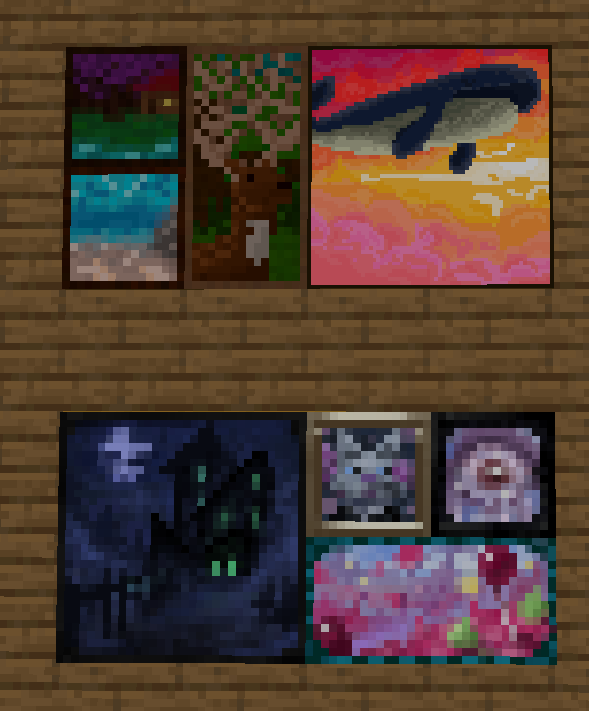
Ovaj mod dodaje mnogo novih slika u igru! Ove slike dolaze u raznim veličinama i umetničkim stilovima. Svaku sliku je dizajnirao i ilustrovao član naše zajednice! Ove slike su besprekorno integrisane sa vanilla slikama i mogu se postaviti u svet pomoću običnog predmeta za sliku. U kreativnom tabu se takođe nalaze predmeti koji se mogu koristiti za postavljanje određenog dizajna tačno tamo gde želite!
Zahvaljujući mnogim talentovanim umetnicima koji su sarađivali sa mnom na ovom modu, uključujući mmg28rtt, FuryDev, Axeonlotl, Wouter, Absolem Jackdaw, Punpudle, Superkat32, i mene Darkhax lol.
Ovaj projekat sponzoriše Nodecraft. Iskoristite kod DARKHAX za 30% popusta na prvi mesec usluge!
Kako instalirati Dark Paintings
With Millida Launcher
Install Millida Launcher
The launcher is free: download it at millida.net/launcher and sign in with any nickname.
Click “Install” on this page
The launcher opens and installs the mod for Minecraft 1.15.2–26.3 on Fabric, Forge, NeoForge or Quilt automatically.
Launch the game
A profile with it appears in the launcher: click “Play”.
Manually
Install Fabric, Forge, NeoForge or Quilt
The loader must match the game version of the mod file, for example Minecraft 26.3. After installing it, a separate profile appears in your launcher.
Download the file for your version
In the version list above, pick the file DarkPaintings-neoforge-MC26.3-26.3.0.1.jar (55 KB) for your game version and loader.
Put it in the mods folder
The folder is inside .minecraft (Windows: %appdata%\.minecraft\mods). If it does not exist, create it.
Launch the loader profile
Open “Mods” in the main menu: Dark Paintings should be in the list.
Verzije
Sa zavisnostima
| Minecraft | Loader | Fajl | Datum | Akcije |
|---|---|---|---|---|
| 26.3 | NeoForge | DarkPaintings-neoforge-MC26.3-26.3.0.1.jar55.3 KB | ||
| 26.3 | Fabric | DarkPaintings-fabric-MC26.3-26.3.0.1.jar57.8 KB 21 | ||
| 1.20.1 | Forge, NeoForge | DarkPaintings-Forge-1.20.1-17.0.6.jar51.4 KB 6 | ||
| 1.19.2 | Forge | DarkPaintings-Forge-1.19.2-13.1.4.jar38.6 KB | ||
| 1.19.2 | Fabric, Quilt | DarkPaintings-Fabric-1.19.2-13.1.4.jar33.8 KB | ||
| 1.17 | Fabric | DarkPaintings-fabric-1.17-rc2-3.0.5.jar12.7 KB | ||
| 1.15.2 | — | DarkPaintings-1.15.2-1.0.2.jar7.1 KB | ||
| 1.15.2 | — | DarkPaintings-1.15.2-1.0.1.jar28.8 KB |
Česta pitanja
Which Minecraft versions does Dark Paintings work on?
There are files for 26.3, 1.20.1, 1.19.2, 1.17, 1.15.2. The newest is 26.3.
Is Dark Paintings for Forge or Fabric?
There are files for Fabric: 1.17–26.3, for Forge: 1.19.2–1.20.1, for NeoForge: 1.20.1–26.3 and for Quilt: 1.19.2.
Does Dark Paintings need other mods?
The author lists no required dependencies: the Fabric, Forge, NeoForge or Quilt loader is enough.
Where can I download Dark Paintings safely?
On this page: the file DarkPaintings-neoforge-MC26.3-26.3.0.1.jar (55 KB) is stored on Millida’s server, with no link shorteners. SHA-1 checksum: 15c9f13e2fa48507f646c9f0b133940516f6350c.
Recenzije
Budi prvi koji će oceniti Dark Paintings


