
Customizable Elytra Mod za Minecraft 1.20.1, 1.16.5
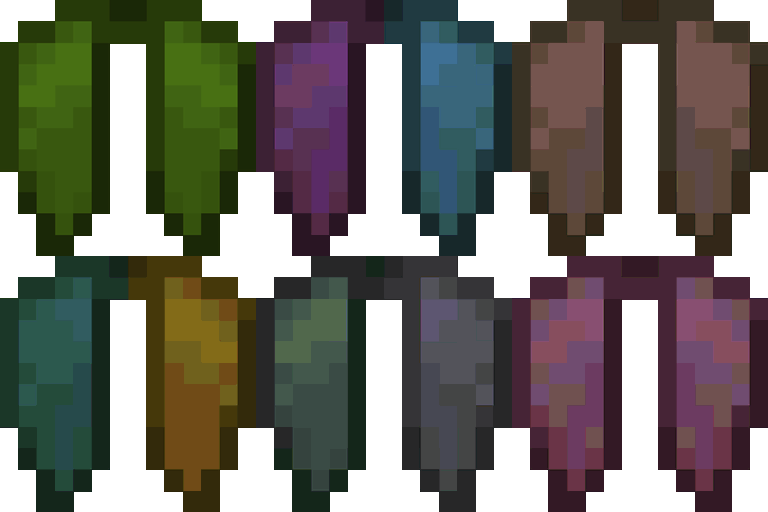
Dodaje razne šarene načine da prilagodite svoju elytru!
 Fabric
 NeoForge
 Forge
Forge Quilt
QuiltO Customizable Elytra modu
1.12.2 Backport by jbredwards
Omogućava da se Elytra oboji i da se na nju postave baneri, na isti način kao kožni oklop i štitovi
Novo u 1.20: Podržava Armor Trims!
Dodatne funkcije i često postavljana pitanja
Radi sa pelerinama!
(Takođe možete sakriti pelerinu da se ne pojavljuje na vašoj elytri tako što ćete je napraviti sa komadom papira!)
Napravite sa Glow Ink Sac da vaša elytra svetli u mraku!
(Takođe radi sa Upgrade Aquatic's i Caves & Cliff's Backport Glow Ink Sacs u 1.16!)
Često postavljana pitanja
Da li je ovaj mod kompatibilan sa banerima dodatim iz drugih modova?
Od najnovije verzije, sledeći modovi su kompatibilni: Additional Banners, Rats, Ice and Fire, Autumnity, Buzzier Bees, Neapolitan, Alex's Mobs i Penguin-Lib
Da li će moji enchantments/custom name ostati ako prilagodim svoju elytru?
Da, sve promene koje ste napravili na svojoj elytri biće sačuvane ako je prilagodite
Kako da uklonim prilagođavanje?
Možete vratiti svoju elytru u običnu tako što ćete kliknuti desnim tasterom miša na kazan napunjen vodom dok je držite!
Video snimci
(3:06 Ako vremenska oznaka ne radi!)
Kako instalirati Customizable Elytra
With Millida Launcher
Install Millida Launcher
The launcher is free: download it at millida.net/launcher and sign in with any nickname.
Click “Install” on this page
The launcher opens and installs the mod for Minecraft 1.16.4–26.2 on Fabric, Forge, NeoForge or Quilt automatically.
Launch the game
A profile with it appears in the launcher: click “Play”.
Manually
Install Fabric, Forge, NeoForge or Quilt
The loader must match the game version of the mod file, for example Minecraft 26.2. After installing it, a separate profile appears in your launcher.
Download the file for your version
In the version list above, pick the file customizableelytra-fabric-2.2.9+26.2.jar (190 KB) for your game version and loader.
Put it in the mods folder
The folder is inside .minecraft (Windows: %appdata%\.minecraft\mods). If it does not exist, create it.
Launch the loader profile
Open “Mods” in the main menu: Customizable Elytra should be in the list.
Verzije
Sa zavisnostima
| Minecraft | Loader | Fajl | Datum | Akcije |
|---|---|---|---|---|
| 26.2 | Fabric | [Fabric] Customizable Elytra 2.2.9+26.2190 KB 2 | ||
| 26.2 | NeoForge | [NeoForge] Customizable Elytra 2.2.9+26.2189 KB | ||
| 26.2 | Forge | [Forge] Customizable Elytra 2.2.9+26.2820 KB 4 | ||
| 1.20.1 | Quilt | [Quilt] Customizable Elytra 2.1.2+1.20273 KB | ||
| 1.16.5 | — | customizableelytra-1.16.4-1.0.1.jar85.2 KB |
Česta pitanja
Which Minecraft versions does Customizable Elytra work on?
There are files for 26.2, 1.20.1, 1.20, 1.16.5, 1.16.4. The newest is 26.2.
Is Customizable Elytra for Forge or Fabric?
There are files for Fabric: 26.2, for Forge: 26.2, for NeoForge: 26.2 and for Quilt: 1.20–1.20.1.
Does Customizable Elytra need other mods?
The author lists no required dependencies: the Fabric, Forge, NeoForge or Quilt loader is enough.
Where can I download Customizable Elytra safely?
On this page: the file customizableelytra-fabric-2.2.9+26.2.jar (190 KB) is stored on Millida’s server, with no link shorteners. SHA-1 checksum: f4975ade8884ccbccf4e1e744c177716129736a9.
Recenzije
Budi prvi koji će oceniti Customizable Elytra


