
Construction Sticks Mod za Minecraft 1.20.1, 1.21.1
Štapovi koji olakšavaju gradnju
 NeoForge
 Forge
ForgeO Construction Sticks modu
Construction Sticks vam omogućavaju da postavite više blokova odjednom, do 1024 u jednom trenutku, proširujući vašu gradnju u smeru u kom gledate. Možete nadograditi svoj štap da poboljšate njegove sposobnosti, čineći gradnju bržom i efikasnijom.
Štapovi
Postoji pet različitih nivoa Construction Sticks: Wood, Copper, Iron, Diamond i Netherite. Svaki nivo nudi poboljšanu izdržljivost i sposobnosti postavljanja blokova, a može se dodatno nadograditi šablonima.
Izdržljivost štapa Maks. blokova Može se nadograditi Angel Distance Maks. blokova (Destroy)
Wood 59 3 Da 1 1
Copper 131 9 Da 2 3
Iron 250 27 Da 4 9
Diamond 1561 128 Da 8 25
Netherite 2031 1024 Da 16 81
Šabloni za nadogradnju
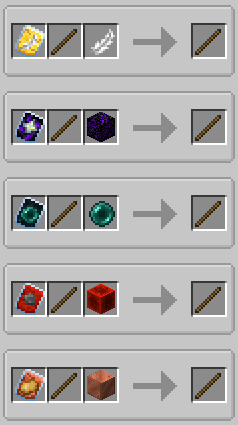
Šabloni dodaju specijalne nadogradnje vašim Construction Sticks. Da biste primenili šablon, kombinujte štap, šablon i dodatni predmet u Smithing Table.
Dostupni šabloni:
- Angel: Postavlja blokove iza onih u koje gledate ili u vazduhu.
- Destruction: Uklanja blokove brzo i efikasno.
- Unbreakable: Uklanja trošenje izdržljivosti, omogućavajući beskonačno postavljanje blokova.
- Battery: Omogućava štapu da koristi RF umesto izdržljivosti.
Dodatne funkcije
- Shulker Boxes, Bundles i drugi kontejneri: Koristite ih kao izvore građevinskih blokova.
- Postavljanje iz druge ruke: Postavite blokove iz druge ruke umesto onog u koji gledate.
Odricanje od odgovornosti
Ovo je fork originalnog ConstructionWand moda, koji je licenciran pod MIT licencom. Modifikovan je radi dodavanja novih funkcija i poboljšanja, uključujući nove nivoe, šablone i funkcionalnost. Originalni mod je kreirao Theta-Dev.
Potreban vam je server? Ostvarite 20% popusta na prvi mesec koristeći promo kod "mrbysco"
Za pitanja slobodno se pridružite mom Discord-u.
Želite da nas podržite?
-Mrbysco
-ShyNieke
Kako instalirati Construction Sticks
With Millida Launcher
Install Millida Launcher
The launcher is free: download it at millida.net/launcher and sign in with any nickname.
Click “Install” on this page
The launcher opens and installs the mod for Minecraft 1.20.1–26.1.2 on Forge or NeoForge automatically.
Launch the game
A profile with it appears in the launcher: click “Play”.
Manually
Install Forge or NeoForge
The loader must match the game version of the mod file, for example Minecraft 26.1.2. After installing it, a separate profile appears in your launcher.
Download the file for your version
In the version list above, pick the file ConstructionSticks-26.1.2-3.2.1.jar (264 KB) for your game version and loader.
Put it in the mods folder
The folder is inside .minecraft (Windows: %appdata%\.minecraft\mods). If it does not exist, create it.
Launch the loader profile
Open “Mods” in the main menu: Construction Sticks should be in the list.
Verzije
Sa zavisnostima
| Minecraft | Loader | Fajl | Datum | Akcije |
|---|---|---|---|---|
| 26.1.2 | NeoForge | ConstructionSticks-26.1.2-3.2.1.jar264 KB | ||
| 1.21.1 | NeoForge | ConstructionSticks-1.21.1-1.5.0.jar259 KB 5 | ||
| 1.20.1 | Forge, NeoForge | ConstructionSticks-1.20.1-1.2.7.jar253 KB 5 | ||
| 1.20.1 | Forge, NeoForge | ConstructionSticks-1.20.1-1.2.6.jar253 KB | ||
| 1.21.1 | NeoForge | ConstructionSticks-1.21.1-1.0.0.jar189 KB |
Česta pitanja
Which Minecraft versions does Construction Sticks work on?
There are files for 26.1.2, 1.21.1, 1.20.1. The newest is 26.1.2.
Is Construction Sticks for Forge or Fabric?
There are files for Forge: 1.20.1 and for NeoForge: 1.20.1–26.1.2. There are no files for Fabric: a mod for another loader will not start.
Does Construction Sticks need other mods?
The author lists no required dependencies: the Forge or NeoForge loader is enough.
Where can I download Construction Sticks safely?
On this page: the file ConstructionSticks-26.1.2-3.2.1.jar (264 KB) is stored on Millida’s server, with no link shorteners. SHA-1 checksum: 145147e476b514d63faaaf2801421f22bc68eb0d.
Recenzije
Budi prvi koji će oceniti Construction Sticks


