
- pregleda
- 29 pregleda
- Ažurirano
- Ažurirano 18.10.2026
- 1.21.4
 Forge
Forge
O CobbleForDays modu
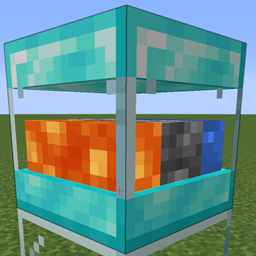
Evo jednostavnog generatora oblutaka. Dostupno je 5 nivoa u slučaju da ljudi žele da dodaju više verzija.
Ovo je napravljeno uglavnom kao samostalan blok da pomogne serverima. Mnogo je efikasnije imati jedan TE koji otkucava nego gomilu i generisanje oblutaka u svetu.
Ali slobodno koristite kako želite.
Svaki nivo ima podešavanja koja se mogu menjati u konfiguracionoj datoteci servera.
[server.1]
Maksimalna količina predmeta koja može da se čuva u internom baferu.
Opseg: > 1
max = 64
Količina predmeta koja se generiše pri svakom ažuriranju.
Opseg: > 1
count = 1
Broj tikova između svakog ažuriranja generisanja.
Opseg: > 1 interval = 40
Postavite na true da omogućite automatsko potiskivanje u inventare iznad ovog bloka.
pushes = true
Hvala Drullkusu za pravljenje lepog modela za njih.
Ovo su podrazumevani recepti, ali očigledno mogu da se menjaju u data pack-ovima.
Kako instalirati CobbleForDays
With Millida Launcher
Install Millida Launcher
The launcher is free: download it at millida.net/launcher and sign in with any nickname.
Click “Install” on this page
The launcher opens and installs the mod for Minecraft 1.21.4 on Forge automatically.
Launch the game
A profile with it appears in the launcher: click “Play”.
Manually
Install Forge
The loader must match the game version of the mod file, for example Minecraft 1.21.4. After installing it, a separate profile appears in your launcher.
Download the file for your version
In the version list above, pick the file CobbleForDays-1.14.1.jar (49 KB) for your game version.
Put it in the mods folder
The folder is inside .minecraft (Windows: %appdata%\.minecraft\mods). If it does not exist, create it.
Launch the loader profile
Open “Mods” in the main menu: CobbleForDays should be in the list.
Minecraft 1.21.4 runs on Java 21: with a different Java version the game may close right after launch.
Verzije
Sa zavisnostima
| Minecraft | Loader | Fajl | Datum | Akcije |
|---|---|---|---|---|
| 1.21.4 | Forge | CobbleForDays-1.14.1.jar49.4 KB |
Česta pitanja
Which Minecraft versions does CobbleForDays work on?
Only Minecraft 1.21.4: there are no files for other versions.
Is CobbleForDays for Forge or Fabric?
Only for Forge: 1.21.4. There are no files for Fabric or NeoForge: a mod for another loader will not start.
Does CobbleForDays need other mods?
The author lists no required dependencies: the Forge loader is enough.
Which Java does CobbleForDays need?
Minecraft 1.21.4 runs on Java 21. If the game closes right after launch, the usual cause is the wrong Java version in the profile settings.
Where can I download CobbleForDays safely?
On this page: the file CobbleForDays-1.14.1.jar (49 KB) is stored on Millida’s server, with no link shorteners. SHA-1 checksum: 5268375f91bf686fe063c4855c65317c92bc4555.
Recenzije
Budi prvi koji će oceniti CobbleForDays


