
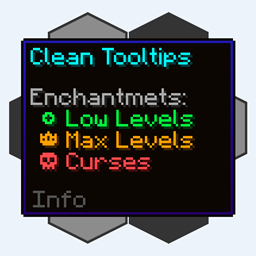
Clean Tooltips Mod za Minecraft 1.20.1, 1.21.10
Poboljšava tooltipove stvarajući čist i dosledan izgled! Tooltip za izdržljivost i još mnogo toga!
 NeoForge
 Fabric
 Forge
O Clean Tooltips modu
Clean Tooltips
Da li ste ikada osetili da bi podrazumevani opisi mogli malo da se ulepšaju? Onda je ovo upravo ono što tražite.
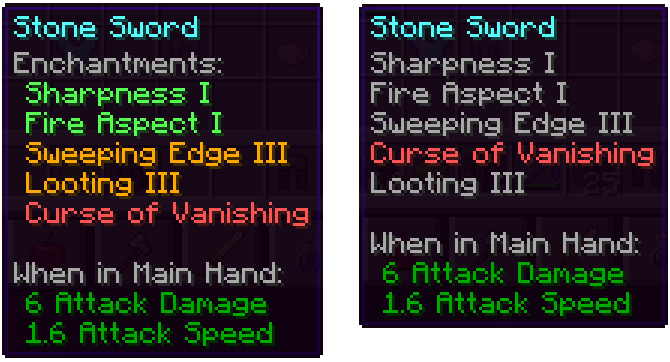
Uglavnom mod menja način na koji se čini prikazuju u opisu:
- sada imaju svoju podkategoriju "Enchantents:"
- označavanje bojom radi lakšeg razlikovanja dobrih čini (zeleno) i kletvi (crveno)
- čini maksimalnog nivoa biće prikazane zlatnom bojom
- kletve su uvek poređane na dnu liste
Sa instaliranim modom: Bez instaliranog moda (Vanila):
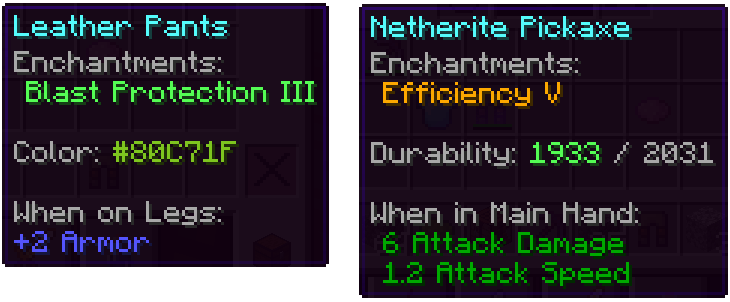
Osim toga, poboljšani su i drugi delovi:
- linija boje na obojenim predmetima sada zaista prikazuje korišćenu boju
- oštećeni predmeti prikazuju preostalu izdržljivost u opisu
Imamo još mnogo ideja kako bi opisi mogli da se poboljšaju u budućim ažuriranjima. Pored dodavanja novih funkcija, sledeća ažuriranja će takođe dodati mnogo opcija za konfiguraciju.
Kako instalirati Clean Tooltips
With Millida Launcher
Install Millida Launcher
The launcher is free: download it at millida.net/launcher and sign in with any nickname.
Click “Install” on this page
The launcher opens and installs the mod for Minecraft 1.20.1–1.21.10 on Fabric, Forge or NeoForge automatically.
Launch the game
A profile with it appears in the launcher: click “Play”.
Manually
Install Fabric, Forge or NeoForge
The loader must match the game version of the mod file, for example Minecraft 1.21.10. After installing it, a separate profile appears in your launcher.
Download the file for your version
In the version list above, pick the file clean_tooltips-1.1-neoforge-1.21.10.jar (24 KB) for your game version and loader.
Put it in the mods folder
The folder is inside .minecraft (Windows: %appdata%\.minecraft\mods). If it does not exist, create it.
Launch the loader profile
Open “Mods” in the main menu: Clean Tooltips should be in the list.
Minecraft 1.21.10 runs on Java 21: with a different Java version the game may close right after launch.
Verzije
Sa zavisnostima
| Minecraft | Loader | Fajl | Datum | Akcije |
|---|---|---|---|---|
| 1.21.10 | NeoForge | clean_tooltips-1.1-neoforge-1.21.10.jar24.4 KB | ||
| 1.21.10 | Fabric | clean_tooltips-1.1-fabric-1.21.10.jar23.1 KB 3 | ||
| 1.20.1 | Forge | clean_tooltips-1.0-forge-1.20.1.jar25.8 KB 1 |
Česta pitanja
Which Minecraft versions does Clean Tooltips work on?
There are files for 1.21.10, 1.20.1. The newest is 1.21.10.
Is Clean Tooltips for Forge or Fabric?
There are files for Fabric: 1.21.10, for Forge: 1.20.1 and for NeoForge: 1.21.10.
Does Clean Tooltips need other mods?
The author lists no required dependencies: the Fabric, Forge or NeoForge loader is enough.
Which Java does Clean Tooltips need?
Minecraft 1.21.10 runs on Java 21. If the game closes right after launch, the usual cause is the wrong Java version in the profile settings.
Where can I download Clean Tooltips safely?
On this page: the file clean_tooltips-1.1-neoforge-1.21.10.jar (24 KB) is stored on Millida’s server, with no link shorteners. SHA-1 checksum: 594541adddbc0d20e2361a8fef21b5ed960c2588.
Recenzije
Budi prvi koji će oceniti Clean Tooltips


