
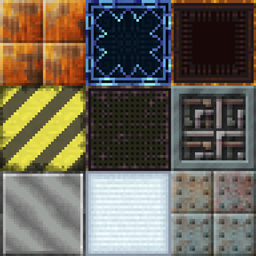
Chisel Chipped Integration Mod za Minecraft 1.20.1, 1.21.1
Dodaje blokove iz chisel moda.
 NeoForge
 Forge
ForgeO Chisel Chipped Integration modu
Originalne teksture iz Chisel moda!
Ako pronađete bilo kakve greške, prijavite ih na trackeru za greške!
Za više informacija/pregled pogledajte Chisel Wiki.
Za zahteve za različite blokove pogledajte odeljak Coming Soon na wikiju.
Aktivni razvoj: 1.21.1
Tehnički razvoj: Forge 1.20.1, NeoForge 1.21.1
Ovaj mod zahteva:
Connected Textures Mod
Athena (1.20 i novije)
Chipped (opciono)
Slobodno za korišćenje u bilo kom modpaku.
Ovaj mod dodaje neke blokove u chipped mod koji su postojali u starom chisel modu.
Ti blokovi uključuju:
- Factory Blocks
- Laboratory Blocks
- Technical Blocks
- Tyrian
- Futura Blocks
- Metal Blocks (Aluminum-, Bronze-, Cobalt-, Copper-, Electrum-, Gold-, Invar-, Iron-, Lead-, Nickel-, Platinum-, Silver-, Steel-, Tin- i Uranium Blocks)
- Wool and Carpets
- Gem Blocks (Diamond-, Emerald-, Lapis- i Redstone Blocks)
Kako instalirati Chisel Chipped Integration
With Millida Launcher
Install Millida Launcher
The launcher is free: download it at millida.net/launcher and sign in with any nickname.
Click “Install” on this page
The launcher opens and installs the mod for Minecraft 1.19.2–1.21.1 on Forge or NeoForge automatically.
Launch the game
A profile with it appears in the launcher: click “Play”.
Manually
Install Forge or NeoForge
The loader must match the game version of the mod file, for example Minecraft 1.21.1. After installing it, a separate profile appears in your launcher.
Download the file for your version
In the version list above, pick the file chisel_chipped_integration-v1.3.9-1.21.1.jar (2.7 MB) for your game version and loader.
Put it in the mods folder
The folder is inside .minecraft (Windows: %appdata%\.minecraft\mods). If it does not exist, create it.
Launch the loader profile
Open “Mods” in the main menu: Chisel Chipped Integration should be in the list.
Minecraft 1.21.1 runs on Java 21: with a different Java version the game may close right after launch.
Verzije
Sa zavisnostima
| Minecraft | Loader | Fajl | Datum | Akcije |
|---|---|---|---|---|
| 1.21.1 | NeoForge | Chisel 1.3.9-1.21.12.7 MB 1 | ||
| 1.20.1 | NeoForge, Forge | Chisel 1.1.6-1.20.12.7 MB 3 | ||
| 1.21 | NeoForge | Chisel v1.3.3-1.21 Beta1.9 MB | ||
| 1.19.2 | Forge | Chisel Chipped Integration 1.0.0 1.19.2 Beta658 KB |
Česta pitanja
Which Minecraft versions does Chisel Chipped Integration work on?
There are files for 1.21.1, 1.21, 1.20.1, 1.19.2. The newest is 1.21.1.
Is Chisel Chipped Integration for Forge or Fabric?
There are files for Forge: 1.19.2–1.20.1 and for NeoForge: 1.20.1–1.21.1. There are no files for Fabric: a mod for another loader will not start.
Does Chisel Chipped Integration need other mods?
The author lists no required dependencies: the Forge or NeoForge loader is enough.
Which Java does Chisel Chipped Integration need?
Minecraft 1.21.1 runs on Java 21. If the game closes right after launch, the usual cause is the wrong Java version in the profile settings.
Where can I download Chisel Chipped Integration safely?
On this page: the file chisel_chipped_integration-v1.3.9-1.21.1.jar (2.7 MB) is stored on Millida’s server, with no link shorteners. SHA-1 checksum: 8a7b23797cf5ecd9db0cc1cced108d5fbdb876b9.
Recenzije
Budi prvi koji će oceniti Chisel Chipped Integration


