

 Fabric
 NeoForge
 Forge
ForgeChipped
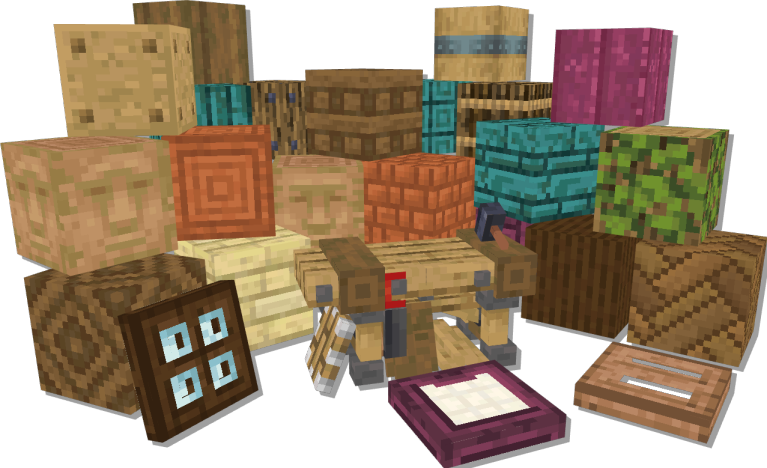
Da li ste ikada želeli da izgradite epski zamak od velikih cigli od peščara? Ili možda nether tvrđavu napravljenu od čistog magme? Možda ste jednostavno ovde da napravite kuću od zemlje ili totem sa ozloglašenim dioritefaces? U svakom slučaju, pokrivamo vas!
Chipped je 1.16+ mod za gradnju koji proširuje raznolikost blokova koje možete koristiti u igri. Mod nudi preko 11.000 jedinstvenih građevinskih blokova, od varijacija obojenog stakla pa sve do betona, prizmarina i čak pozlaćenog crnog kamena! Ne samo da su sve teksture ručno izrađene u vanilla stilu, već uključuju i mnoge povezane teksture, koje pokreće Athena!
Inspirisan popularnim Chisel modom, Chipped omogućava graditeljima punu slobodu kreativnosti jer svaki blok zaslužuje prijatelja!
Da biste počeli, sve što treba da uradite je da napravite jedan od sedam stolova koji vam omogućavaju da promenite razne vanilla blokove u njihove chipped varijante. Svi stolovi izgledaju drugačije, ali rade isto, tako da možete izabrati onaj koji najbolje izgleda u vašoj gradnji, ili napraviti nekoliko različitih i rasporediti ih po kući. Šta god želite da uradite, Chipped vam može pomoći da to oživite!

Programeri:
Alex Nijjar, Grim, MsRandom1, CodexAdrian, ThatGravyBoat

Umetnici:
Kekie6, Marc-IceBlade, Shrimp, Facu, Frogipher, SunsetSoup, Valilla, Brother Earth, Joosh, ArtistMonster, Zilver
Kako instalirati Chipped
With Millida Launcher
Install Millida Launcher
The launcher is free: download it at millida.net/launcher and sign in with any nickname.
Click “Install” on this page
The launcher opens and installs the mod for Minecraft 1.20.1–1.21.1 on Fabric, Forge or NeoForge automatically, together with its dependencies: Resourceful Lib, Fabric API, Athena.
Launch the game
A profile with it appears in the launcher: click “Play”.
Manually
Install Fabric, Forge or NeoForge
The loader must match the game version of the mod file, for example Minecraft 1.21.1. After installing it, a separate profile appears in your launcher.
Download the file for your version
In the version list above, pick the file chipped-fabric-1.21.1-4.0.2.jar (14 MB) for your game version and loader.
Put it in the mods folder
The folder is inside .minecraft (Windows: %appdata%\.minecraft\mods). If it does not exist, create it. Required dependencies go there too: Resourceful Lib, Fabric API, Athena.
Launch the loader profile
Open “Mods” in the main menu: Chipped should be in the list.
On a server
A server on Fabric, Forge or NeoForge
The mod only works on a server with the same loader and game version, for example 1.21.1.
File goes into the server’s mods folder
Stop the server, put the mod file into the mods folder and start the server again.
Use the “To server” button
On Millida Hosting, the button at the top of the page uploads the file to your server and restarts it for you.
Minecraft 1.21.1 runs on Java 21: with a different Java version the game may close right after launch.
Verzije
Sa zavisnostima
| Minecraft | Loader | Fajl | Datum | Akcije |
|---|---|---|---|---|
| 1.20.1 | Fabric | 1.20.114.4 MB 7 | ||
| 1.20.1 | Forge | 1.20.114.4 MB 65 | ||
| 1.20.4 | Fabric | 1.20.414.3 MB | ||
| 1.20.4 | NeoForge | 1.20.414.3 MB | ||
| 1.21.1 | Fabric | 1.21.114.3 MB 26 | ||
| 1.21.1 | NeoForge | 1.21.114.3 MB 54 | ||
| 1.21.1 | Fabric | 1.21.114.3 MB | ||
| 1.21.1 | NeoForge | 1.21.114.3 MB |
Šta je potrebno za pokretanje
- Resourceful Libobavezno
- Fabric APIobavezno
- Athenaobavezno
Recenzije
Budi prvi koji će oceniti Chipped


