
Basic Nether Ores [Forge/Fabric] Mod za Minecraft 1.21.1
Stvara Vanilla i modovane rude u Netheru
 Forge
Forge NeoForge
 Fabric
O Basic Nether Ores [Forge/Fabric] modu
OSNOVNE NETHER RUDE
Forge, NeoForge i Fabric kompatibilnost sada dostupna za 1.21
Datapackovi dostupni za prilagođavanje uz Forge i NeoForge verzije
Pogledajte naš sestrinski mod za End
https://www.curseforge.com/minecraft/mc-mods/basic-end-ores
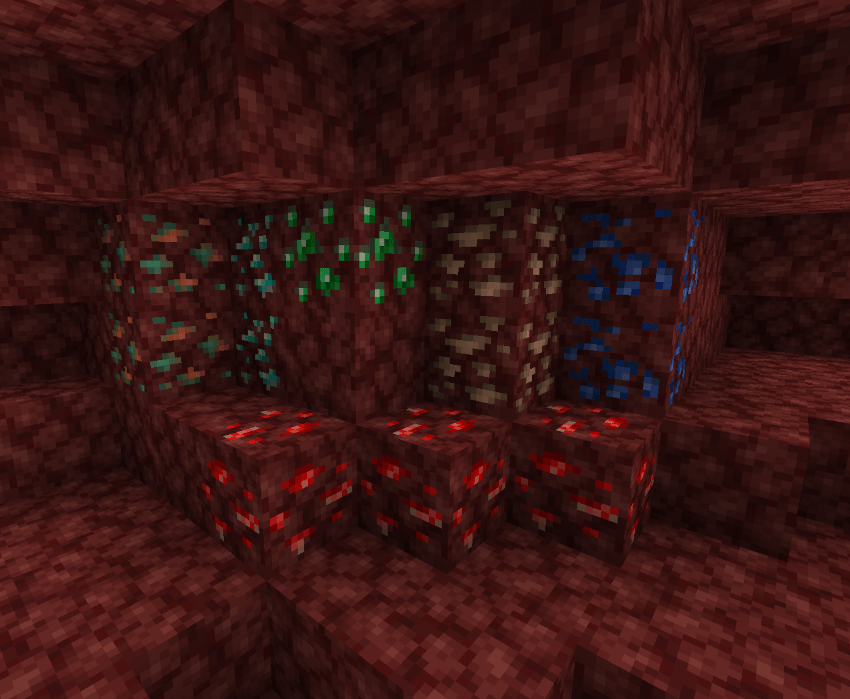
Basic Nether Ores stvara obične rude u Netheru. Jednostavno rečeno, ovaj mod proširuje mogućnost igrača da kopa rude i dragulje u Netheru, dajući Netheru novi život i smisao. Rude bakra i kalaja dodate su u mod radi funkcionisanja u drugim modovima. Stope pojavljivanja Nether ruda postavljene su jednake ili veće od njihovih vanilla ekvivalenata kako bi kopanje u Netheru bilo isplativo. Teksture nisu preterane, pa igrač mora da obraća pažnju na okolinu da bi prepoznao Nether rude.
Kakvu prednost Basic Nether Ores donosi u odnosu na druge modove za Nether rude?
- Basic Nether Ore je samostalan mod i ne zavisi od drugih API-ja ili modova.
- Svim rudama, blokovima i predmetima dodeljen je Ore Dictionary unos koji odgovara njihovom vanilla ekvivalentu.
- Blokovi ruda mogu se topiti da bi vratili jedan ingot kao vanilla rude.
Treba biti oprezan pri kopanju i sakupljanju Nether ruda. namig namig
Kako instalirati Basic Nether Ores [Forge/Fabric]
With Millida Launcher
Install Millida Launcher
The launcher is free: download it at millida.net/launcher and sign in with any nickname.
Click “Install” on this page
The launcher opens and installs the mod for Minecraft 1.16.1–1.21.1 on Fabric, Forge or NeoForge automatically.
Launch the game
A profile with it appears in the launcher: click “Play”.
Manually
Install Fabric, Forge or NeoForge
The loader must match the game version of the mod file, for example Minecraft 1.21.1. After installing it, a separate profile appears in your launcher.
Download the file for your version
In the version list above, pick the file bno-forge-1.21.1-10.1.0.jar (701 KB) for your game version and loader.
Put it in the mods folder
The folder is inside .minecraft (Windows: %appdata%\.minecraft\mods). If it does not exist, create it.
Launch the loader profile
Open “Mods” in the main menu: Basic Nether Ores [Forge/Fabric] should be in the list.
Minecraft 1.21.1 runs on Java 21: with a different Java version the game may close right after launch.
Verzije
Sa zavisnostima
| Minecraft | Loader | Fajl | Datum | Akcije |
|---|---|---|---|---|
| 1.21.1 | Forge | BasicNetherOres-1.21.1-10.1.0 - Forge701 KB 1 | ||
| 1.21.1 | NeoForge | BasicNetherOres-1.21.1-10.1.0 - NeoForge664 KB 1 | ||
| 1.21.1 | Fabric | BasicNetherOres-1.21.1-10.1.0 - Fabric896 KB | ||
| 1.20.4 | Forge | BasicNetherOres-1.20.4-9.4.1 - Forge598 KB | ||
| 1.16.1 | — | Basic Nether Ores-1.16.1-5.1.0 - Forge331 KB | ||
| 1.16.1 | — | Basic Nether Ores-1.16.1-5.0.0 - Forge308 KB |
Česta pitanja
Which Minecraft versions does Basic Nether Ores [Forge/Fabric] work on?
There are files for 1.21.1, 1.20.4, 1.16.1. The newest is 1.21.1.
Does Basic Nether Ores [Forge/Fabric] need other mods?
The author lists no required dependencies: the Fabric, Forge or NeoForge loader is enough.
Which Java does Basic Nether Ores [Forge/Fabric] need?
Minecraft 1.21.1 runs on Java 21. If the game closes right after launch, the usual cause is the wrong Java version in the profile settings.
Where can I download Basic Nether Ores [Forge/Fabric] safely?
On this page: the file bno-forge-1.21.1-10.1.0.jar (701 KB) is stored on Millida’s server, with no link shorteners. SHA-1 checksum: ee379e9cf582befd6a207492db18e0ad6f2a0b67.
Recenzije
Budi prvi koji će oceniti Basic Nether Ores [Forge/Fabric]


