

 NeoForge
 Forge
O Alex's Delight modu
Dodaje kompatibilnost između Alex's Mobs i Farmer's Delight
Ovi modovi su očigledno potrebni. Verzije za 1.18 i starije više nisu podržane
Takođe pogledajte Alex's Abnormalities
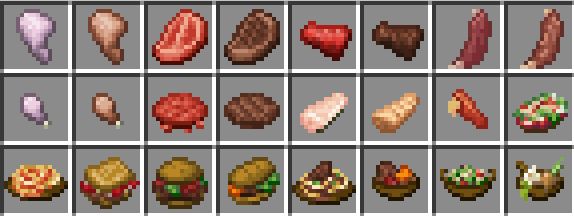
Trenutni predmeti:
Kangaroo Shanks
Loose Moose Ribs
Bison Meat
Bison Patties
Bunfungus Meat
Bunfungus Drumsticks
Catfish Slices
Kangaroo Stew
Barbecue on a Stick recept sa Moose Ribs
Maggot Salad
Lobster Pasta
Acacia Blossom Soup
Gongylidia Bruschetta
Bison Burger
Bunfungus Sandwich
Kangaroo Pasta
Ako novi Kangaroo Burger recept ili Bison/Bunfungus tabele plena ne rade, onemogućite i ponovo omogućite Alex's Delight datapack, a zatim Alex's Mobs datapack
Hvala za preko 20.000.000 preuzimanja!
Ako imate bilo kakve probleme, predloge ili želite da budete uključeni, pridružite se discordu!
Slobodno predložite funkcije
Možete koristiti ovaj mod u bilo kom modpacku ili videu ako želite.
Korišćenjem ovog linka možete dobiti 15% popusta na prvi mesec! Obavezno dodajte kod tokom procesa plaćanja
Kako instalirati Alex's Delight
With Millida Launcher
Install Millida Launcher
The launcher is free: download it at millida.net/launcher and sign in with any nickname.
Click “Install” on this page
The launcher opens and installs the mod for Minecraft 1.18.2–1.21.1 on Forge or NeoForge automatically.
Launch the game
A profile with it appears in the launcher: click “Play”.
Manually
Install Forge or NeoForge
The loader must match the game version of the mod file, for example Minecraft 1.21.1. After installing it, a separate profile appears in your launcher.
Download the file for your version
In the version list above, pick the file alexsdelight-1.6.jar (87 KB) for your game version and loader.
Put it in the mods folder
The folder is inside .minecraft (Windows: %appdata%\.minecraft\mods). If it does not exist, create it.
Launch the loader profile
Open “Mods” in the main menu: Alex's Delight should be in the list.
Minecraft 1.21.1 runs on Java 21: with a different Java version the game may close right after launch.
Verzije
Sa zavisnostima
| Minecraft | Loader | Fajl | Datum | Akcije |
|---|---|---|---|---|
| 1.21.1 | NeoForge | alexsdelight-1.6.jar87.3 KB 62 | ||
| 1.20.1 | Forge | alexsdelight-1.5.jar54.1 KB 94 | ||
| 1.18.2 | Forge | alexsdelight-1.18.2-1.2.3.jar28.4 KB 6 |
Česta pitanja
Which Minecraft versions does Alex's Delight work on?
There are files for 1.21.1, 1.20.1, 1.18.2. The newest is 1.21.1.
Is Alex's Delight for Forge or Fabric?
There are files for Forge: 1.18.2–1.20.1 and for NeoForge: 1.21.1. There are no files for Fabric: a mod for another loader will not start.
Does Alex's Delight need other mods?
The author lists no required dependencies: the Forge or NeoForge loader is enough.
Which Java does Alex's Delight need?
Minecraft 1.21.1 runs on Java 21. If the game closes right after launch, the usual cause is the wrong Java version in the profile settings.
Where can I download Alex's Delight safely?
On this page: the file alexsdelight-1.6.jar (87 KB) is stored on Millida’s server, with no link shorteners. SHA-1 checksum: 19e8d1e255c431b706e79412be92d8448c668f4c.
Recenzije
Budi prvi koji će oceniti Alex's Delight


