

Timer Data pak za Minecraft 1.20.1, 1.21.1
Timer Data Pack - Više dizajna za izbor - Pravila koja se mogu uključiti/isključiti za zamrzavanje/obezbeđivanje/oslepljivanje igrača
- pregleda
- 43 pregleda
- Ažurirano
- Ažurirano 26.09.2026
- 1.16 — 1.21.8
 Data pak
- Klijent i server
M-Timer & Clock
Add a timer to your HUD to stop times or display the current time. You have full control over your timer with design customization or even rules like freezing/blind/secure all players on timer pause.

Important
This data pack was designed for simple usage in single player. If you search for a high customizable timer with even more features like custom designs with animations, automated tasks and more visit the plugin (and soon fabric mod) version of MTimer!

Access & customize the Timer
Some commands can be used without cheats enabled via /trigger .
Command - Cheat-less Command - Short Description :-: - :-: - :-: /function timer:resume - /trigger resume - Resumes your timer /function timer:pause - /trigger pause - Pauses your timer /function timer:reset - ❌ - Resets the current time /function timer:help - /trigger help - Displays a list of all commands /function timer:settings - ❌ - Customize your timer (design & rules)
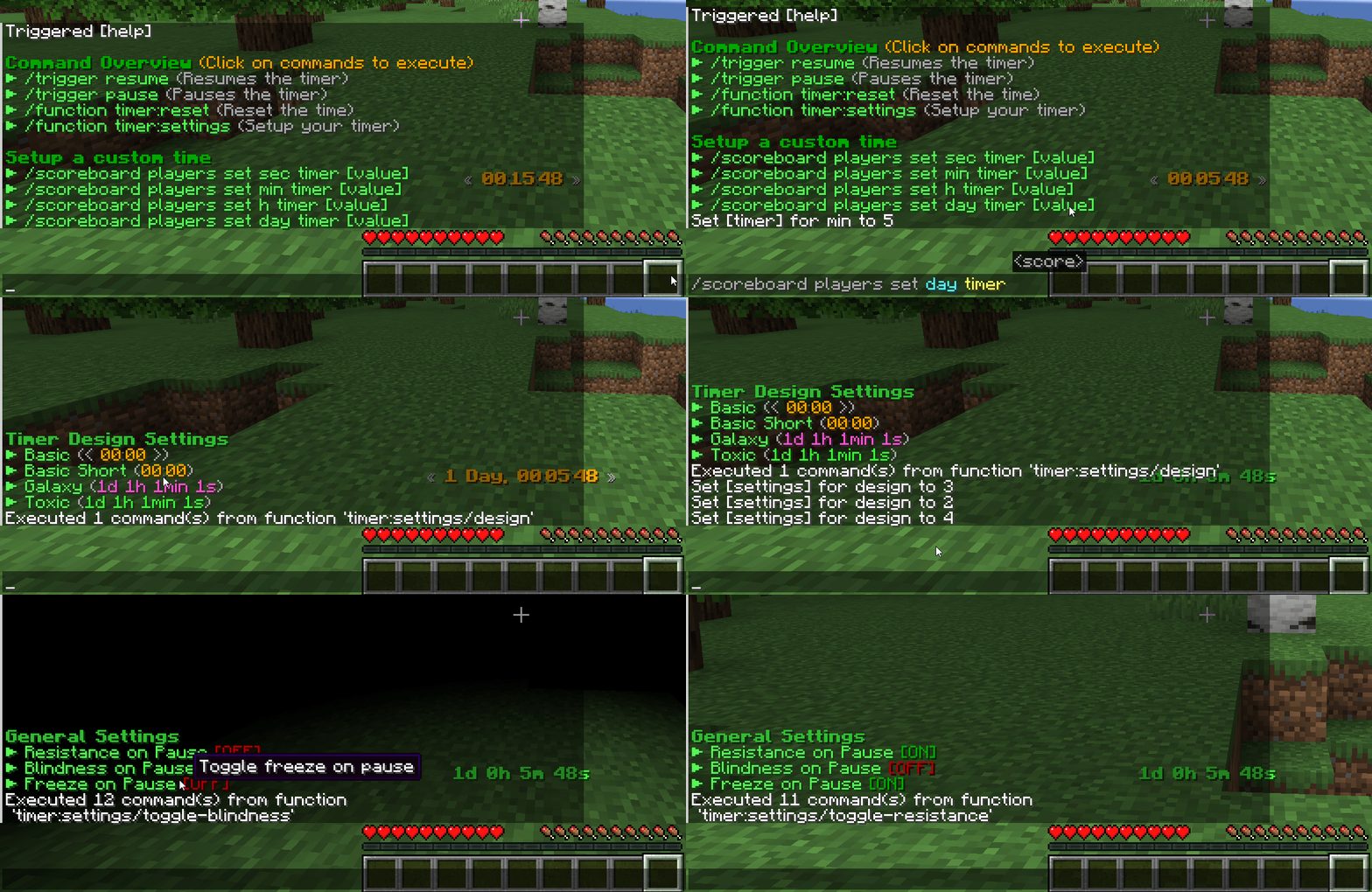
Timer Designs
The data pack was designed to easily support multiple designs. If you have an idea for a new unique design join our Discord Server to suggest it!
You can try to create it on your own in our design creator of the original MTimer.
Timer Settings
MTimer currently support 3 rules to customize the experience accessible under function timer:settings. You can toggle...
- Player invulnerability on pausing (default off)
- Blindness on pausing (default off)
- Player movement freezing (default off)
Roadmap
In 1.20.2 a new feature called macros releases. This will allow me to add timer animations too to the cost of performance (probably very small impact). Until then, no animations are possible in designs currently.
Kako instalirati Timer
With Millida Launcher
Install Millida Launcher
The launcher is free: download it at millida.net/launcher and sign in with any nickname.
Click “Install” on this page
The launcher opens and installs the data pack for Minecraft 1.16–1.21.8 automatically.
Launch the game
A profile with it appears in the launcher: click “Play”.
Manually
Download the archive
Pick the file MTimer.zip (29 KB) for your game version.
New world: “Data Packs”
When creating a world, click “Data Packs”, drag the archive into the window, then move it to “Selected”.
Existing world: the datapacks folder
Put the archive into saves/<world>/datapacks and type /reload in game.
On a server
Archive goes into the server world’s datapacks
The world/datapacks folder on the server; players do not need to install anything.
Reload the data
Type /reload in the server console or restart the server.
Use the “To server” button
On Millida Hosting, the button at the top of the page uploads the file to your server and restarts it for you.
Verzije
Sa zavisnostima
| Minecraft | Loader | Fajl | Datum | Akcije |
|---|---|---|---|---|
| 1.21.8 | Data pak | 1.21.829.2 KB | ||
| 1.21.4 | Data pak | 1.21.429.2 KB | ||
| 1.21 | Data pak | 1.2129.2 KB | ||
| 1.19.2 | Data pak | 1.19.29 KB | ||
| 1.17.1 | Data pak | 1.17.19 KB | ||
| 1.18.2 | Data pak | 1.18.29 KB | — | |
| 1.16.5 | Data pak | 1.16.59 KB | — |
Česta pitanja
Which Minecraft versions does Timer work on?
There are files for 1.16–1.21.8, 32 versions in total. The newest is 1.21.8.
Does Timer work on a server?
Yes: the data pack goes into the datapacks folder of the server world, and players do not need to install anything.
Where can I download Timer safely?
On this page: the file MTimer.zip (29 KB) is stored on Millida’s server, with no link shorteners. SHA-1 checksum: 48bccfad2d9dcc486e77f20798876bdea3ed836b.
Recenzije
Budi prvi koji će oceniti Timer


