

 Data pak
📖 About
This datapack adds an atlas in which you can put maps, the atlas will automatically show the map for the player's position.
To change the preferred scaling, you need to swap the atlas twice, starting from the off hand. #

▶️ Demonstration
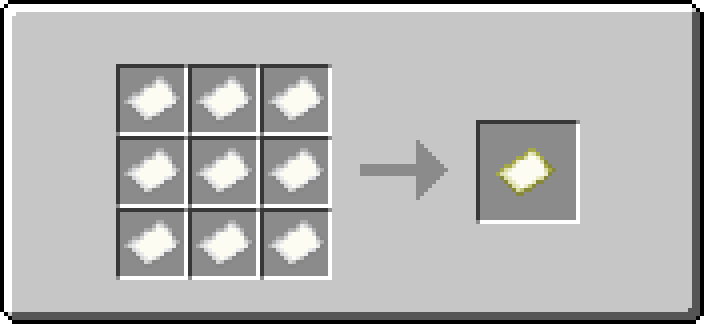
📗 Recipes
Atlas recipe:
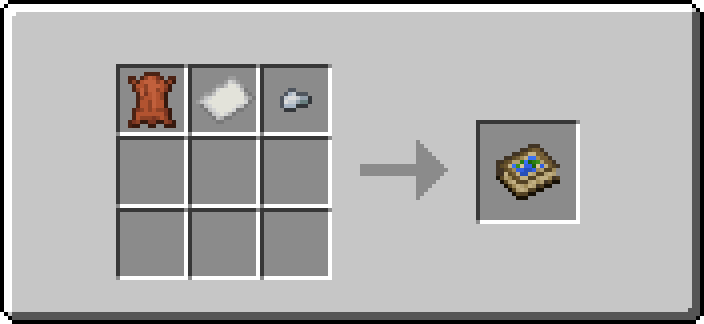
Changed map recipe:
⛔️ Known Issues
These issues cannot be fixed or are only partially fixed
- Since the atlas is technically a minecraft:bundle, it can be recolored (this is not displayed visually).

🔗 Links
You can leave a comment on the PMC page!
Kako instalirati Just Atlas
With Millida Launcher
Install Millida Launcher
The launcher is free: download it at millida.net/launcher and sign in with any nickname.
Click “Install” on this page
The launcher opens and installs the data pack for Minecraft 1.21.9–26.2 automatically.
Launch the game
A profile with it appears in the launcher: click “Play”.
Manually
Download the archive
Pick the file Just-Atlas_DP_v2-1-2_26-2.zip (78 KB) for your game version.
New world: “Data Packs”
When creating a world, click “Data Packs”, drag the archive into the window, then move it to “Selected”.
Existing world: the datapacks folder
Put the archive into saves/<world>/datapacks and type /reload in game.
On a server
Archive goes into the server world’s datapacks
The world/datapacks folder on the server; players do not need to install anything.
Reload the data
Type /reload in the server console or restart the server.
Use the “To server” button
On Millida Hosting, the button at the top of the page uploads the file to your server and restarts it for you.
Verzije
Sa zavisnostima
| Minecraft | Loader | Fajl | Datum | Akcije |
|---|---|---|---|---|
| 26.2 | Data pak | 26.277.5 KB | ||
| 1.21.11 | Data pak | 1.21.1176.1 KB |
Česta pitanja
Which Minecraft versions does Just Atlas work on?
There are files for 26.2, 1.21.11, 1.21.10, 1.21.9. The newest is 26.2.
Does Just Atlas work on a server?
Yes: the data pack goes into the datapacks folder of the server world, and players do not need to install anything.
Where can I download Just Atlas safely?
On this page: the file Just-Atlas_DP_v2-1-2_26-2.zip (78 KB) is stored on Millida’s server, with no link shorteners. SHA-1 checksum: ad44177f8f946e7f47ebd09fe0790345f81255e1.
Recenzije
Budi prvi koji će oceniti Just Atlas


