

Extra Move Animations (Cobblemon) Data pak za Minecraft 1.21.1
Nisi impresioniran trenutnim izborom poteza sa animacijama u Cobblemon-u? Ovaj pack dodaje još neke!
- pregleda
- 14 pregleda
- Ažurirano
- Ažurirano 07.01.2026
- 1.21.1
 Data pak
- Klijent i server
O Extra Move Animations (Cobblemon) data paku
Are you not currently impressed with the selection of moves with animations in Cobblemon? Cut them some slack, please, but this pack aims to adds some more!
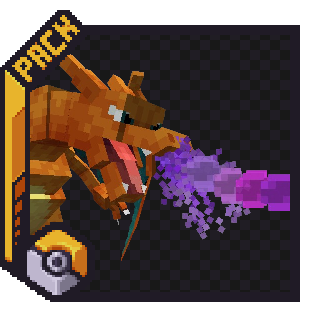
As of the Latest Update (1.3.af), these moves have animations:
- Dragon Pulse
- Aura Sphere
- Make It Rain
- Bitter Blade
- Discharge
- Bulk Up
- Teleport
- Earthquake
- Twinkle Tackle (Z-Move)
- Self-Destruct
You can expect around 1-2 (Maybe 3) new animations per update, decided by the members of the Cobblemon Discord from a selection of moves that I pick out.
This addon is both a Resource Pack and a Datapack as one file. The Resource Pack must be installed in your Resource Pack folder, or through [Esc] -> Options -> Resource Packs, while the Datapack must be installed in a Minecraft World's Datapack Folder, or through More -> Data Packs during world creation. (There is also an option to download it as a mod, for those who want to do that)
Kako instalirati Extra Move Animations (Cobblemon)
With Millida Launcher
Install Millida Launcher
The launcher is free: download it at millida.net/launcher and sign in with any nickname.
Click “Install” on this page
The launcher opens and installs the data pack for Minecraft 1.21.1 automatically, together with its dependencies: Cobblemon.
Launch the game
A profile with it appears in the launcher: click “Play”.
Manually
Download the archive
Pick the file Extra Move Anims 1.7v1.0.2.zip (461 KB) for your game version.
New world: “Data Packs”
When creating a world, click “Data Packs”, drag the archive into the window, then move it to “Selected”.
Existing world: the datapacks folder
Put the archive into saves/<world>/datapacks and type /reload in game.
On a server
Archive goes into the server world’s datapacks
The world/datapacks folder on the server; players do not need to install anything.
Reload the data
Type /reload in the server console or restart the server.
Use the “To server” button
On Millida Hosting, the button at the top of the page uploads the file to your server and restarts it for you.
Verzije
Sa zavisnostima
| Minecraft | Loader | Fajl | Datum | Akcije |
|---|---|---|---|---|
| 1.21.1 | Data pak | 1.21.1461 KB | ||
| 1.21.1 | Data pak | 1.21.1461 KB | ||
| 1.21.1 | Data pak | 1.21.1471 KB | ||
| 1.21.1 | Data pak | 1.21.1480 KB | ||
| 1.21.1 | Data pak | 1.21.1380 KB | ||
| 1.21.1 | Data pak | 1.21.1281 KB | ||
| 1.21.1 | Data pak | 1.21.1192 KB | ||
| 1.21.1 | Data pak | 1.21.1147 KB |
Šta je potrebno za pokretanje
- Cobblemonobavezno
Česta pitanja
Which Minecraft versions does Extra Move Animations (Cobblemon) work on?
Only Minecraft 1.21.1: there are no files for other versions.
Does Extra Move Animations (Cobblemon) work on a server?
Yes: the data pack goes into the datapacks folder of the server world, and players do not need to install anything.
What does Extra Move Animations (Cobblemon) need to work?
Required: Cobblemon. Without it the data pack will not start.
Where can I download Extra Move Animations (Cobblemon) safely?
On this page: the file Extra Move Anims 1.7v1.0.2.zip (461 KB) is stored on Millida’s server, with no link shorteners. SHA-1 checksum: dd817b0353dad2ce64bb5fc97bd8a20093507f99.
Recenzije
Budi prvi koji će oceniti Extra Move Animations (Cobblemon)


