

 Data pak
Dye Tweaks Data Pack
Enhance your Minecraft dye crafting with the Dye Tweaks data pack! This pack allows you to efficiently craft dyes by combining different dye colors using simple recipes.

Features:
- Efficient Dye Crafting: Convert white dye and any other dye into more of that dye efficiently.
- Universal Recipes: Works with all dyes in Minecraft, making dye crafting versatile and straightforward.
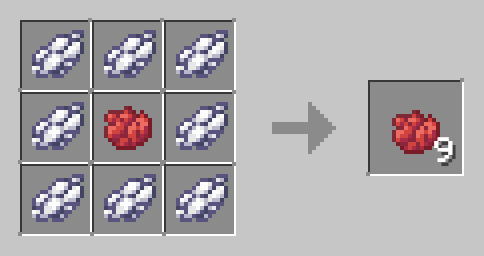
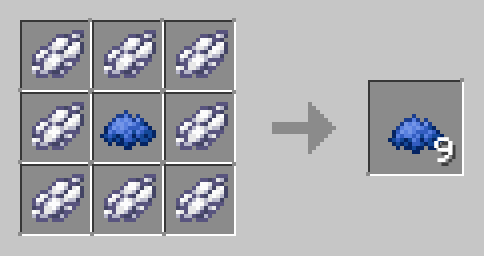
How to Use:
- Download the Dye Tweaks Data Pack.
- Place the file in the "datapacks" folder of your Minecraft world save.
- Launch Minecraft and open your world.
- Use the /reload command to activate the data pack.
- Start crafting and enjoy more efficient dye production for all your building and decoration needs!

Compatibility:
- No additional dependencies required.
Simplify Your Gameplay:
Streamline your dye crafting process with Dye Tweaks. Perfect for builders and decorators, this data pack ensures you have the dyes you need, when you need them.
Download Dye Tweaks now and color your Minecraft world with ease!
Kako instalirati Dye Tweaks
With Millida Launcher
Install Millida Launcher
The launcher is free: download it at millida.net/launcher and sign in with any nickname.
Click “Install” on this page
The launcher opens and installs the data pack for Minecraft 1.13–26.2 automatically.
Launch the game
A profile with it appears in the launcher: click “Play”.
Manually
Download the archive
Pick the file Dye Tweaks.zip (9 KB) for your game version.
New world: “Data Packs”
When creating a world, click “Data Packs”, drag the archive into the window, then move it to “Selected”.
Existing world: the datapacks folder
Put the archive into saves/<world>/datapacks and type /reload in game.
On a server
Archive goes into the server world’s datapacks
The world/datapacks folder on the server; players do not need to install anything.
Reload the data
Type /reload in the server console or restart the server.
Use the “To server” button
On Millida Hosting, the button at the top of the page uploads the file to your server and restarts it for you.
Verzije
Sa zavisnostima
| Minecraft | Loader | Fajl | Datum | Akcije |
|---|---|---|---|---|
| 26.2 | Data pak | 26.29.2 KB | ||
| 1.19.2 | Data pak | 1.19.29.3 KB | ||
| 1.18.2 | Data pak | 1.18.29.3 KB | ||
| 1.17.1 | Data pak | 1.17.19.3 KB | ||
| 1.15.2 | Data pak | 1.15.29.3 KB | ||
| 1.14.4 | Data pak | 1.14.49.3 KB | ||
| 1.16.5 | Data pak | 1.16.59.3 KB | — |
Česta pitanja
Which Minecraft versions does Dye Tweaks work on?
There are files for 1.13–26.2, 48 versions in total. The newest is 26.2.
Does Dye Tweaks work on a server?
Yes: the data pack goes into the datapacks folder of the server world, and players do not need to install anything.
Where can I download Dye Tweaks safely?
On this page: the file Dye Tweaks.zip (9 KB) is stored on Millida’s server, with no link shorteners. SHA-1 checksum: d22fb0c3506b63b63acb7d1446e484211de8bf06.
Recenzije
Budi prvi koji će oceniti Dye Tweaks


