

Craft More Chains Data pak za Minecraft 1.20.1, 1.21.1
Povećava izlaz recepta za lanac, dajući 2 lanca po izradi umesto 1.
- pregleda
- 41 pregleda
- Ažurirano
- Ažurirano 03.09.2026
- 1.16.2 — 26.2
 Data pak
- Klijent i server
Craft More Chains
In vanilla Minecraft, crafting chains yields only 1 chain per recipe (using 1 ingot and 2 nuggets). Craft More Chains changes this by giving you 2 chains instead of 1.

Recipes
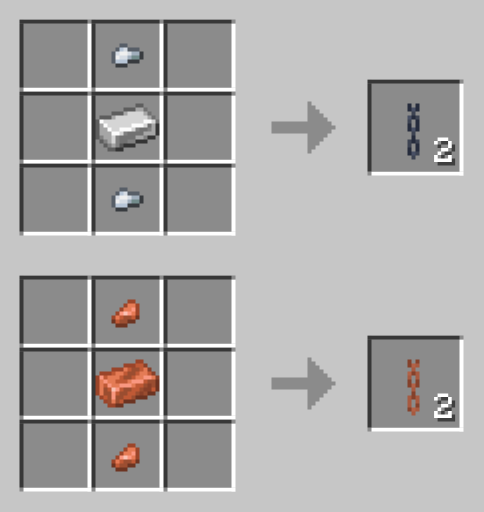
(Note: The copper chain recipe is only available for Minecraft versions 1.21.9 and above, as copper chains do not exist in earlier versions of the game.)

Can I get more than 2 chains per craft?
Yes! You can easily adjust the recipe output yourself.
How to get more than 2 chains:
- Extract the Download: Download the mod/datapack file and extract (unzip) it.
- Find the Recipe File(s):
- Minecraft 1.21.9 and above: Go to data/minecraft/recipe/ and edit both iron_chain.json and copper_chain.json.
- Minecraft 1.21-1.21.8: Go to data/minecraft/recipe/ and edit chain.json.
- Minecraft 1.20.6 and below: Go to data/minecraft/recipes/ and edit chain.json.
- Change the amount: Open the .json file, find "count": 2 and change it to any number between 1 and 64. Save and close.
- Re-pack the file: Select all files inside the extracted folder and compress (zip) them back together.
- Tip: Make sure the data folder is at the top level of your zip file, not tucked inside another folder!
- Rename file extension: If you're using the mod version, rename the file extension .zip to .jar. You're done!
Why I made Craft More Chains?
Craft More Chains is designed for use with Craftable Chainmail Armor. It lets you craft chainmail armor using chains, making it more expensive than iron armor. With Craft More Chains, chainmail armor becomes less expensive than iron armor.
Check out my other mods here.
Kako instalirati Craft More Chains
With Millida Launcher
Install Millida Launcher
The launcher is free: download it at millida.net/launcher and sign in with any nickname.
Click “Install” on this page
The launcher opens and installs the data pack for Minecraft 1.16.2–26.2 automatically.
Launch the game
A profile with it appears in the launcher: click “Play”.
Manually
Download the archive
Pick the file Craft_More_Chains_1.21.9+_v1.1.zip (2 KB) for your game version.
New world: “Data Packs”
When creating a world, click “Data Packs”, drag the archive into the window, then move it to “Selected”.
Existing world: the datapacks folder
Put the archive into saves/<world>/datapacks and type /reload in game.
On a server
Archive goes into the server world’s datapacks
The world/datapacks folder on the server; players do not need to install anything.
Reload the data
Type /reload in the server console or restart the server.
Use the “To server” button
On Millida Hosting, the button at the top of the page uploads the file to your server and restarts it for you.
Verzije
Sa zavisnostima
| Minecraft | Loader | Fajl | Datum | Akcije |
|---|---|---|---|---|
| 26.2 | Data pak | 26.22.5 KB | ||
| 26.1 | Data pak | 26.12.5 KB | ||
| 1.21.11 | Data pak | 1.21.112.5 KB | ||
| 1.21 | Data pak | 1.212.7 KB | ||
| 1.20.1 | Data pak | 1.20.12.2 KB | ||
| 1.19.2 | Data pak | 1.19.22.2 KB | ||
| 1.17.1 | Data pak | 1.17.12.1 KB | ||
| 1.18.2 | Data pak | 1.18.22.1 KB | — |
Recenzije
Budi prvi koji će oceniti Craft More Chains


