
O resource packu Quick Crafting Pro
Crafting in bedrock takes a long time
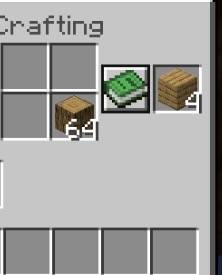
this pack add a button in the crafting menu that instantly craft !
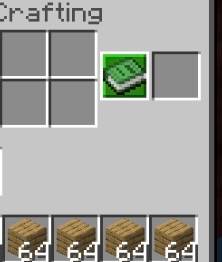
for example 64 logs into 4 stacks of planks with a single button, much faster and easier.
You will be able to craft much faster just like on java!
Ako nainštalovať Quick Crafting Pro
With Millida Launcher
Install Millida Launcher
The launcher is free: download it at millida.net/launcher and sign in with any nickname.
Click “Install” on this page
The launcher opens and installs the resource pack for Minecraft 1.19–26.10 automatically.
Launch the game
A profile with it appears in the launcher: click “Play”.
Manually
Download the archive
Pick the file Quick Crafting.mcpack (28 KB) for your game version. No need to unpack it.
Put it in the resourcepacks folder
The easiest way: “Options”, then “Resource Packs”, then “Open Pack Folder”, and drag the archive there.
Enable the pack
In the same window, move the pack to the right-hand “Selected” column and click “Done”.
Verzie
So závislosťami
| Minecraft | Loader | Súbor | Dátum | Akcie |
|---|---|---|---|---|
| 1.20.40 | — | Quick Crafting.mcpack28.5 KB |
FAQ
Which Minecraft versions does Quick Crafting Pro work on?
There are files for 1.19–26.10, 51 versions in total. The newest is 26.10.
Where can I download Quick Crafting Pro safely?
On this page: the file Quick Crafting.mcpack (28 KB) is stored on Millida’s server, with no link shorteners. SHA-1 checksum: f231e9223ae14b6ab8734d52fdde20661fb03438.
Recenzie
Buď prvý, kto ohodnotí Quick Crafting Pro


