

Random Stuff Plugin pre Minecraft 1.8.1
Add gliders, jet packs, quarries, and much more to your server!
Features
This plugin adds:
- Hang glider
- Jet pack
- Grappling hook
- Torch machine
- Mob Cage
- Block Detector
- Ender Quarry
Glider: Glide around your world with an awesome glider (just like batman)! To use it you first must craft a glider. Then go somewhere high and jump off, right away right-click with your glider to toggle it on. You will move really fast in the direction you are looking, and slowly down. You can right-click again to toggle it off, but it will turn off automatically when you land.
Recipe:
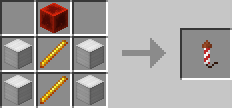
Jet Pack: To use the jet pack right-click with it in your hand to equip it. Then double tap jump to toggle the jet pack on/off. The jet pack uses definable fuel (default is redstone). You just have to have the fuel in your inventory.
Recipe:
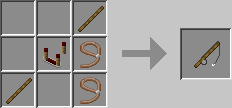
Grappling Hook: To use the grappling hook just right-click to shoot the hook, when it hits something solid you will be pulled after it.
Recipe:
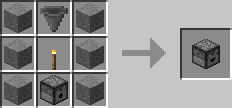
Torch Machine: To use the torch machine just craft it and put it in your hot-bar. Then it will take torches from your inventory and place them down if you are in a dark area.
Recipe:
Mob Cage To use the mob cage, just click a mob to catch it, and click the ground to drop it.
Recipe:
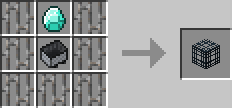
Block Detector: Right click a block with it to set what to search for, then left click to make the machine search around you for that block. It will tell you the coords of the nearest one if it finds that block type.
Recipe:
Ender Quarry Much like the quarries from Build Craft, you can dig a huge whole down to bedrock and collect the materials. However, since its an ender quarry, you don't need those pesky support beams and stuff.
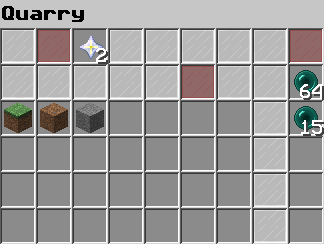
To use it just place four glowing redstone torches in a cube, they all must be at the same Y level with no blocks obstructing the view to the other torches. The default max distance is 32 blocks. Then place a quarry beside one if the torches. It will start emitting red smoke, now you need to put fuel in (defaults to ender pearls), maybe some upgrades (defaults to nether stars), and you can change the block settings if you want. Once it has fuel it will start emitting black smoke and start mining the blocks from between the torches. You will need a chest or two beside the quarry to collect mined blocks. When finished it should emit white smoke.
Example of Quarry:
Quarry GUI:
Recipe:
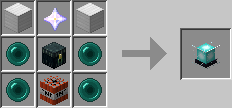
There are definable crafting recipes and options for all items.
Commands
/rs reload /rs glider /rs jetpack /rs grapple /rs torch /rs cage /rs block /rs quarry
Permissions
Permission to use the reload command: random.stuff.reload Permission to use the jet pack: random.stuff.jetpack Permission to use the grapple gun: random.stuff.grapple Permission to use the glider: random.stuff.glider Permission to use the torch machine: random.stuff.torch Permission to use the cage: random.stuff.cage Permission to use the block detector: random.stuff.block Permission to use the quarry: random.stuff.quarry
Note: All players can use the items unless you set "usePerms" to true in the config.
Configuration/Installation
- Drop the plugin into your plugins folder and restart the server.
- Edit the config to change anything you want.
- Do /rs reload
Media
Plugin showcases:
Upcoming Features
- Teleportation Device
- More random and useful items!
MC Stats
This plugin sends info on how many servers and players are using this plugin. If you wish to disable the usage stats, look at /plugins/PluginMetrics/config.yml.
Donate
If you like my plugins and want to help me out:
YouTube/FaceBook/Twitter
Check out my YouTube for more Minecraft awesomeness: http://www.youtube.com/user/Jacobvejvoda
Keep up to date with my stuffs at my FB page/Twitter: https://www.facebook.com/EliminatorProductions https://twitter.com/Elimnator
Ako nainštalovať Random Stuff
A server on Paper or Spigot
The plugin runs on the server core for Minecraft 1.8.1; players do not need to install anything.
File goes into the plugins folder
Download the file RandomStuff.jar (54 KB) and put it into the server’s plugins folder.
Restart the server
On startup the plugin creates its own settings folder in plugins.
Use the “To server” button
On Millida Hosting, the button at the top of the page uploads the file to your server and restarts it for you.
Minecraft 1.8.1 runs on Java 8: with a different Java version the game may close right after launch.
Verzie
So závislosťami
| Minecraft | Loader | Súbor | Dátum | Akcie |
|---|---|---|---|---|
| 1.8.1 | — | Random Stuff v1.254 KB |
FAQ
Which Minecraft versions does Random Stuff work on?
Only Minecraft 1.8.1: there are no files for other versions.
Do players need to install Random Stuff?
No, the plugin goes only on the server, into the plugins folder: players do not need to download anything.
Which Java does Random Stuff need?
Minecraft 1.8.1 runs on Java 8. If the game closes right after launch, the usual cause is the wrong Java version in the profile settings.
Where can I download Random Stuff safely?
On this page: the file RandomStuff.jar (54 KB) is stored on Millida’s server, with no link shorteners. SHA-1 checksum: d2cec71d8df2622c5a6c3ebd01dd58b96fd55857.
Recenzie
Buď prvý, kto ohodnotí Random Stuff


