
Custom Portals
Custom Portals
Note: Since version 1.1.3, this plugin is using only the Bukkit API to work.
Download Custom Portals v1.1.3 [1.6.2-R0.1] (Dev Build)
See the source code on GitHub.
Bukkit forums.
Description
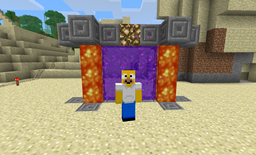
This little plugin allows you to create custom Nether and Ender portals. It means you can create these portals using any blocks for the frame and any shapes.
This plugin is compatible with TravelGates v1.10.18 !
Configuration
Just run the plugin once and the config file will be created with default values. They are modifiable in game and automatically saved.
- usepermissions: [true|false] -> enable the internal Bukkit permissions system or use the OP statuts
- enderframeblock: [BlockType|other] -> enable the use of a block type for building Ender portals or disable if another value is used
- netherframeblock: [BlockType|other] -> enable the use of a block type for building Nether portals or disable if another value is used
- maxportalblocks: <positive number> -> define the maximum portal blocks the plugins is allowed to create
Commands
Main command is /customportals (with some convenient aliases: cp, custportals, customportal, cportal).
- /cp on : your player is able to create custom portals
- /cp off : your player is no more able to create custom portals
- /cp enderframeblock [BlockType|other] : configure the ender frame block to use in the portals or disable if other value used
- /cp netherframeblock [BlockType|other] : configure the nether frame block to use in the portals or disable if other value used
- /cp usepermissions [true|false] : configure if the plugin uses permissions (auto saved)
- /cp maxportalblocks [positive number] : configure the maximum portal blocks the plugin is allowed to create (auto saved)
How to create portals
- Nether: enable the custom portals for your player with /cp on. Then, get a flint and steel in your hand and right-click on the upper face of the lower block of the portal frame (as you would do with a normal Nether portal). In case of wrong portal shape, just break one block, and all the Nether portal will disappear. You can create Nether portals in the Nether but they won't send you there.
- Ender: enable the custom portals for your player with /cp on. Then, get an eye of ender in your hand and right-click on the inside face of the portal frame block. In case of wrong portal shape, if you have enabled the custom portals (/cp on), you can clean an ender portal by right-clicking on an ender portal block holding a wool block (any color). The plugin will clean the entire Ender portal. You cannot create Ender portals in Ender worlds.
Permissions
- customportals.on # allows to enable the custom portals mode
- customportals.off # allows to disable the custom portals mode
- customportals.conf # allows to modify the configuration
- customportals.nether # allows to create a custom nether portal
- customportals.ender # allows to create a custom ender portal
- customportals.clean # allows to clean ender portals
Changelogs
Check this page.
Bugs
- If you make a portal of 1 block wide, it can be generated in a wrong direction.
If you encounter other bugs, please open a ticket here.
Ako nainštalovať CustomPortals
A server on Paper or Spigot
The plugin runs on the server core for Minecraft 1.6.2; players do not need to install anything.
File goes into the plugins folder
Download the file CustomPortals-1.1.3.zip (26 KB) and put it into the server’s plugins folder.
Restart the server
On startup the plugin creates its own settings folder in plugins.
Use the “To server” button
On Millida Hosting, the button at the top of the page uploads the file to your server and restarts it for you.
Minecraft 1.6.2 runs on Java 8: with a different Java version the game may close right after launch.
Verzie
So závislosťami
| Minecraft | Loader | Súbor | Dátum | Akcie |
|---|---|---|---|---|
| 1.6.2 | — | CustomPortals v1.1.326 KB |
FAQ
Which Minecraft versions does CustomPortals work on?
Only Minecraft 1.6.2: there are no files for other versions.
Do players need to install CustomPortals?
No, the plugin goes only on the server, into the plugins folder: players do not need to download anything.
Which Java does CustomPortals need?
Minecraft 1.6.2 runs on Java 8. If the game closes right after launch, the usual cause is the wrong Java version in the profile settings.
Where can I download CustomPortals safely?
On this page: the file CustomPortals-1.1.3.zip (26 KB) is stored on Millida’s server, with no link shorteners. SHA-1 checksum: 6d8b4bf8782a566cd1f7f893ffd7f831079db060.
Recenzie
Buď prvý, kto ohodnotí CustomPortals



