

cmdBook Plugin pre Minecraft
Execute multiple commands that are written in a book
cmdBook
About:
cmdBook is a plugin that allows you to execute and store multiple commands. You just have to put the commands (or chat text) in a book, and use a command to make it a cmdbook. Whenever you left click with that book, your commands will be executed. You can specify variables so that you can replace them with (F.ex : your player name , the player you are looking at,..) and you can add javascript to it
Version Information
Latest Version: 1.4.5
Release date: 15/12/2013

Upcomming Features
- Basic Logic (If statements , for loops , custom variables)
- Devide this page into other pages (permissions, configuration , examples ,..) (planned 1.4.0)
- Compatibility with Skript and CmdHelper to use WITH a book
- A youtube tutorial (planned 1.4.x)
- Config editor ingame (planned 1.5.0)
Compatibility
cmdBook works with most book related plugins.
Contribute
Do you like cmdBook ant you want to help me expand it even further? Any donation will be welcome (Even if it is just enough so I can buy a cup of coffee while programming) The Source code is also available if you have remarks about the code. NOTE: You may not copy any of the code without asking me
Commands
NOTE: /cb OR /cbook can be used # Create a cmdBook with the written book in your hand /cb create # Edit/Add commands in a cmdBook (Other books are blocked) /cb edit # List the commands inside a cmdBook /cb info # Show plugin information /cb about # Make a normal book private /cb private # Make a normal book public /cb public # Reload the configuration /cb reload # Convert deprecated variables /cb convert # Show ingame variables and info /cb variables
Permissions
cmdBook uses permissions to define who may create/use a cmdbook.
Permissions page
Create a cmdBook
Ok, to create a cmdBook you need a few things:
- You have to get the rights to make one
- You have to get the rights to use on (not necessarily if you only intend to make it)
- You need a Writable book
- Start you book with: [cmdbook]
- Create a new line and you can type your first command F.ex /broadcast Hello World!
- Split your commands with the character: | OR split commands by starting a new page
- Create a second command , third ,....
- Sign your book
- Type the command /cb create while holding the book in your hand
- Now left click the book to perform the commands
Variables
You can define several variables to replace
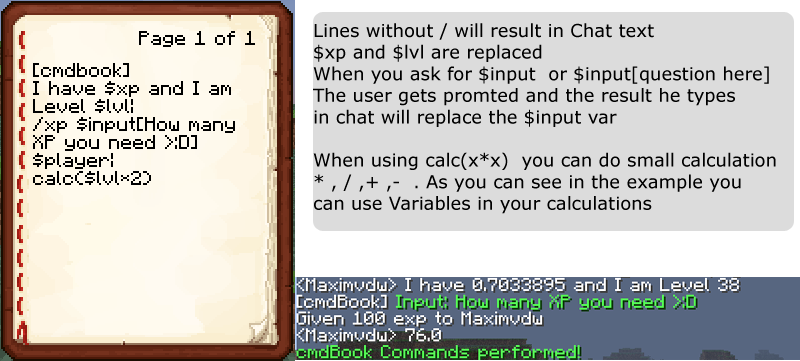
Run every command as console: @runconsole # TIP: You might want to use $chat[..] if you want to let the player use a command without op perm. # Hide all cmdBook messages # This will hide thinigs like " Command performed" or " waiting.." @hidemessages # This will be replaced with the name of the player that uses the book $player # This will be replaced with the player you are clicking on $targetplayer # This will give you an integer with your health $health # This will give you a decimal with your xp $xp # This will give you a decimal with your target's xp $targetxp # This will give you an integer with your level $lvl # This will give you an decimal with your target's level $targetlvl # This allows you to see your hunger as integer (0-10) $hunger # This allows you to see your target's hunger as integer (0-10) $targethunger # This will give you your killers name $killer # This will give you the name of your target's killer $targetkiller # This will give your X position $xpos # This will give your Y position $ypos # This will give the xpos of the block you look at $losx # This will give the ypos of the block you look at $losy # This will give the zpos of the block you look at $losz # Input - A very handy variable: # The input variable will prompt the player before all commands are executed # The data the player enters in chat after getting prompted (without any use of commands, just plain text) # will replace the input variable $input -> When using it in this format , it will just ask for an input $input[Question here] -> put [text] to customize your question # When using @input instead of $input, it will input the user at the beginning of the book # the $input will only input right before the command will be executed # Delay - variable is $wait[int] replace int with a number # This will cause the command execution to Pause (in ms) $wait[int] # Execute javascript, create a variable 'output' this variable will replace the script[] $script[javascript here] $script[var dNow = new Date();var output = 'Today is ' + dNow.getDate();] # Make a simple calculation $calc[1+2] $calc[$losy+1] # Send a private message to the player $msg[messagehere] # Broadcast a message $broadcast[HEllo There!] # Send player chat $chat[..] # Only required when using @runconsole # MAKE SURE TO USE /cb variables for all 40** variables
Examples
Ex1:
[cmdbook] /give $player cookie 1| I got a cookie :D|
Ex2:
[cmdbook] $targetplayer You have been caught griefing!| /ban $targetplayer Griefing Visual proof| /resident delete $targetplayer|
Ex3:
[cmdbook] /lb lookup player $targetplayer block 56 area 100 time 30 minutes|
Ex4:
PAGE1: [cmdbook] This is my first page| HELLOOWW PAGE2: This is my second command| /give $player cookie 10| :D PAGE3: The End
Ex5:
[cmdbook] /ban $targetplayer $input[Why ban him?]| /lb rollback player $targetplayer time $input[How many days you want to rollback him?] days| $wait[2000]| /yes| $wait[10000]| /no
Ex6:
permissions needed: - cmdbook.variable.runconsole - cmdbook.use [cmdbook] @runconsole /give $player cookie 1
Ex7:
Will act like WorldEdit compass the calc adds 1 block to the y axis, so you dont teleport IN the block [cmdbook] /teleport $losx calc($losy+1) $losz
Updating
This plugin utilizes an external version checking system, which means that the plugin makes a connection to curseforge.com and the following may occur:
The plugins version checked against approved files Downloading of the plugin files Launching of the plugin files downloaded You can disable the check and/or automated download via the configuration of this plugin.
Metrics
This plugin utilizes Hidendra's plugin metrics system, which means that the following information is collected and sent to mcstats.org:
A unique identifier The server's version of Java Whether the server is in offline or online mode The plugin's version The server's version The OS version/name and architecture The core count for the CPU The number of players online The Metrics version You can disable the stat collection via /plugins/PluginMetrics/config.yml if you wish.
Changes
Version 1.4.5
Status: Optional
- Moved /cb to an alias command of /cbook. You can now use /cb OR /cbook but /cb will be overridden by other plugins
- Fixed some small bugs
Version 1.4.3
Status: Higly Recommended
- Added @name[namehere] (put anywhere in your book) to name books
- Added permissions based on name "cmdbook.book.namehere" for individual permissions per book
- Fixed several bugs with "You do not have permissions!" messages
- Updated to 1.6.4
Click here to see all version changes
Ako nainštalovať cmdBook
A server on Paper or Spigot
The plugin runs on the server core; players do not need to install anything.
File goes into the plugins folder
Download the file cmdBook.jar (537 KB) and put it into the server’s plugins folder.
Restart the server
On startup the plugin creates its own settings folder in plugins.
Use the “To server” button
On Millida Hosting, the button at the top of the page uploads the file to your server and restarts it for you.
Verzie
So závislosťami
| Minecraft | Loader | Súbor | Dátum | Akcie |
|---|---|---|---|---|
| — | — | cmdBook 1.4.6537 KB | ||
| — | — | cmdBook 1.3.037.8 KB |
Recenzie
Buď prvý, kto ohodnotí cmdBook


