
BiomeEdit Plugin pre Minecraft 1.7.2
Manage your biomes
O plugine BiomeEdit
» If you like this plugin you should definitely check out our other plugins too «
Using BiomeEdit you can easily manage the biomes of your map
Features / Usage
You actually have three modes to replace existing biomes:
- REPLACE the complete biome (it will try to detect the whole biome area and then replace it completely)
- set a ROUND biome area
- set a SQUARE biome area
- use a WorldEdit selection (WE)
- use a WorldGuard region (WG)
Therefore you can use two methods to change/create the biomes:
- use your location -> /biome set ...
- use the location you're pointing at -> /biome brush ...
So for example you could create round jungle biomes with radius 5 at some distant location by just clicking your mouse button after you enabled brush mode with: /biome brush jungle round 5 (to disable brush mode use: /biome brush off) Or you could replace the entire biome you're currently standing in with just: /biome set jungle replace
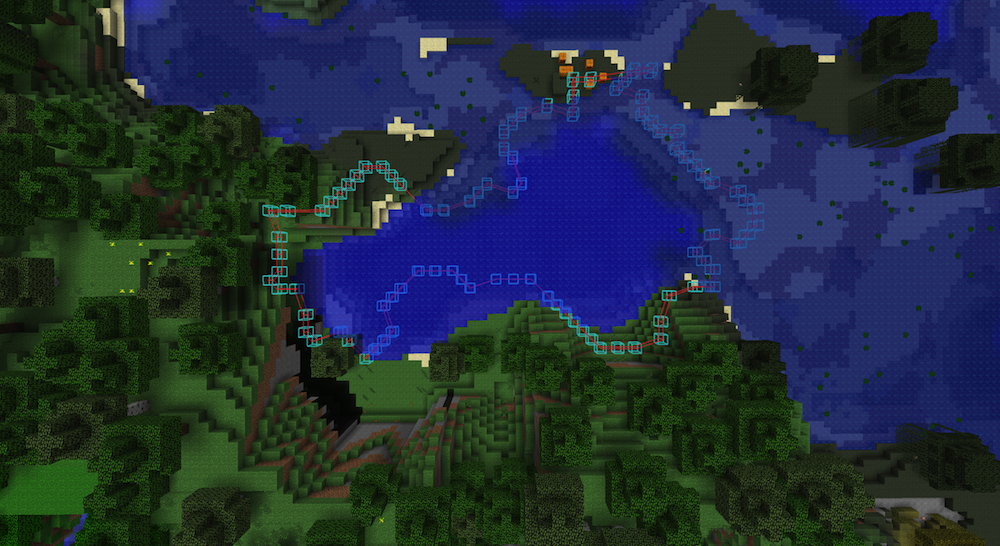
One cool feature is it's WorldEditCUI integration! As soon as you use /biome info or after you've changed a biome area, the plugin will tell your WorldEditCUI in your client to draw the shape of this area into the air. This way you can check exactly what was changed and where. All you need to do is to install the weCUI Clientside Mod: http://www.minecraftforum.net/topic/885099-12-worldeditcui-worldedit-client-user-interface-v12/pagehlwecui
What BiomeEdit does NOT
Actually there's no API in Bukkit to regenerate the map itself based on the new biome code you just changed using BiomeEdit! When you regenerate the specific area, the biome code itself will be reset too. As soon as there's a way to get nice jungle where you had a desert, I'll definitely try to add this and let you know!
What BiomeEdit CAN do
BiomeEdit changes the information at what point which biome should be seen by either the client and the server.
So the server:
- will spawn ocelots when you've set jungle biome (despite the fact that there may still be a desert ;-) )
- will or will not create snow plates regarding you've set a taiga biome or not
And the client:
- will show snowfall or rain depending on taiga or another biome
- will colorize the grass and leaves depending on the changed biome
Requirements
- Actually you need at least the latest CraftBukkit Beta (#2060) build from http://dl.bukkit.org/downloads/craftbukkit/ for this to work!
Optional requirements
- WorldEditCUI Client Mod to see what you're doing ;-)
- WorldEdit to use WE selections
- WorldGuard to use WG regions
Permissions
- cnbiome.admin - enables the user to use the /biome command
Command overview
- Main command: /biome OR /be OR /biomeedit
- /biome set <biome> <mode> [radius|regionID] - Sets the biome using the current player location
- /biome brush <biome> <mode> [radius] - Activate biome brush
- /biome brush off - Deactivate biome brush
- /biome info - Gives you informations about the biome you're currently standing in
- /biome list - Lists the servers' available biomes
- /biome modes - Lists the replacement modes
Useful tips
When using BiomeEdit to replace whole biomes, it tries to load all surrounding chunks, but sometimes it can't. But there's a trick: Using the plugin ChunkLoad you can tell bukkit to NOT throw away unused chunks. So you then just need to fly over the whole biome area once and BiomeEdit will work like a charm!
Source & Snapshots
Feel free to contribute or share your thoughts and ideas! GitHub: http://github.com/DerFlash/BiomeEdit
You can find snapshot builds in the Jenkins.¹
¹ Development builds of this project can be acquired at the provided continuous integration server. These builds have not been approved by the BukkitDev staff. Use them at your own risk.
» Powered by Cube Nation «
» If you like this plugin you should definitely check out our other plugins too «
Ako nainštalovať BiomeEdit
A server on Paper or Spigot
The plugin runs on the server core for Minecraft 1.7.2; players do not need to install anything.
File goes into the plugins folder
Download the file BiomeEdit-1.0.1.jar (47 KB) and put it into the server’s plugins folder.
Restart the server
On startup the plugin creates its own settings folder in plugins.
Use the “To server” button
On Millida Hosting, the button at the top of the page uploads the file to your server and restarts it for you.
Minecraft 1.7.2 runs on Java 8: with a different Java version the game may close right after launch.
Verzie
So závislosťami
| Minecraft | Loader | Súbor | Dátum | Akcie |
|---|---|---|---|---|
| 1.7.2 | — | BiomeEdit 1.0.146.6 KB | ||
| — | — | BiomeEdit 0.432.5 KB | ||
| — | — | BiomeEdit 0.17.7 KB |
FAQ
Do players need to install BiomeEdit?
No, the plugin goes only on the server, into the plugins folder: players do not need to download anything.
Where can I download BiomeEdit safely?
On this page: the file BiomeEdit-1.0.1.jar (47 KB) is stored on Millida’s server, with no link shorteners. SHA-1 checksum: f162440b7822f915f7cf8444db30a617599968db.
Recenzie
Buď prvý, kto ohodnotí BiomeEdit


