

Twilight Forest Smithing Data pack pre Minecraft 1.20.1, 1.21.1
Progression-based smithing for the Twilight Forest mod.
- zobrazení
- 36 zobrazení
- Aktualizované
- Aktualizované 27.09.2026
- 1.19.4 — 1.21.1
 Data pack
- Klient a server
ABOUT
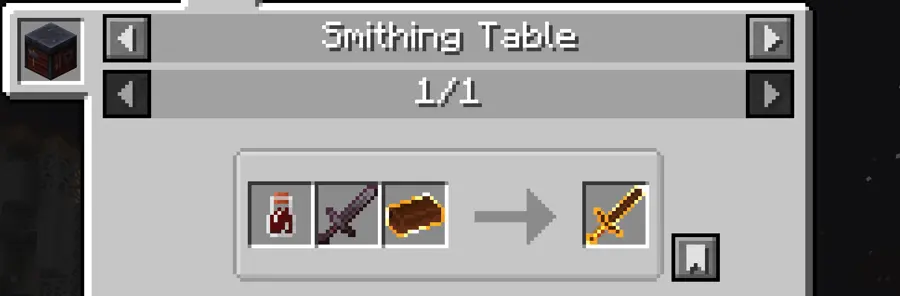
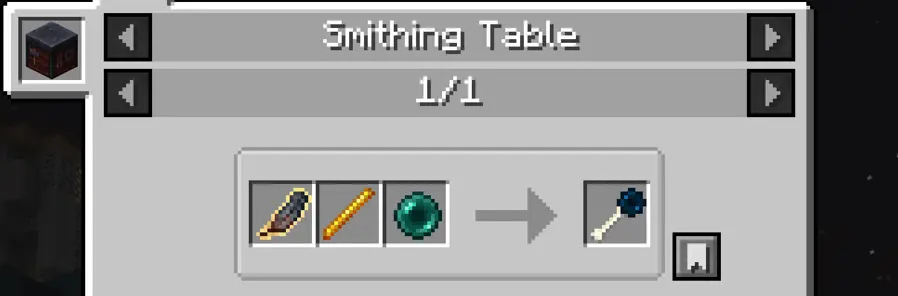
Progression-based smithing for the Twilight Forest mod. This mod/datapack allows you to upgrade tools, weapons, and armor at the smithing table, while being significantly cheaper.
Works for every major version of Twilight Forest since the smithing table was added: 1.16.5, 1.17.1, 1.18.2, 1.19.1, 1.19.2, 1.19.3, 1.19.4, 1.20.1, 1.20.4, 1.20.6, 1.21.1.
RECIPES
- USE JEI/REI/EMI TO DISPLAY ALL RECIPES

MY MODPACKS
- Rising Legends [1.20.1] RLCraft Recreated For Modern Minecraft Versions.
- [Dragon Realm [FABRIC]](https://modrinth.com/modpack/dragon-realm) [1.20.1] Dragons, dungeons and bosses.
- [Dragon Realm [FORGE]](https://modrinth.com/modpack/dragon-realm-forge) [1.20.1] Dragons, dungeons and bosses.
- FEAR [1.20.1] The Ultimate Horror Modpack.
- Survival Expansion [1.21.1] Minecraft survival, but better.
- The Better Vanilla [1.21.1] Vanilla with improved visuals and performance.
- Gold Client [1.21.1] PvP modpack for the best combat experience.
Ako nainštalovať Twilight Forest Smithing
With Millida Launcher
Install Millida Launcher
The launcher is free: download it at millida.net/launcher and sign in with any nickname.
Click “Install” on this page
The launcher opens and installs the data pack for Minecraft 1.19.4–1.21.1 automatically.
Launch the game
A profile with it appears in the launcher: click “Play”.
Manually
Download the archive
Pick the file Twilight_Forest_Smithing_1.21.1_Fabric.zip (43 KB) for your game version.
New world: “Data Packs”
When creating a world, click “Data Packs”, drag the archive into the window, then move it to “Selected”.
Existing world: the datapacks folder
Put the archive into saves/<world>/datapacks and type /reload in game.
On a server
Archive goes into the server world’s datapacks
The world/datapacks folder on the server; players do not need to install anything.
Reload the data
Type /reload in the server console or restart the server.
Use the “To server” button
On Millida Hosting, the button at the top of the page uploads the file to your server and restarts it for you.
Verzie
So závislosťami
| Minecraft | Loader | Súbor | Dátum | Akcie |
|---|---|---|---|---|
| 1.21.1 | Data pack | 1.21.143 KB | ||
| 1.21.1 | Data pack | 1.21.142.5 KB | ||
| 1.20.6 | Data pack | 1.20.642.6 KB | ||
| 1.20.4 | Data pack | 1.20.442 KB | ||
| 1.20.2 | Data pack | 1.20.242.4 KB | ||
| 1.20.1 | Data pack | 1.20.146.2 KB | ||
| 1.20.1 | Data pack | 1.20.146.2 KB | ||
| 1.19.4 | Data pack | 1.19.441.5 KB |
FAQ
Which Minecraft versions does Twilight Forest Smithing work on?
There are files for 1.21.1, 1.20.6, 1.20.4, 1.20.2, 1.20.1, 1.19.4. The newest is 1.21.1.
Does Twilight Forest Smithing work on a server?
Yes: the data pack goes into the datapacks folder of the server world, and players do not need to install anything.
Where can I download Twilight Forest Smithing safely?
On this page: the file Twilight_Forest_Smithing_1.21.1_Fabric.zip (43 KB) is stored on Millida’s server, with no link shorteners. SHA-1 checksum: d776cfe45ee7b05e3e5b746805c9fa927baa44dd.
Recenzie
Buď prvý, kto ohodnotí Twilight Forest Smithing


