
Wall-Jump! [FORGE] Mod do Minecraft 1.16.5, 1.18.2
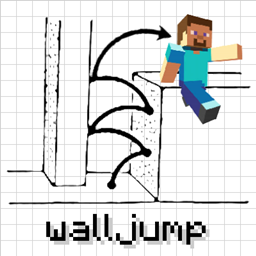
Skacz ze ściany na ścianę! Skok od ściany, podwójny skok, skok z rozpędu, skok przez płot itp.
- pobrań
- 4 pobrań
- wyświetleń
- 20 wyświetleń
- Zaktualizowano
- Zaktualizowano 17.10.2026
- 1.16.4 — 1.18.2
 Forge
Forge
O modzie Wall-Jump! [FORGE]
Wall-Jump TXF for Minecraft 1.19-1.21.4
Wall to wall platforming in Minecraft! This mod adds wall jumping and double jumping to the game.
Wall Cling: Jump towards a wall and hold the wall jump key (LSHIFT). Then...
Wall Jump: While wall clinging, keep holding W and let go of LSHIFT to wall jump.
Double Jump: Optional mid-air jump that you can use to your advantage.
If you made a map or video for the Wall-Jump mod and you want it listed here, feel free to message me!
Some configuration options:
- The Wall-Jump key (LSHIFT by default, but SPACE works well too)
- The height and distance launched during a Wall-Jump
- Double jumping (off by default, but it's a really fun feature)
- Single-wall jumping (climb upwards using only a single wall)
- The minimum distance for fall damage (small falls won't slow you down)
- A speed boost while sprinting on the ground and when gliding
- Enchantments for wall-jumping, double-jumping, and speed-boosting
(Servers with the mod installed will force clients to use the server's config) Use the Configured mod to config the mod in-game!
Check out these awesome movement-based mods...
Elenai Dodge: Adds a multi-directional dodging mechanic to the game! Elenai Dodge 2: Adds even better dodging mechanics to the game! GoProne: Adds a keybind for entering crawling mode on demand! Move Plus: Adds ledge grabbing, dodging and crawling!
Jak zainstalować Wall-Jump! [FORGE]
With Millida Launcher
Install Millida Launcher
The launcher is free: download it at millida.net/launcher and sign in with any nickname.
Click “Install” on this page
The launcher opens and installs the mod for Minecraft 1.16.4–1.18.2 on Forge automatically.
Launch the game
A profile with it appears in the launcher: click “Play”.
Manually
Install Forge
The loader must match the game version of the mod file, for example Minecraft 1.18.2. After installing it, a separate profile appears in your launcher.
Download the file for your version
In the version list above, pick the file walljump-forge-1.18.1-1.3.7.jar (81 KB) for your game version.
Put it in the mods folder
The folder is inside .minecraft (Windows: %appdata%\.minecraft\mods). If it does not exist, create it.
Launch the loader profile
Open “Mods” in the main menu: Wall-Jump! [FORGE] should be in the list.
Minecraft 1.18.2 runs on Java 17: with a different Java version the game may close right after launch.
Wersje
Z zależnościami
| Minecraft | Loader | Plik | Data | Akcje |
|---|---|---|---|---|
| 1.18.1 | Forge | walljump-forge-1.18.1-1.3.7.jar81.2 KB 2 | ||
| 1.16.5 | — | walljump-forge-1.16.4-1.3.7.jar82.5 KB 2 |
FAQ
Which Minecraft versions does Wall-Jump! [FORGE] work on?
There are files for 1.18.2, 1.18.1, 1.18, 1.16.5, 1.16.4. The newest is 1.18.2.
Is Wall-Jump! [FORGE] for Forge or Fabric?
Only for Forge: 1.18–1.18.2. There are no files for Fabric or NeoForge: a mod for another loader will not start.
Does Wall-Jump! [FORGE] need other mods?
The author lists no required dependencies: the Forge loader is enough.
Which Java does Wall-Jump! [FORGE] need?
Minecraft 1.18.2 runs on Java 17. If the game closes right after launch, the usual cause is the wrong Java version in the profile settings.
Where can I download Wall-Jump! [FORGE] safely?
On this page: the file walljump-forge-1.18.1-1.3.7.jar (81 KB) is stored on Millida’s server, with no link shorteners. SHA-1 checksum: 8d2baf2c28043815b2b1cdb66d6d9b1ef721e2c4.
Opinie
Oceń Wall-Jump! [FORGE] jako pierwszy


