
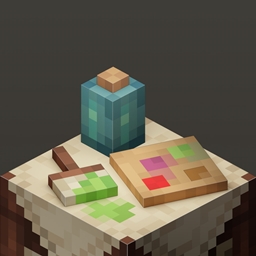
Vanity: Core Mod do Minecraft 1.20.1, 1.21.1
Nadaj swoim przedmiotom dowolny wygląd i twórz własne Vanity Packs, aby dzielić się nimi ze światem.
 Fabric
 NeoForge
 Forge
ForgeVanity, a way to customize your items
Vanity allows players to create custom skins for any item they choose! Driven by data and resource packs, Vanity allows you to make your own packs which include "Designs" that can be used in a Styling Table to apply a custom skin to an item defined in the data pack.
How to customize your items
To customize your items, you'll need a Styling Table - Crafted with four planks and two Leather. Insert your items in there, and the styles available will depend on the Vanity Packs you have downloaded, and the Designs you currently have placed inside the Styling Table.
Vanity Packs
To make a Vanity Pack, you should check out pre-existing ones, or even better, use our Template Vanity Pack. To check out existing Vanity Packs, check out the Vanity Gallery, where all vanity packs get added on request of their authors.
If you're looking for a place to discuss Vanity Pack creation, or want to meet the Vanity community, then Join my Discord
Jak zainstalować Vanity: Core
With Millida Launcher
Install Millida Launcher
The launcher is free: download it at millida.net/launcher and sign in with any nickname.
Click “Install” on this page
The launcher opens and installs the mod for Minecraft 1.19.2–1.21.1 on Fabric, Forge or NeoForge automatically.
Launch the game
A profile with it appears in the launcher: click “Play”.
Manually
Install Fabric, Forge or NeoForge
The loader must match the game version of the mod file, for example Minecraft 1.21.1. After installing it, a separate profile appears in your launcher.
Download the file for your version
In the version list above, pick the file vanity-fabric-1.21.1-5.0.3.jar (706 KB) for your game version and loader.
Put it in the mods folder
The folder is inside .minecraft (Windows: %appdata%\.minecraft\mods). If it does not exist, create it.
Launch the loader profile
Open “Mods” in the main menu: Vanity: Core should be in the list.
Minecraft 1.21.1 runs on Java 21: with a different Java version the game may close right after launch.
Wersje
Z zależnościami
| Minecraft | Loader | Plik | Data | Akcje |
|---|---|---|---|---|
| 1.21 | Fabric | Vanity 5.0.3 [Fabric]706 KB | ||
| 1.21 | NeoForge | Vanity 5.0.3 [NeoForge]706 KB 2 | ||
| 1.20.1 | NeoForge, Forge | Vanity 2.1.1 [Forge]825 KB 2 | ||
| 1.19.2 | Fabric | [Fabric 1.19.2] Vanity 1.1.0191 KB |
FAQ
Which Minecraft versions does Vanity: Core work on?
There are files for 1.21.1, 1.21, 1.20.1, 1.19.2. The newest is 1.21.1.
Is Vanity: Core for Forge or Fabric?
There are files for Fabric: 1.19.2–1.21.1, for Forge: 1.20.1 and for NeoForge: 1.20.1–1.21.1.
Does Vanity: Core need other mods?
The author lists no required dependencies: the Fabric, Forge or NeoForge loader is enough.
Which Java does Vanity: Core need?
Minecraft 1.21.1 runs on Java 21. If the game closes right after launch, the usual cause is the wrong Java version in the profile settings.
Where can I download Vanity: Core safely?
On this page: the file vanity-fabric-1.21.1-5.0.3.jar (706 KB) is stored on Millida’s server, with no link shorteners. SHA-1 checksum: bdb17a537809b7bd4779352c6025d0796490e003.
Opinie
Oceń Vanity: Core jako pierwszy


