
Transparent Mod do Minecraft 1.20.1, 1.21.5
Pozwala paczkom zasobów sprawić, by niektóre encje obsługiwały przezroczystość.
 Fabric
 Quilt
Quilt NeoForge
 Forge
ForgeO modzie Transparent
Transparent pozwala paczkom zasobów nadać niektórym bytom tekstury z przezroczystymi (lub półprzezroczystymi) pikselami. Aby użyć, wystarczy zainstalować moda i użyć lub stworzyć paczkę zasobów, która nadaje jednemu z obsługiwanych bytów przezroczystą teksturę.
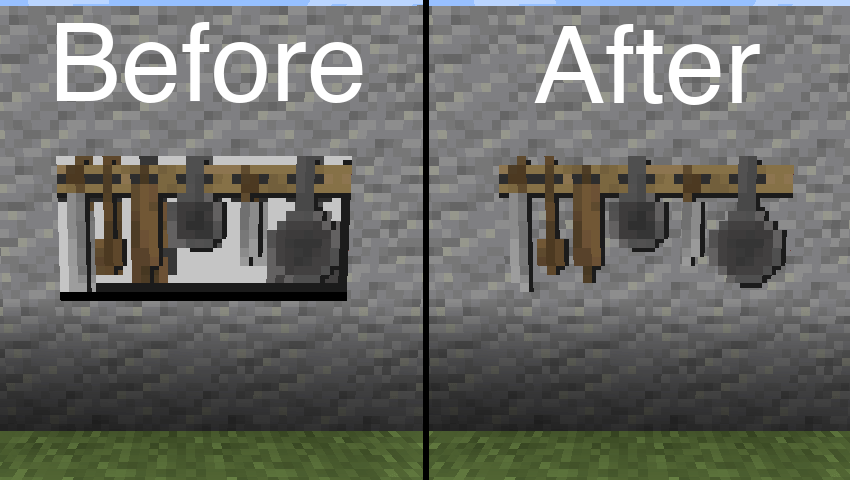
Paczka zasobów użyta na powyższym obrazie: BwW Texturepack.
Oficjalnie obsługuje Paintings++ Mod!
Obsługiwane byty
- Armor Stand (1.19.4+)
- End Crystal
- End Crystal Beam (1.21+)
- Item Frame
- Painting
- Player Cape (1.21+)
- Player Armor (1.21+)
- Beacon Beam (domyślnie wyłączone)
Jeśli chcesz, aby ten mod obsługiwał inny byt, daj mi znać na Discordzie lub w GitHub Issues.
Konfiguracja
Aby zmienić domyślną konfigurację, wklej poniższą zawartość pliku json do pliku w swojej paczce zasobów znajdującego się w /assets/transparent/transparent.json.
{ "armorstand": true, "beaconbeam": false, "endcrystal": true, "endcrystalbeam": true, "itemframe": true, "painting": true, "playercape": true, "playerarmor": true }
Zgłaszaj wszelkie problemy na GitHubie. Rozmawiaj na Discordzie na kanale transparent.
Wesprzyj rozwój moich modów na Ko-fi.
Jak zainstalować Transparent
With Millida Launcher
Install Millida Launcher
The launcher is free: download it at millida.net/launcher and sign in with any nickname.
Click “Install” on this page
The launcher opens and installs the mod for Minecraft 1.20.1–1.21.5 on Fabric, Forge, NeoForge or Quilt automatically.
Launch the game
A profile with it appears in the launcher: click “Play”.
Manually
Install Fabric, Forge, NeoForge or Quilt
The loader must match the game version of the mod file, for example Minecraft 1.21.5. After installing it, a separate profile appears in your launcher.
Download the file for your version
In the version list above, pick the file transparent-fabric-21.5.0.jar (35 KB) for your game version and loader.
Put it in the mods folder
The folder is inside .minecraft (Windows: %appdata%\.minecraft\mods). If it does not exist, create it.
Launch the loader profile
Open “Mods” in the main menu: Transparent should be in the list.
Minecraft 1.21.5 runs on Java 21: with a different Java version the game may close right after launch.
Wersje
Z zależnościami
| Minecraft | Loader | Plik | Data | Akcje |
|---|---|---|---|---|
| 1.21.5 | Fabric, Quilt | [Fabric 1.21.5] v21.5.035.3 KB | ||
| 1.21.5 | NeoForge | [NeoForge 1.21.5] v21.5.033.6 KB | ||
| 1.20.6 | Forge | [Forge 1.20.6] v20.6.125.8 KB | ||
| 1.20.1 | Quilt | [Quilt 1.20.1] v8.0.129.4 KB |
FAQ
Which Minecraft versions does Transparent work on?
There are files for 1.21.5, 1.20.6, 1.20.1. The newest is 1.21.5.
Is Transparent for Forge or Fabric?
There are files for Fabric: 1.21.5, for Forge: 1.20.6, for NeoForge: 1.21.5 and for Quilt: 1.20.1–1.21.5.
Does Transparent need other mods?
The author lists no required dependencies: the Fabric, Forge, NeoForge or Quilt loader is enough.
Which Java does Transparent need?
Minecraft 1.21.5 runs on Java 21. If the game closes right after launch, the usual cause is the wrong Java version in the profile settings.
Where can I download Transparent safely?
On this page: the file transparent-fabric-21.5.0.jar (35 KB) is stored on Millida’s server, with no link shorteners. SHA-1 checksum: b1ad3807de859e41029047644e38377a0f023716.
Opinie
Oceń Transparent jako pierwszy


