
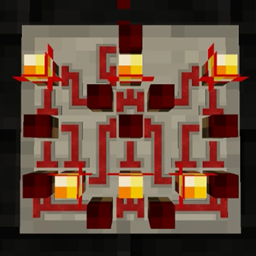
Super Circuit Maker Mod do Minecraft 1.18.2
Zawsze chciałeś budować własne bramki logiczne i złożone układy? Teraz możesz!
- wyświetleń
- 11 wyświetleń
- Zaktualizowano
- Zaktualizowano 17.10.2026
- 1.18.1 — 1.18.2
 Forge
Forge
Ten mod nie jest już aktywnie rozwijany.
Doceniam osoby, które zgłosiły się z pytaniem, czy mogą przenieść go na nowsze wersje, ale wciąż mam nadzieję, że pewnego dnia znajdę czas na modowanie, i chciałbym zachować pełną własność oraz kontrolę twórczą nad moimi projektami.
Mimo to nie mogę powstrzymać ciebie ani nikogo innego przed stworzeniem własnego moda redstone, a jeśli to zrobisz, naprawdę zachęcam cię do myślenia nieszablonowego i dążenia do stworzenia czegoś świeżego i wyjątkowego. Ja przynajmniej byłbym znacznie bardziej podekscytowany czymś nowym niż kolejnym portem/remake'iem moda, w którego grałem 8 lat temu.
Super Circuit Maker pozwala budować złożone układy redstone na niewielkiej przestrzeni, a teraz jest dostępny dla Minecraft 1.18! Zrób wszystko, od prostego włącznika światła po kontroler gantry quarry z Create, a nawet komputer. Twoja wyobraźnia jest jedynym ograniczeniem!
Uwaga: nie wszystkie funkcje z SCM1 (MC 1.10.2) są dostępne w najnowszej wersji.
Planowane funkcje dla SCM2 v0.3 (MC 1.19.3+):
- Układy na ścianach
- Blueprints/redprints (kopiuj/wytnij i wklej)
- ASIC (układ w układzie)
- API dodatków
- Nowe tekstury i modele
Planowane funkcje dla SCM2 v0.4 (MC 1.19.3+):
- Samodzielny przewód (redstone, kolorowy, wiązkowy i magistralowy)
- Nowe komponenty świetlne
- (Udostępnianie blueprintów? Może w tej wersji?)
Port na Fabric nie jest obecnie planowany. Ten mod nie zostanie również przeniesiony na wcześniejsze wersje.
Prezentacja Super Circuit Maker 1 autorstwa Direwolf20:
Jak zainstalować Super Circuit Maker
With Millida Launcher
Install Millida Launcher
The launcher is free: download it at millida.net/launcher and sign in with any nickname.
Click “Install” on this page
The launcher opens and installs the mod for Minecraft 1.18.1–1.18.2 on Forge automatically.
Launch the game
A profile with it appears in the launcher: click “Play”.
Manually
Install Forge
The loader must match the game version of the mod file, for example Minecraft 1.18.2. After installing it, a separate profile appears in your launcher.
Download the file for your version
In the version list above, pick the file SuperCircuitMaker2-0.2.9+1.18.2.jar (551 KB) for your game version.
Put it in the mods folder
The folder is inside .minecraft (Windows: %appdata%\.minecraft\mods). If it does not exist, create it.
Launch the loader profile
Open “Mods” in the main menu: Super Circuit Maker should be in the list.
Minecraft 1.18.2 runs on Java 17: with a different Java version the game may close right after launch.
Wersje
Z zależnościami
| Minecraft | Loader | Plik | Data | Akcje |
|---|---|---|---|---|
| 1.18.2 | Forge | Super Circuit Maker 2 v0.2.9551 KB | ||
| 1.18.2 | Forge | Super Circuit Maker 2 v0.2.4533 KB | ||
| 1.18.1 | Forge | Super Circuit Maker 2 v0.0.3465 KB |
FAQ
Which Minecraft versions does Super Circuit Maker work on?
There are files for 1.18.2, 1.18.1. The newest is 1.18.2.
Is Super Circuit Maker for Forge or Fabric?
Only for Forge: 1.18.1–1.18.2. There are no files for Fabric or NeoForge: a mod for another loader will not start.
Does Super Circuit Maker need other mods?
The author lists no required dependencies: the Forge loader is enough.
Which Java does Super Circuit Maker need?
Minecraft 1.18.2 runs on Java 17. If the game closes right after launch, the usual cause is the wrong Java version in the profile settings.
Where can I download Super Circuit Maker safely?
On this page: the file SuperCircuitMaker2-0.2.9+1.18.2.jar (551 KB) is stored on Millida’s server, with no link shorteners. SHA-1 checksum: 6a5265e024852b2f66db7962633c8e879e8f7634.
Opinie
Oceń Super Circuit Maker jako pierwszy


