
Steve's Addons Mod do Minecraft 1.7.10
Dodaje dodatkową funkcjonalność do Steve's Factory Manager
O modzie Steve's Addons
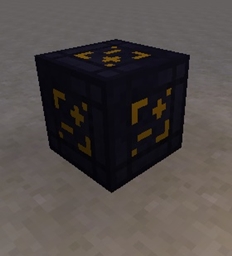
Ever finished a wonderful program and then realised your Manager needs to move and you have to rewrite the whole thing? Ever need to copy and paste a section of code a bunch of times and been frustrated that you can't? Well we've got you covered with the Manager Duplicator:
Not only can this wonderful piece of digitized technology be used to copy setups between managers in a world, but with admin-accessible commands can also be used to copy saved setups between worlds!
Also included is our patent pending Inventory Manager upgrade which modifies the standard Manager to provide RF Input, Output and Conditions - as well as including a Gui enabled Copy button!
But wait! there's more - we are also throwing in for no additional cost a unique RF Node which allows the manager to interface with more traditional RF transportation methods and certain engines which do not respond to the normal transfer methods.
Included as of 0.9.1:
The Steve's Addons Factory Labeller:
Storable, searchable and editable - the factory labeller allows you to assign unique names to anything that can be connected to a manager - making it easy to identify when you are setting up commands.
Type in the text box to set a label or to searched stored labels - click any stored entry to select it, double click to edit it. Closing the GUI will set the Labeller to whatever was in the text box at that time.
Left click to set labels, right click to open the gui. Setting a blank label will remove any existing labels.
Comes with WAILA integration
Furthermore we improve the basic SFM inter-mod compatibility: giving JABBA the ability to move Managers with it's Dollie's as well as allowing the manager to correctly inspect the full contents of Barrels, Caches and MFR Deep Storage Units - no longer are you limited to the meagre 1 stack interface! Additionally the manager will display the contents of Barrels, Caches and Deep Storage Units in their tooltip - and allows you to search inventories by their contents while you're at it
And if you thought we're done there - oh boy are you in for a surprise! Also included are a number of fixes for SFM bugs which improves the stability of worlds through updates, optimizes the item search speed (and fixes another client crash), and correctly renders blocks and item in the Manager GUI.
For those of you interested in getting the search speed boost but your server doesn't include SA - there is now a Client-Only version which adds this
Jak zainstalować Steve's Addons
With Millida Launcher
Install Millida Launcher
The launcher is free: download it at millida.net/launcher and sign in with any nickname.
Click “Install” on this page
The launcher opens and installs the mod for Minecraft 1.7.10 automatically.
Launch the game
A profile with it appears in the launcher: click “Play”.
Manually
Download the file for your version
In the version list above, pick the file StevesAddons-1.7.10-0.10.16.jar (260 KB) for your game version.
Put it in the mods folder
The folder is inside .minecraft (Windows: %appdata%\.minecraft\mods). If it does not exist, create it.
Launch the loader profile
Open “Mods” in the main menu: Steve's Addons should be in the list.
Minecraft 1.7.10 runs on Java 8: with a different Java version the game may close right after launch.
Wersje
Z zależnościami
| Minecraft | Loader | Plik | Data | Akcje |
|---|---|---|---|---|
| 1.7.10 | — | StevesAddons-1.7.10-0.10.16.jar260 KB | ||
| 1.7.10 | — | StevesAddons-1.7.10-0.10.5.jar259 KB |
FAQ
Which Minecraft versions does Steve's Addons work on?
Only Minecraft 1.7.10: there are no files for other versions.
Which Java does Steve's Addons need?
Minecraft 1.7.10 runs on Java 8. If the game closes right after launch, the usual cause is the wrong Java version in the profile settings.
Where can I download Steve's Addons safely?
On this page: the file StevesAddons-1.7.10-0.10.16.jar (260 KB) is stored on Millida’s server, with no link shorteners. SHA-1 checksum: a377175ef96f5490d2f68c15d76e8a11ef2deffc.
Opinie
Oceń Steve's Addons jako pierwszy


