

Simply No Shading Mod do Minecraft 26.2
Usuwa przyciemnienie boków geometrii, inspirowane starym oświetleniem z wewnętrznych shaderów OptiFine, dla bloków w grze, chmur i encji (bloków).
- pobrań
- 11 pobrań
- wyświetleń
- 33 wyświetleń
- Zaktualizowano
- Zaktualizowano 04.10.2026
- 1.21.11 — 26.2
 Fabric
- Klient
O modzie Simply No Shading
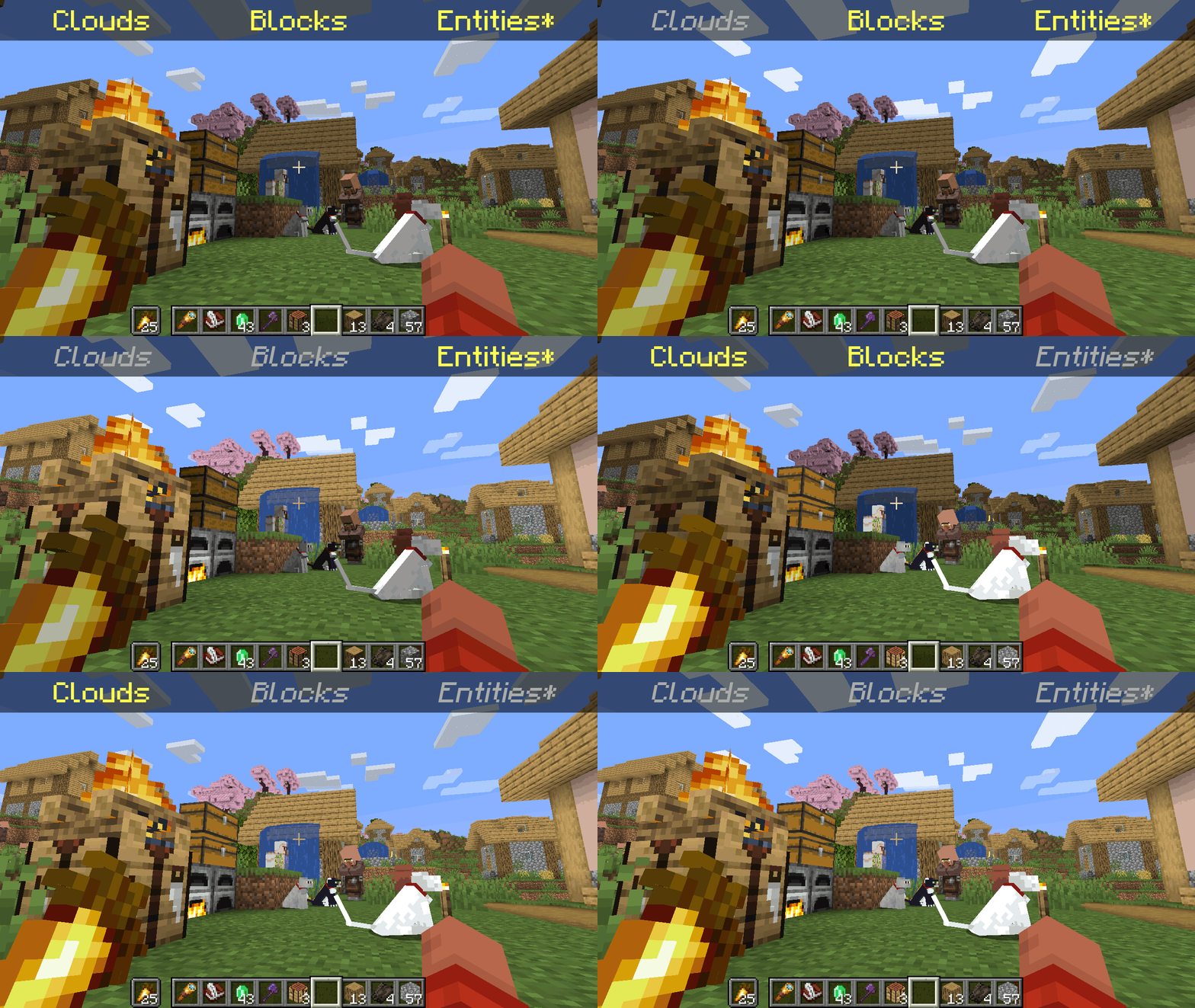
*Clarification that Entity shading is now stable and DOES NOT affect the inventory and in-game screens.
   Simply No Shading is a [Fabric]-based [modification] (mod) for the [Minecraft] [client]. This mod removes the darkening on sides or faces (also known as [shading]) to in-game objects such as blocks, clouds, and entities as illustrated above.
[Fabric]: https://fabricmc.net [modification]: https://minecraft.wiki/w/Mods [Minecraft]: https://minecraft.net [client]: https://minecraft.wiki/w/Mods#Client-based [shading]: https://en.m.wikipedia.org/wiki/Shading
Compatibility
   Simply No Shading provides active compatibility for [BedrockIfy] and [Sodium]. Some mods that provide or replace stuff may work such as [Enhanced Block Entities] (EBE), where block entities act like blocks and are affected as such when toggling shading. Some mods that replace rendering are most likely incompatible; exceptions have active support such as Sodium, for example. One example of incompatibility is shaders, usually applied using [Iris], as they may not crash the game but would just render this mod ineffective when they are applied.
[BedrockIfy]: https://modrinth.com/mod/bedrockify [Sodium]: https://modrinth.com/mod/sodium [Enhanced Block Entities]: https://modrinth.com/mod/ebe [Iris]: https://modrinth.com/mod/iris
Similar Solutions
   Simply No Shading is not the only effort to removing shading, there are other solutions such as:
- [Flat Lighting] is a simple Fabric mod that achieves the same results for blocks and supports Sodium.
- internal-shaders, though unlisted, is a simple Iris shader that removes shading on blocks and entities.
- [Lightingless] is a simple shader that removes shading on blocks and entities.
- [OptiFine]'s old lighting through the internal shader. Achieved by turning Options > Video Settings > Shaders... > (internal) > Old Lighting to ON.
- [New Lighting 1.18+ (Internal Shaders without Optifine)]. This resource pack achieves the similar results by setting the shade flag on block models to false (OFF).
[Flat Lighting]: https://modrinth.com/mod/flat-lighting [Lightingless]: https://modrinth.com/shader/lightingless [OptiFine]: https://optifine.net [New Lighting 1.18+ (Internal Shaders without Optifine)]: https://www.planetminecraft.com/texture-pack/new-lighting-1-16/
Features
   Simply No Shading supports the following categories for toggling shading:
- Blocks - this includes blocks, liquids, and EBE's block entities
- Clouds - this includes clouds
- Entities ([≥7.4.0]) - this includes normal entities and block entities in the world
- Deprecated Experimental Entities Built-in Resource Pack - this includes block entities, entities, and blocks, block entities, entities, and items in toasts (pop-ups, e.g. completing an [advancement]) and inventories and or Graphical User Interfaces (GUIs)
[≥7.4.0]: https://modrinth.com/mod/simply-no-shading/version/7.4.0+mc1.21 [advancement]: https://minecraft.wiki/w/Advancement
Configuration
   Simply No Shading has a configuration screen and it's accessible through:
- a key mapping. It's unbound by default and can be bound at Options > Controls > Keys > Simply No Shading > Open Config Screen
- [Mod Menu]. Mods > Simply No Shading > Configure...
[Mod Menu]: https://modrinth.com/mod/modmenu
   Simply No Shading stores its configuration as a formatted [JSON] file at /config/simply-no-shading.json.
[JSON]: https://en.m.wikipedia.org/wiki/JSON
[1.2.0]: https://modrinth.com/mod/flat-lighting/version/1.2.0 [core shaders]: https://minecraft.wiki/w/Shaders [Fabric Loom]: https://github.com/FabricMC/fabric-loom [MIT License]: https://github.com/simply-no-shading/blob/master/LICENSE [Modrinth]: https://modrinth.com/mod/simply-no-shading/versions [resource pack]: https://minecraft.wiki/w/Resource_Packs
Versions
   Simply No Shading follows semantic versioning. This mod aims to maintain the same feature across supported Minecraft versions. Given the version X.Y.Z where:
- X changes when breaking changes occur, such as with breaking config format changes.
- Y changes when features are added or changed (non-breaking).
- Z changes for bug and compatibility fixes and may not stay consistent across supported Minecraft versions.
   Target versions is currently being reconsidered. Mod version 8.x will likely only be maintained for the newest versions of the game. 7.x will still remain maintained for bug-fixing and translations.
   Simply No Shading aims to provide support for the latest minor updates to major releases along with some April Fool's snapshots. All minor releases for the latest major version are supported. The latest snapshot versions also get temporary support before the next major release. Following are all those versions:
- Mod Version - Minecraft Version
1 - 7.6.4 - 1.14.4 2 - 7.6.4 - 1.15.2 3 - 7.6.4 - 20w14infinite 4 - 7.6.4 - 1.16.5 5 - 7.6.4 - 1.17.1 6 - 7.6.4 - 1.18.2 7 - 7.6.4 - 22w13oneblockatatime 8 - 7.6.4 - 1.19.4 9 - 7.6.4 - 23w13a_or_b 10 - 7.6.4 - 1.20.1 11 - 7.6.4 - 24w14potato 12 - 7.6.4 - 1.20.6 13 - 7.6.4 - 1.21 14 - 7.6.4 - 1.21.1 15 - 7.6.4 - 25w14craftmine 16 - 7.6.6 - 1.21.10 17 - 8.0.0-alpha.5 - 1.21.11 18 - 8.0.0-alpha.6 - 26.1.2 19 - 8.0.0-alpha.5 - 26.2
Jak zainstalować Simply No Shading
With Millida Launcher
Install Millida Launcher
The launcher is free: download it at millida.net/launcher and sign in with any nickname.
Click “Install” on this page
The launcher opens and installs the mod for Minecraft 1.21.11–26.2 on Fabric automatically.
Launch the game
A profile with it appears in the launcher: click “Play”.
Manually
Install Fabric
The loader must match the game version of the mod file, for example Minecraft 26.2. After installing it, a separate profile appears in your launcher.
Download the file for your version
In the version list above, pick the file simply-no-shading-8.0.0-alpha.5+mc26.2.jar (76 KB) for your game version.
Put it in the mods folder
The folder is inside .minecraft (Windows: %appdata%\.minecraft\mods). If it does not exist, create it.
Launch the loader profile
Open “Mods” in the main menu: Simply No Shading should be in the list.
Simply No Shading works on the player’s side only: there is no need to install it on a server.
Wersje
Z zależnościami
| Minecraft | Loader | Plik | Data | Akcje |
|---|---|---|---|---|
| 26.2 | Fabric | 26.276.3 KB 1 | ||
| 1.21.11 | Fabric | 1.21.1180.5 KB 10 | ||
| 26.1.2 | Fabric | 26.1.273.6 KB | ||
| 26.1.2 | Fabric | 26.1.273.6 KB | ||
| 26.1.2 | Fabric | 26.1.290.7 KB | ||
| 26.1.1 | Fabric | 26.1.190.7 KB | ||
| 1.21.11 | Fabric | 1.21.1187.1 KB | ||
| 26.1 | Fabric | 26.190.7 KB |
FAQ
Is Simply No Shading for Forge or Fabric?
Only for Fabric: 1.21.11–26.2. There are no files for Forge or NeoForge: a mod for another loader will not start.
Does Simply No Shading need other mods?
The author lists no required dependencies: the Fabric loader is enough.
Do I need to install Simply No Shading on a server?
No. Simply No Shading works on the player’s side only: there is no need to install it on a server.
Where can I download Simply No Shading safely?
On this page: the file simply-no-shading-8.0.0-alpha.5+mc26.2.jar (76 KB) is stored on Millida’s server, with no link shorteners. SHA-1 checksum: ee16e4c3c71e86b38056bd58f8d30b636e60df2a.
Opinie
Oceń Simply No Shading jako pierwszy


