
 Forge
O modzie Shutup Experimental Settings!
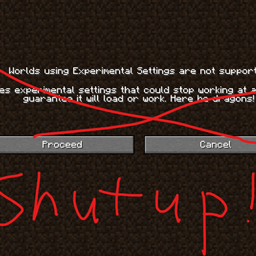
Ten prosty mod to port na Forge moda na Fabric o nazwie "Disable Custom Worlds Advice", który wyłącza irytującą informację o "Experimental Features", pojawiającą się za każdym razem, gdy tworzysz lub wczytujesz świat z niestandardowymi wymiarami lub ustawieniami świata. Możesz go użyć, jeśli ten ekran denerwuje cię tak samo jak mnie albo tworzysz moda z niestandardową generacją świata!(Ten opis odpowiada opisowi znajdującemu się na https://www.curseforge.com/minecraft/mc-mods/fabric-disable-custom-worlds-advice)
Jak zainstalować Shutup Experimental Settings!
With Millida Launcher
Install Millida Launcher
The launcher is free: download it at millida.net/launcher and sign in with any nickname.
Click “Install” on this page
The launcher opens and installs the mod for Minecraft 1.18.2–1.19.2 on Forge automatically.
Launch the game
A profile with it appears in the launcher: click “Play”.
Manually
Install Forge
The loader must match the game version of the mod file, for example Minecraft 1.19.2. After installing it, a separate profile appears in your launcher.
Download the file for your version
In the version list above, pick the file shutupexperimentalsettings-1.0.5.jar (5 KB) for your game version.
Put it in the mods folder
The folder is inside .minecraft (Windows: %appdata%\.minecraft\mods). If it does not exist, create it.
Launch the loader profile
Open “Mods” in the main menu: Shutup Experimental Settings! should be in the list.
Minecraft 1.19.2 runs on Java 17: with a different Java version the game may close right after launch.
Wersje
Z zależnościami
| Minecraft | Loader | Plik | Data | Akcje |
|---|---|---|---|---|
| 1.19.1 | Forge | shutupexperimentalsettings-1.0.5.jar4.6 KB 4 |
FAQ
Which Minecraft versions does Shutup Experimental Settings! work on?
There are files for 1.19.2, 1.19.1, 1.19, 1.18.2. The newest is 1.19.2.
Is Shutup Experimental Settings! for Forge or Fabric?
Only for Forge: 1.18.2–1.19.2. There are no files for Fabric or NeoForge: a mod for another loader will not start.
Does Shutup Experimental Settings! need other mods?
The author lists no required dependencies: the Forge loader is enough.
Which Java does Shutup Experimental Settings! need?
Minecraft 1.19.2 runs on Java 17. If the game closes right after launch, the usual cause is the wrong Java version in the profile settings.
Where can I download Shutup Experimental Settings! safely?
On this page: the file shutupexperimentalsettings-1.0.5.jar (5 KB) is stored on Millida’s server, with no link shorteners. SHA-1 checksum: ad722f0e86a61310bdcea8975a106f0a4148ccb2.
Opinie
Oceń Shutup Experimental Settings! jako pierwszy


