

Server Tab Info Mod do Minecraft 1.20.1, 1.12.2
Mod kliencki i/lub serwerowy, który daje wygodny sposób na podgląd średniego czasu ticku i ticków na sekundę (TPS) gry
 NeoForge
 Forge
ForgeO modzie Server Tab Info
Should really be called Tab Info, because it now also works when in singleplayer!
Introduction
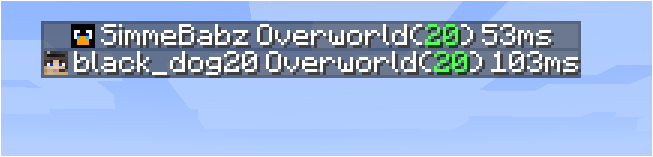
This is a mod that can be installed on both the client and the server without causing missing mods errors for clients without the mod or servers without the mod. When connected to a server the mod only works when the server also has the mod. The version on the server does not need to match the version on the client, but if the client connects to a server with an too old version some features will be missing.
Features showcase
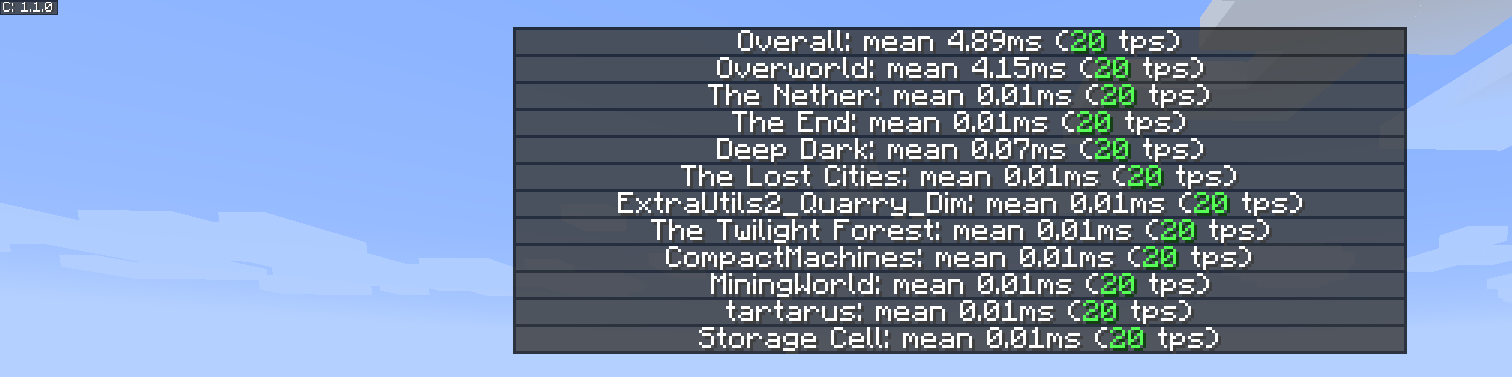
The new and improved dimension tps list
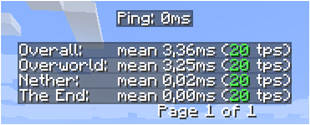
The new player list

Inspiration
The inspiration for the mod and the presentation have been based on a small feature from MineTogether, where if an optional mod was installed on the server and query feature was active, you could view information like tps and entities in world. It would present this information like the player tab list, when pressing Tab + Ctrl.
The spark for me was that it stopped working, therefore I made this small mod to view tps for all dimensions.
To activate the gui press Tab + Ctrl (standard but configuable in keybindings) then you are presented with the tps overall for the server and for each dimension.
Know issues
- If MineTogether is installed and siv intregration is enabled and ServerInfoProvider is not installed, you can get lag issues when using the keybind for the tps page, because they use the same keybinds.
To fix this issue either, disable siv intregration under MineTogether or change the keybind for tps page.
Jak zainstalować Server Tab Info
With Millida Launcher
Install Millida Launcher
The launcher is free: download it at millida.net/launcher and sign in with any nickname.
Click “Install” on this page
The launcher opens and installs the mod for Minecraft 1.12–1.20.4 on Forge or NeoForge automatically.
Launch the game
A profile with it appears in the launcher: click “Play”.
Manually
Install Forge or NeoForge
The loader must match the game version of the mod file, for example Minecraft 1.20.4. After installing it, a separate profile appears in your launcher.
Download the file for your version
In the version list above, pick the file ServerTabInfo-1.20.4-1.3.8.jar (109 KB) for your game version and loader.
Put it in the mods folder
The folder is inside .minecraft (Windows: %appdata%\.minecraft\mods). If it does not exist, create it.
Launch the loader profile
Open “Mods” in the main menu: Server Tab Info should be in the list.
Minecraft 1.20.4 runs on Java 17: with a different Java version the game may close right after launch.
Wersje
Z zależnościami
| Minecraft | Loader | Plik | Data | Akcje |
|---|---|---|---|---|
| 1.20.4 | NeoForge | ServerTabInfo-1.20.4-1.3.8.jar109 KB | ||
| 1.20.1 | Forge | ServerTabInfo-1.20-1.3.8.jar101 KB | ||
| 1.17.1 | Forge | ServerTabInfo-1.17.1-1.3.4-b2.jar102 KB | ||
| 1.16.1 | Forge | ServerTabInfo-1.16.1-1.2.7-alpha.jar71.3 KB | ||
| 1.12.1 | — | ServerTabInfo-1.12.2-1.2.6.jar53.5 KB | ||
| 1.13.2 | — | ServerTabInfo-1.13.2-1.2.4-beta.jar51.5 KB |
FAQ
Which Minecraft versions does Server Tab Info work on?
There are files for 1.12–1.20.4, 9 versions in total. The newest is 1.20.4.
Is Server Tab Info for Forge or Fabric?
There are files for Forge: 1.16.1–1.20.1 and for NeoForge: 1.20.4. There are no files for Fabric: a mod for another loader will not start.
Does Server Tab Info need other mods?
The author lists no required dependencies: the Forge or NeoForge loader is enough.
Which Java does Server Tab Info need?
Minecraft 1.20.4 runs on Java 17. If the game closes right after launch, the usual cause is the wrong Java version in the profile settings.
Where can I download Server Tab Info safely?
On this page: the file ServerTabInfo-1.20.4-1.3.8.jar (109 KB) is stored on Millida’s server, with no link shorteners. SHA-1 checksum: 10b7839c442bfb1d3ba61870a11344b0db072e3e.
Opinie
Oceń Server Tab Info jako pierwszy


