

Runes Mod do Minecraft 1.20.1, 26.3
🪨 Twórz runy, które służą jako amunicja do zaklęć
 NeoForge
 Fabric
 Forge
Forge☕️ Support me on Ko-Fi, if you like my project
⚡️ Getting started
Runes are typically crafted out of Cobblestone and a some material that is relevant to the specific rune.
Runes have shapeless recipes, can be crafted in hand or at a regular crafting table.
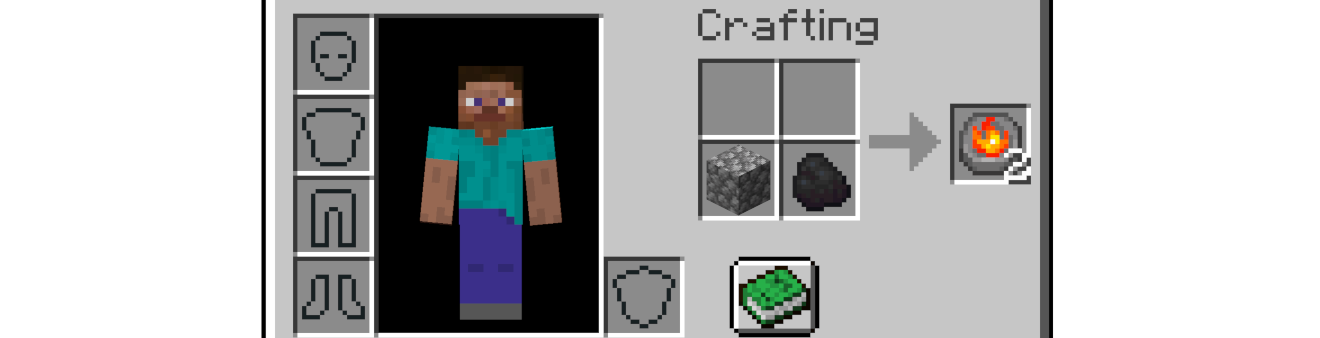
The most efficient way to craft runes, is to use a Rune Crafting Altar.
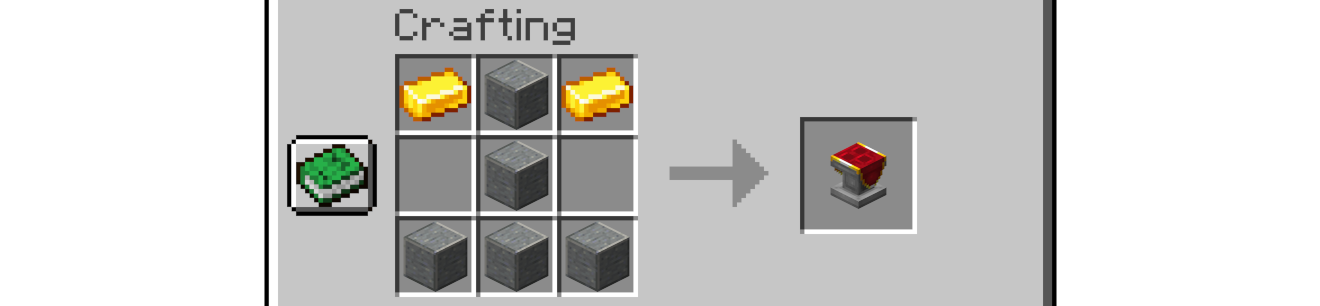
All runes have the same recipe on the Rune Crafting Altar, but provide more runes for the same amount of ingredients.
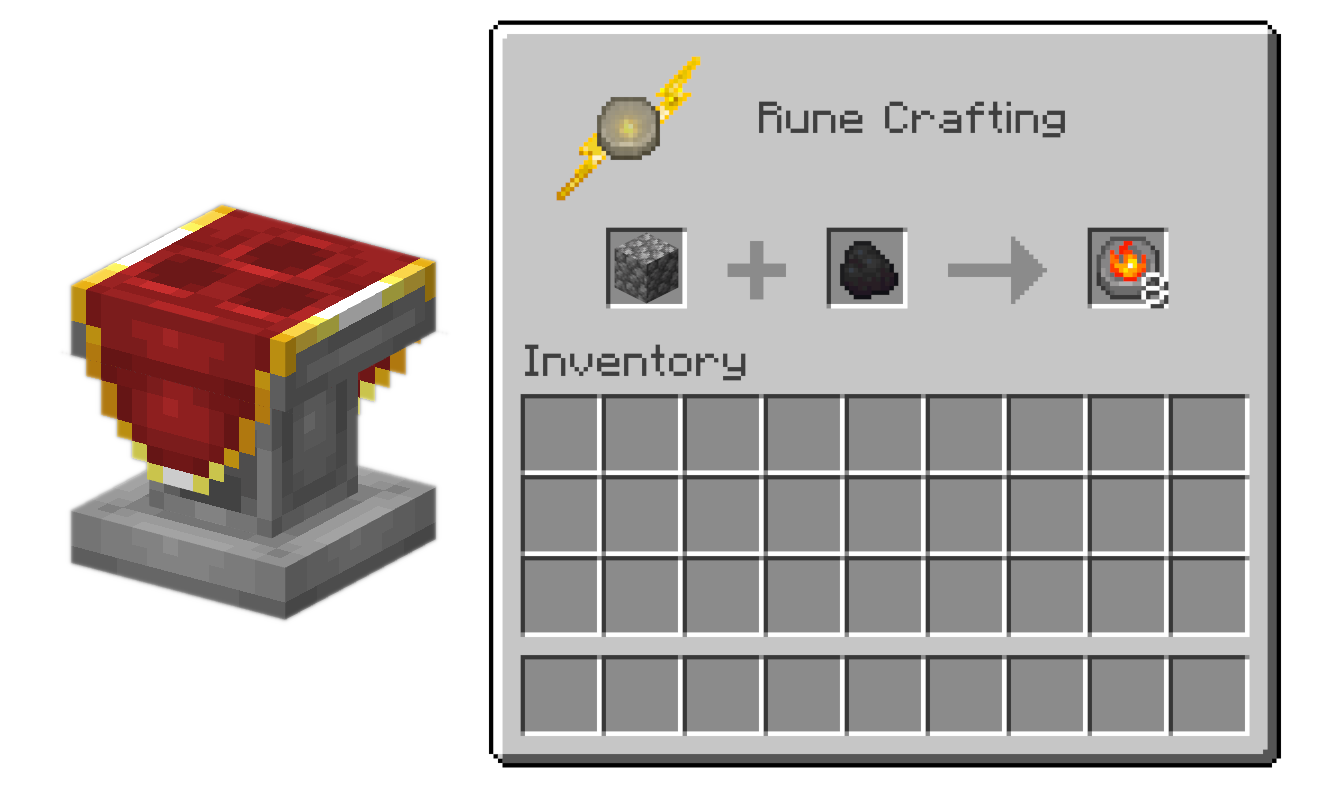
Runes

Runes can be crafted using the following ingredients
- 🔮 Arcane - Amethyst
- 🔥 Fire - Coal
- ❄️ Frost - Snowball
- 💚 Healing - Honey, Gold
- ⚡️ Lightning (not available yet)
- 👻 Soul (not available yet)

Jak zainstalować Runes
With Millida Launcher
Install Millida Launcher
The launcher is free: download it at millida.net/launcher and sign in with any nickname.
Click “Install” on this page
The launcher opens and installs the mod for Minecraft 1.20.1–26.3 on Fabric, Forge or NeoForge automatically, together with its dependencies: Fabric API, Dependency.
Launch the game
A profile with it appears in the launcher: click “Play”.
Manually
Install Fabric, Forge or NeoForge
The loader must match the game version of the mod file, for example Minecraft 26.3. After installing it, a separate profile appears in your launcher.
Download the file for your version
In the version list above, pick the file runes-neoforge-1.3.2+26.3.jar (381 KB) for your game version and loader.
Put it in the mods folder
The folder is inside .minecraft (Windows: %appdata%\.minecraft\mods). If it does not exist, create it. Required dependencies go there too: Fabric API, Dependency.
Launch the loader profile
Open “Mods” in the main menu: Runes should be in the list.
On a server
A server on Fabric, Forge or NeoForge
The mod only works on a server with the same loader and game version, for example 26.3.
File goes into the server’s mods folder
Stop the server, put the mod file into the mods folder and start the server again.
Or use the “To hosting” button
On Millida Hosting, the button at the top of the page uploads the file to your server and restarts it for you.
Wersje
Z zależnościami
| Minecraft | Loader | Plik | Data | Akcje |
|---|---|---|---|---|
| 26.3 | NeoForge | 26.3381 KB 1 | ||
| 26.3 | Fabric | 26.3377 KB 16 | ||
| 1.20.1 | Fabric | 1.20.1344 KB 3 | ||
| 1.20.1 | Forge, NeoForge | 1.20.1348 KB 22 | ||
| 1.20.1 | Forge, NeoForge | 1.20.1348 KB | ||
| 1.20.1 | Fabric | 1.20.1344 KB | ||
| 26.2 | NeoForge | 26.2380 KB | ||
| 26.2 | Fabric | 26.2377 KB 1 |
Co jest potrzebne do działania
- Fabric APIwymagane
- Dependencywymagane
Materiały, które tego wymagają
Opinie
Oceń Runes jako pierwszy


