
Replication Mod do Minecraft 1.20.1, 1.21.1
Replikowanie przedmiotów bez żadnych błędów w druku
 NeoForge
 Forge
ForgeO modzie Replication
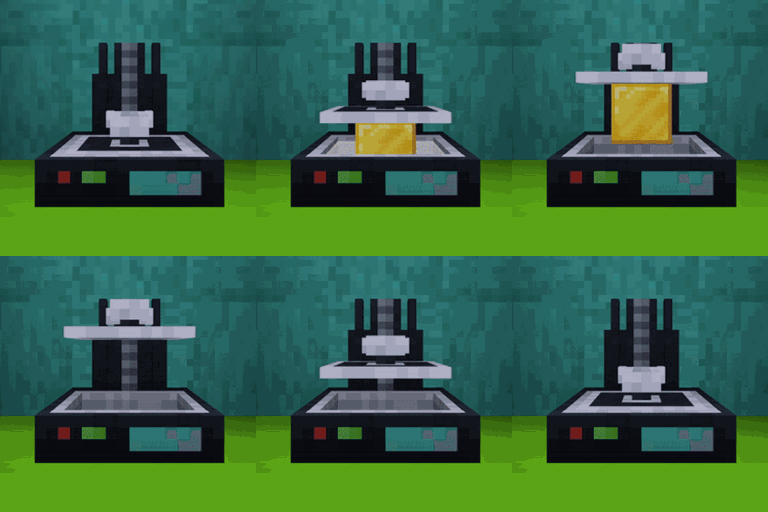
Replication is a tech mod that allows you to replicate resources of similar types. You can transform dirt to stone but you can't transform dirt to diamonds.
This mod needs Aequivaleo(only 1.20) and Titanium
Important Concepts
Matter pipes will allow you to connect Replication machines and they will automate some processes:
- Transfer Power: they work like any power pipe
- Transfer Matter: they will transfer matter from the Disintegrator to Matter Tanks and from Matter Tanks to other machines that need it. Matter Tanks can be configured to only accept certain matter types and they have a priority system, on insertion higher priority tanks will be prioritized and on extraction lower priority tanks will be prioritized.
The Identification Chamber will scan items to know their matter values and store them into chips. Those Chips can be stored in the Chip Storage and will be available to the network. If you place a Chip Storage on top of the Identification Chamber, the patterns will be pushed to the Chip Storage directly without the need of having a chip inside the Identification Chamber.
Replicators can be used in "Infinite Mode", where they will keep replicating a resource until it is full or has run out of matter, you can configure that mode in the GUI by placing the resource into the slot.
How it works
To transform items you will need to break them down to their primal values using a Disintegrator. Using that machine you will transform any item with matter values into matter. Once you have scanned some items and stored their values into chips you can use the Replication Terminal to request items. With a request created Replicators will use the Matter stored in tanks to replicate the item from scratch and send it back to the terminal.
Acceleration
- Replicator Enclosure: You can add the enclosure to a Replicator by Sneak + Right-Clicking into the Replicator, and it will provide a passive 20% acceleration but with 10% extra power consumption.
- Replicator Motor: You can add the motor to a Replicator by Sneak + Right-Clicking into the Replicator. You will be able to configure a speed multiplier for the Replicator where 100% is the default speed and 20% is as fast as it can go. The faster it goes, the bigger of failure chance. When a print fails, the replicator will need to run again, but it won't consume more matter to do it. To craft it you will need to craft the blueprint for it and then use it in the Chip Storage, and then you will be able to replicate it.
MatterOpedia
The MatterOpedia is a searcheable list that will allow you to search what items have a specific Matter Value. You can access using the button on the left of the Search Bar in the Replication Terminal screen, you can also access it by clicking on the matter displays on the right of the terminal.
In the search bar of the MatterOpedia you can use:
- Any matter name: will show all the items that have that matter
- earth>10 will show all the items that have more than 10 earth
- nether=20 will show all the items that have exactly 20 nether
- quantum<6 will show all the items that have less than 6 quantum
- !earth will show all the items that don't have earth
- *metallic will show all the items that only have metallic
Community Values
To increase compatibility between mods extra Matter Values recipes can be PR'd to this directory to add them as default values. It would be the same format as the recipes explained in the Datapack section. To make them more organised add a subfolder with the modid.
For Pack Makers
Datapack
You can modify/add/remove matter values using datapacks, you don't need to add values for each modded item as the system will calculate the values using the crafting recipes. Datapack examples.
Blueprints
You can create blueprints (one use item) that have a % of the scanned item information using the command /replication create-blueprint-using-hand <progress> where progress is a decimal number between 0 and 1. This will allow you to create the blueprint using the current item in your hand respecting the NBT of the item. Then those blueprints can be transferred using the Identification Chamber or directly to the Chip Storage.
Tag
You can disable an item from being scanned using the tag replication:cant_be_scanned. This will only prevent the item from being scanned and not replicated You can disable an item from being disintegrated using the tag replication:cant_be_disintegrated You can disable a calculation of an item by adding it the tag replication:skip_calculation, it will always return empty in all calculation checks. You can disable the subtraction of crafting remaining items using the tag replication:ignore_crafting_result
KubeJS Integration (1.21.1)
Replication now supports KubeJS 2101.x on NeoForge 1.21.1 for:
- Creating custom matter types at startup via StartupEvents.registry('replication:matter_types', ...).
- Adding matter values for items/tags via ServerEvents.recipes using a small JSON helper.
Notes
- KubeJS is an optional dependency (soft). The mod runs fine without it.
- New matter types must be created during startup registry events. Creating them later isn’t supported.
Creating custom matter types
// kubejs/startup_scripts/replication_matter_types.js StartupEvents.registry('replication:matter_types', event => { // Basic type event.create('plasma') .color(0.2, 0.7, 1.0, 1.0); // RGBA 0..1 // Another example event.create('crystal') .color(0.6, 0.9, 0.9, 1.0); });
Adding matter values for items/tags
Use ServerEvents.recipes and the global Replication helper to build the JSON for our custom recipe type replication:matter_value.
// kubejs/server_scripts/replication_matter_values.js ServerEvents.recipes(event => { // Single item event.custom(Replication.matterValueForItem('minecraft:stone', { earth: 3.0, })); // Tag (with or without leading #) event.custom(Replication.matterValueForTag('#c:iron_ingots', { metallic: 4, })); // Arbitrary ingredient object event.custom(Replication.matterValue({ tag: 'minecraft:planks' }, { "kubejs:plasma": 2, })); });
Jak zainstalować Replication
With Millida Launcher
Install Millida Launcher
The launcher is free: download it at millida.net/launcher and sign in with any nickname.
Click “Install” on this page
The launcher opens and installs the mod for Minecraft 1.20.1–1.21.1 on Forge or NeoForge automatically.
Launch the game
A profile with it appears in the launcher: click “Play”.
Manually
Install Forge or NeoForge
The loader must match the game version of the mod file, for example Minecraft 1.21.1. After installing it, a separate profile appears in your launcher.
Download the file for your version
In the version list above, pick the file Replication-1.21.1-1.2.7.jar (822 KB) for your game version and loader.
Put it in the mods folder
The folder is inside .minecraft (Windows: %appdata%\.minecraft\mods). If it does not exist, create it.
Launch the loader profile
Open “Mods” in the main menu: Replication should be in the list.
Minecraft 1.21.1 runs on Java 21: with a different Java version the game may close right after launch.
Wersje
Z zależnościami
| Minecraft | Loader | Plik | Data | Akcje |
|---|---|---|---|---|
| 1.21.1 | NeoForge | Replication-1.21.1-1.2.7.jar822 KB | ||
| 1.21.1 | NeoForge | Replication-1.21.1-1.1.23.jar769 KB | ||
| 1.20.1 | Forge | Replication-1.20.1-1.1.3.jar706 KB |
FAQ
Which Minecraft versions does Replication work on?
There are files for 1.21.1, 1.20.1. The newest is 1.21.1.
Is Replication for Forge or Fabric?
There are files for Forge: 1.20.1 and for NeoForge: 1.21.1. There are no files for Fabric: a mod for another loader will not start.
Does Replication need other mods?
The author lists no required dependencies: the Forge or NeoForge loader is enough.
Which Java does Replication need?
Minecraft 1.21.1 runs on Java 21. If the game closes right after launch, the usual cause is the wrong Java version in the profile settings.
Where can I download Replication safely?
On this page: the file Replication-1.21.1-1.2.7.jar (822 KB) is stored on Millida’s server, with no link shorteners. SHA-1 checksum: bb433ec94394e960ba26fc2e7fd5537fcb7fbe50.
Opinie
Oceń Replication jako pierwszy


