
Progressive Bosses Mod do Minecraft 1.20.1, 1.16.5
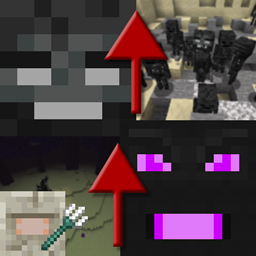
Przywołaj silniejsze wersje Withera i Smoka Endu
- pobrań
- 7 pobrań
- wyświetleń
- 20 wyświetleń
- Zaktualizowano
- Zaktualizowano 17.10.2026
- 1.16 — 1.20.1
 Forge
Forge
O modzie Progressive Bosses
W przypadku portu na Fabric sprawdź [Fabric] Progressive Bosses (uwaga: nie jest to ze mną powiązane, problemy zgłaszaj deweloperowi)
Ten mod wymaga InsaneLib
Ten mod utrudnia walkę z Wither i Smokiem Endu, pozwalając ci przyzwać ich silniejszą wersję. Utrudnia też walkę ze Starszym Strażnikiem.
Poziom trudności dostosowuje się do graczy w pobliżu bossa.
- Więcej zdrowia: to bossowie... dlaczego mieliby padać od kilku ciosów?
- Nowe umiejętności: jak Wither Charging czy odradzanie kryształów przez Smoka
- Sługi: zarówno Smok, jak i Wither mają sługi
- Kryształy w klatkach: wokół kryształów pojawi się więcej klatek, a część kryształów pojawi się wewnątrz wież
- Szybsze kule kwasu i czaszki: unikanie jest trudniejsze
- Walka ze Starszym Strażnikiem jest trudniejsza i daje prawdziwą nagrodę!
- Wiele, wiele poprawek błędów: Mojang nie dba już o aspekt survivalowy gry
- I znacznie, znacznie więcej! To tylko wierzchołek góry lodowej.
Zostań patronem, aby wcześnie testować nowsze wersje i grać na publicznym serwerze.
Sprawdź moje inne projekty!
Zgody na modpacki
Rób z nimi, co chcesz, publiczne czy prywatne!
Stop Mod Reposts
Nie pobieraj tego moda z żadnej innej strony niż Curseforge lub Modrinth. Może to być złośliwe oprogramowanie i może zaszkodzić twojemu PC. Więcej informacji znajdziesz na https://stopmodreposts.org.
Jak zainstalować Progressive Bosses
With Millida Launcher
Install Millida Launcher
The launcher is free: download it at millida.net/launcher and sign in with any nickname.
Click “Install” on this page
The launcher opens and installs the mod for Minecraft 1.16–1.20.1 on Forge automatically.
Launch the game
A profile with it appears in the launcher: click “Play”.
Manually
Install Forge
The loader must match the game version of the mod file, for example Minecraft 1.20.1. After installing it, a separate profile appears in your launcher.
Download the file for your version
In the version list above, pick the file progressivebosses-4.3.12.jar (999 KB) for your game version.
Put it in the mods folder
The folder is inside .minecraft (Windows: %appdata%\.minecraft\mods). If it does not exist, create it.
Launch the loader profile
Open “Mods” in the main menu: Progressive Bosses should be in the list.
Minecraft 1.20.1 runs on Java 17: with a different Java version the game may close right after launch.
Wersje
Z zależnościami
| Minecraft | Loader | Plik | Data | Akcje |
|---|---|---|---|---|
| 1.20.1 | Forge | 4.3.12999 KB 7 | ||
| 1.20.1 | Forge | 4.3.3990 KB | ||
| 1.20.1 | Forge | 4.3.1959 KB | ||
| 1.16.3 | — | [1.16.x] Progressive Bosses 2.2.068 KB |
FAQ
Which Minecraft versions does Progressive Bosses work on?
There are files for 1.16–1.20.1, 7 versions in total. The newest is 1.20.1.
Is Progressive Bosses for Forge or Fabric?
Only for Forge: 1.20.1. There are no files for Fabric or NeoForge: a mod for another loader will not start.
Does Progressive Bosses need other mods?
The author lists no required dependencies: the Forge loader is enough.
Which Java does Progressive Bosses need?
Minecraft 1.20.1 runs on Java 17. If the game closes right after launch, the usual cause is the wrong Java version in the profile settings.
Where can I download Progressive Bosses safely?
On this page: the file progressivebosses-4.3.12.jar (999 KB) is stored on Millida’s server, with no link shorteners. SHA-1 checksum: 5ec938a9e975ec49ae461d6ca1dd6e798a1d0dbc.
Opinie
Oceń Progressive Bosses jako pierwszy


