

 NeoForge
 Forge
ForgeO modzie Productive Trees
Przedstawiamy mod 'Productive Trees' do Minecrafta, duchowego następcę mini-gry w hodowlę drzew z Forestry. Dzięki temu modowi możesz teraz zająć się sztuką hodowli drzew, pozwalającą na krzyżowanie różnych gatunków drzew i uprawę unikalnych, hybrydowych odmian. Skończyły się dni budowania z drewna z nudnych, starych drzew waniliowych dzięki kolekcji ponad 160 nowych, unikalnych zestawów drewna.
Z Productive Trees masz moc strategicznego hodowania drzew, aby uzyskać piękne rodzaje drewna. Eksperymentuj z różnymi kombinacjami, aby odkryć i odblokować mnóstwo ekscytujących możliwości. Wyobraź sobie zbieranie drzewa, które nie tylko dostarcza rzadkiego drewna, ale także rodzi pyszne owoce lub orzechy!
Rozwijaj swoje umiejętności leśne, twórz własne, unikalne gatunki drzew i przekształć swój świat w grze w kwitnący ekosystem własnoręcznie wyhodowanych cudów. Pobierz mod Productive Trees już dziś i wyrusz w podróż arborealnych innowacji w rozległych, pikselowych krajobrazach Minecrafta.
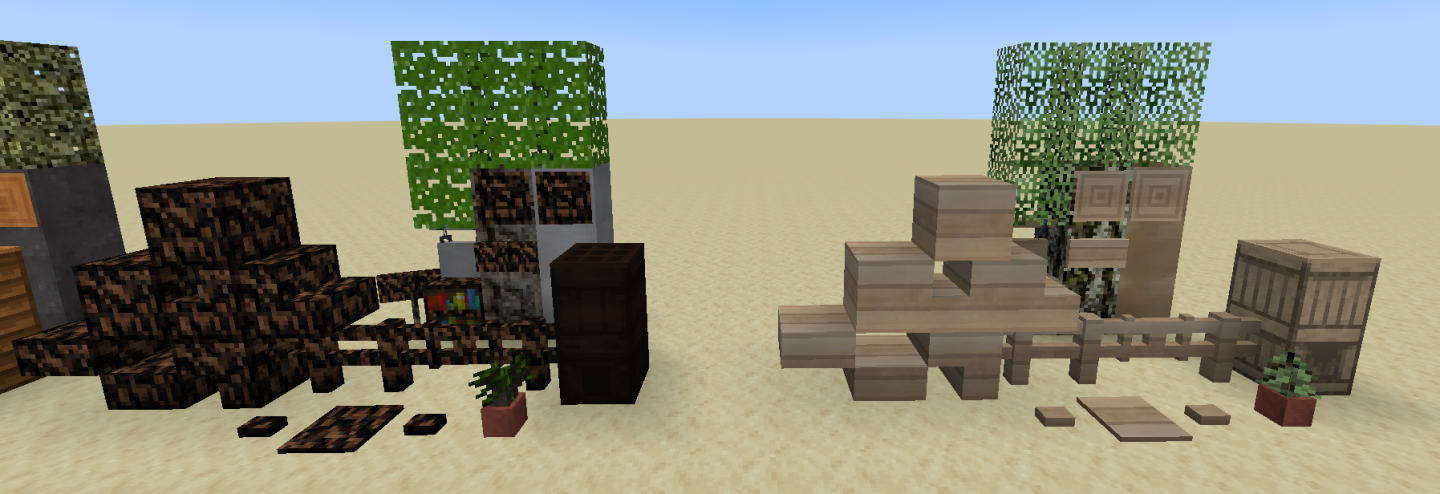
Ten mod jest w wersji beta i nie jest jeszcze ukończony. Brakuje między innymi cech drzew (tego, jak wyglądają po wyrośnięciu).
Istnieje serwer Discord, jeśli potrzebujesz pomocy lub chcesz wpaść i pochwalić tekstury.
"Tak dużo drewna, że będziesz szukać pomocy medycznej" - anonim
Jak zainstalować Productive Trees
With Millida Launcher
Install Millida Launcher
The launcher is free: download it at millida.net/launcher and sign in with any nickname.
Click “Install” on this page
The launcher opens and installs the mod for Minecraft 1.20.1–1.21.1 on Forge or NeoForge automatically.
Launch the game
A profile with it appears in the launcher: click “Play”.
Manually
Install Forge or NeoForge
The loader must match the game version of the mod file, for example Minecraft 1.21.1. After installing it, a separate profile appears in your launcher.
Download the file for your version
In the version list above, pick the file productivetrees-1.21.1-1.1.1.jar (13 MB) for your game version and loader.
Put it in the mods folder
The folder is inside .minecraft (Windows: %appdata%\.minecraft\mods). If it does not exist, create it.
Launch the loader profile
Open “Mods” in the main menu: Productive Trees should be in the list.
Minecraft 1.21.1 runs on Java 21: with a different Java version the game may close right after launch.
Wersje
Z zależnościami
| Minecraft | Loader | Plik | Data | Akcje |
|---|---|---|---|---|
| 1.21.1 | NeoForge | productivetrees-1.21.1-1.1.1.jar13.4 MB 2 | ||
| 1.21.1 | NeoForge | productivetrees-1.21.1-0.6.0.jar3.2 MB | ||
| 1.20.1 | NeoForge, Forge | productivetrees-1.20.1-0.2.6.jar14 MB | ||
| 1.20.1 | NeoForge, Forge | productivetrees-1.20.1-0.1.0.jar13.3 MB |
FAQ
Which Minecraft versions does Productive Trees work on?
There are files for 1.21.1, 1.20.1. The newest is 1.21.1.
Is Productive Trees for Forge or Fabric?
There are files for Forge: 1.20.1 and for NeoForge: 1.20.1–1.21.1. There are no files for Fabric: a mod for another loader will not start.
Does Productive Trees need other mods?
The author lists no required dependencies: the Forge or NeoForge loader is enough.
Which Java does Productive Trees need?
Minecraft 1.21.1 runs on Java 21. If the game closes right after launch, the usual cause is the wrong Java version in the profile settings.
Where can I download Productive Trees safely?
On this page: the file productivetrees-1.21.1-1.1.1.jar (13 MB) is stored on Millida’s server, with no link shorteners. SHA-1 checksum: 33b7f304e4e13297fdbbef4822f8b178d73868cc.
Opinie
Oceń Productive Trees jako pierwszy


