
Pottery (Additional Pots) Mod do Minecraft 26.3
Pottery dodaje nowe dekoracyjne doniczki oraz kilka usprawnień jakości życia!
 NeoForge
 Fabric
 Quilt
Quilt Forge
ForgeO modzie Pottery (Additional Pots)
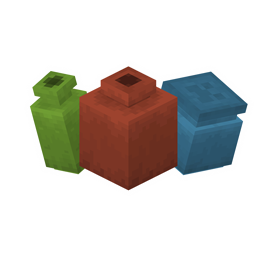
The Pottery (Additional Pots) mod adds five new decorative pots to the game that can be dyed with dyes. Pots can be crafted with a dye in the recipe or recolored by right-clicking them. The color can be washed off by placing the pot on a cauldron of water — just click on it. The mod also simplifies working with sherds: you can now swap them on a pot by right-clicking the side while holding the desired sherd, and get the old sherd back. This speeds up the decorating process and makes decorative elements more flexible. All changes affect only the interface and interaction mechanics — nothing changes in gameplay or balance.
Works on Fabric, Forge, NeoForge and Quilt. It all depends on the version: Fabric, NeoForge and Quilt require version 26.3, while Forge requires 26.2. Installation requires the corresponding loader and game version. The mod can be used on both the client and the server — it does not require a separate server version. Installation is part of the standard process: the file is placed in the mods folder. Suitable for modpacks that include decorative elements, quality-of-life improvements and color management systems.
The mod is for those who want to add more color and detail to interiors, especially when combined with other decorative mods. Ideal for those who value convenience in manually customizing decor. It is related to crafting and interaction mechanics, but does not create new blocks, mobs or systems. Suitable for quiet, creative and decorating projects.
Frequently asked questions
Which loader and game version are needed?
Works on Fabric, Forge, NeoForge and Quilt. Fabric, NeoForge and Quilt — version 26.3, Forge — version 26.2.
Is a server file needed?
No, the mod works on both the client and the server without a separate file.
What does the mod add?
Adds 5 new pots, allows you to dye them and swap sherds without losses.
Jak zainstalować Pottery (Additional Pots)
With Millida Launcher
Install Millida Launcher
The launcher is free: download it at millida.net/launcher and sign in with any nickname.
Click “Install” on this page
The launcher opens and installs the mod for Minecraft 26.2–26.3 on Fabric, Forge, NeoForge or Quilt automatically.
Launch the game
A profile with it appears in the launcher: click “Play”.
Manually
Install Fabric, Forge, NeoForge or Quilt
The loader must match the game version of the mod file, for example Minecraft 26.3. After installing it, a separate profile appears in your launcher.
Download the file for your version
In the version list above, pick the file pottery-1.0.2-neoforge-mc26.3.jar (748 KB) for your game version and loader.
Put it in the mods folder
The folder is inside .minecraft (Windows: %appdata%\.minecraft\mods). If it does not exist, create it.
Launch the loader profile
Open “Mods” in the main menu: Pottery (Additional Pots) should be in the list.
Wersje
Z zależnościami
| Minecraft | Loader | Plik | Data | Akcje |
|---|---|---|---|---|
| 26.3 | NeoForge | Pottery 1.0.2 for NeoForge 26.3748 KB | ||
| 26.3 | Fabric, Quilt | Pottery 1.0.2 for Fabric 26.3712 KB | ||
| 26.2 | Forge | Pottery 1.0.2 for Forge 26.2688 KB |
FAQ
Which Minecraft versions does Pottery (Additional Pots) work on?
There are files for 26.3, 26.2. The newest is 26.3.
Is Pottery (Additional Pots) for Forge or Fabric?
There are files for Fabric: 26.3, for Forge: 26.2, for NeoForge: 26.3 and for Quilt: 26.3.
Does Pottery (Additional Pots) need other mods?
The author lists no required dependencies: the Fabric, Forge, NeoForge or Quilt loader is enough.
Where can I download Pottery (Additional Pots) safely?
On this page: the file pottery-1.0.2-neoforge-mc26.3.jar (748 KB) is stored on Millida’s server, with no link shorteners. SHA-1 checksum: ef74148229bd27b5effb4cc8534c631f0df81717.
Opinie
Oceń Pottery (Additional Pots) jako pierwszy


