
 NeoForge
 Forge
ForgeO modzie Plonk
Dostępne na 1.7.10, 1.12.2, 1.14.4, 1.15.2, 1.16.5, 1.18.2, 1.19.2, 1.19.4, 1.20.1, 1.21.1, 26.1.x (Files (above) > View All > Game Version). Obsługiwane wersje są pogrubione (ale postaram się wspierać także inne wersje w rozsądnych granicach).
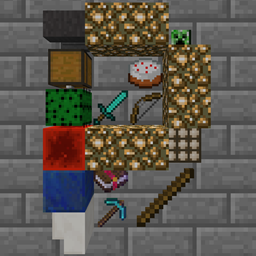
Umieszczaj przedmioty, naciskając P, patrząc na blok. Obróć wszystkie za pomocą Sneak + P. Obróć przedmiot za pomocą Sneak + Use. (Wymaga pustych rąk)
- Uwaga (dla 1.16.4+): Klawisz P używany przez Plonk koliduje z klawiszem ekranu interakcji społecznych, więc będziesz musiał zmienić jeden lub drugi!
Możesz swobodnie używać tego moda w dowolnym modpacku (nie musisz pytać!).
Umieść do 4 stacków przedmiotów na boku dowolnego bloku za pomocą klawisza Place Item (domyślnie P). (Maksymalny rozmiar każdego stacka jest konfigurowalny i obsługuje StackUp!)
Przedmioty można indywidualnie obracać w 16 różnych kierunkach (Sneak + Prawy przycisk myszy z pustymi rękami).
Cały kafel przedmiotów można obrócić jako całość w 4 różnych kierunkach (Sneak + klawisz Place Item z pustymi rękami).
Przedmioty mogą być wyciągane przez automatyzację, ale nie mogą być wkładane.
Nie mogą już być zmywane przez płyny. Umieszczone przedmioty mogą być zmywane przez ciecze. Mogą być zalane wodą (od MC1.16.3+).
Konfiguracja w config/plonk.cfg (przed mc 1.13) lub [save folder]/serverconfig/plonk-server.toml (po mc 1.13)
Wygląd umieszczonych przedmiotów i mechanika mogą się obecnie zmienić.
Ten film jest bardzo nieaktualny
Znane błędy:
Kamera trzeciej osoby koliduje z blokiem (tylko 1.7.10 i 1.12.2). Nie jestem pewien, jak powiedzieć minecraftowi, żeby przepuścił ray trace trzeciej osoby (1.13+ ma RayTraceContext.Visual). Półprzezroczyste przedmioty (np. Stained Glass) powodują, że inne półprzezroczyste rzeczy za nimi nie renderują się poprawnie. (przed mc 1.16)
Jak zainstalować Plonk
With Millida Launcher
Install Millida Launcher
The launcher is free: download it at millida.net/launcher and sign in with any nickname.
Click “Install” on this page
The launcher opens and installs the mod for Minecraft 1.18–26.1.2 on Forge or NeoForge automatically.
Launch the game
A profile with it appears in the launcher: click “Play”.
Manually
Install Forge or NeoForge
The loader must match the game version of the mod file, for example Minecraft 26.1.2. After installing it, a separate profile appears in your launcher.
Download the file for your version
In the version list above, pick the file plonk-26.1.2-10.0.10-neo.jar (162 KB) for your game version and loader.
Put it in the mods folder
The folder is inside .minecraft (Windows: %appdata%\.minecraft\mods). If it does not exist, create it.
Launch the loader profile
Open “Mods” in the main menu: Plonk should be in the list.
Wersje
Z zależnościami
| Minecraft | Loader | Plik | Data | Akcje |
|---|---|---|---|---|
| 26.1 | NeoForge | plonk-26.1.2-10.0.10-neo.jar162 KB | ||
| 26.1 | NeoForge | plonk-26.1.1-10.0.8-neo.jar162 KB | ||
| 1.20.1 | NeoForge, Forge | plonk-1.20.1-10.0.5-forge.jar148 KB | ||
| 1.18.1 | Forge | plonk-1.18.1-10.0.1.jar147 KB |
FAQ
Which Minecraft versions does Plonk work on?
There are files for 1.18–26.1.2, 7 versions in total. The newest is 26.1.2.
Is Plonk for Forge or Fabric?
There are files for Forge: 1.18–1.20.1 and for NeoForge: 1.20–26.1.2. There are no files for Fabric: a mod for another loader will not start.
Does Plonk need other mods?
The author lists no required dependencies: the Forge or NeoForge loader is enough.
Where can I download Plonk safely?
On this page: the file plonk-26.1.2-10.0.10-neo.jar (162 KB) is stored on Millida’s server, with no link shorteners. SHA-1 checksum: 4c8d57969618899ad01a7f182a680245070bcd7d.
Opinie
Oceń Plonk jako pierwszy


