
Passive SearchBar Mod do Minecraft 1.12.2, 1.21
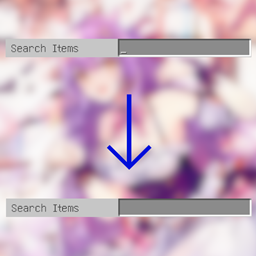
Gdy klikniesz zakładkę z paskiem wyszukiwania, pasek wyszukiwania nie będzie już automatycznie aktywowany, a także traci fokus po kliknięciu poza nim!
 NeoForge
 Fabric
 Forge
ForgeO modzie Passive SearchBar
Some of the creative mode tabs(such as the vanilla "Search Items" tab) come with a search bar. The search bar is always focused when the tab is opened, so it recognizes most of the keyboard input as characters and puts them into the search bar, which is annoying for players (including the author >_<) who are used to using the E key to close the tabs.
This mod makes the search bar no longer autofocus when a tab is opened, and lose its focus when the player clicks outside the search bar.
The 1.12.2 version of this mod requires MixinBooter.
Jak zainstalować Passive SearchBar
With Millida Launcher
Install Millida Launcher
The launcher is free: download it at millida.net/launcher and sign in with any nickname.
Click “Install” on this page
The launcher opens and installs the mod for Minecraft 1.12.2–1.21 on Fabric, Forge or NeoForge automatically.
Launch the game
A profile with it appears in the launcher: click “Play”.
Manually
Install Fabric, Forge or NeoForge
The loader must match the game version of the mod file, for example Minecraft 1.21. After installing it, a separate profile appears in your launcher.
Download the file for your version
In the version list above, pick the file PassiveSearchBar+Neo+1.21.0-1.0.0.jar (3 KB) for your game version and loader.
Put it in the mods folder
The folder is inside .minecraft (Windows: %appdata%\.minecraft\mods). If it does not exist, create it.
Launch the loader profile
Open “Mods” in the main menu: Passive SearchBar should be in the list.
Minecraft 1.21 runs on Java 21: with a different Java version the game may close right after launch.
Wersje
Z zależnościami
| Minecraft | Loader | Plik | Data | Akcje |
|---|---|---|---|---|
| 1.21 | NeoForge | PassiveSearchBar+Neo+1.21.0-1.0.0.jar2.8 KB | ||
| 1.21 | Fabric | PassiveSearchBar+Fabric+1.21-1.0.0.jar3.6 KB | ||
| 1.12.2 | Forge | PassiveSearchBar+Forge+1.12.2-1.0.0.jar4.4 KB |
FAQ
Which Minecraft versions does Passive SearchBar work on?
There are files for 1.21, 1.12.2. The newest is 1.21.
Is Passive SearchBar for Forge or Fabric?
There are files for Fabric: 1.21, for Forge: 1.12.2 and for NeoForge: 1.21.
Does Passive SearchBar need other mods?
The author lists no required dependencies: the Fabric, Forge or NeoForge loader is enough.
Which Java does Passive SearchBar need?
Minecraft 1.21 runs on Java 21. If the game closes right after launch, the usual cause is the wrong Java version in the profile settings.
Where can I download Passive SearchBar safely?
On this page: the file PassiveSearchBar+Neo+1.21.0-1.0.0.jar (3 KB) is stored on Millida’s server, with no link shorteners. SHA-1 checksum: a67f8a3172c9406a0ee0dfa47adcfde80aef7aa7.
Opinie
Oceń Passive SearchBar jako pierwszy


