

Particle Rain Mod do Minecraft 1.20.1, 1.21.1
Zastępuje pogodę ładniejszymi efektami cząsteczkowymi
 Fabric
 NeoForge
 Forge
ForgeO modzie Particle Rain
Particle Rain replaces the default weather with prettier particle effects, and adds some additional fog, wind, and sandstorm weather effects. You can disable, add, or customise weather effects with the in-game config menu.
Fabric versions require Fabric API.
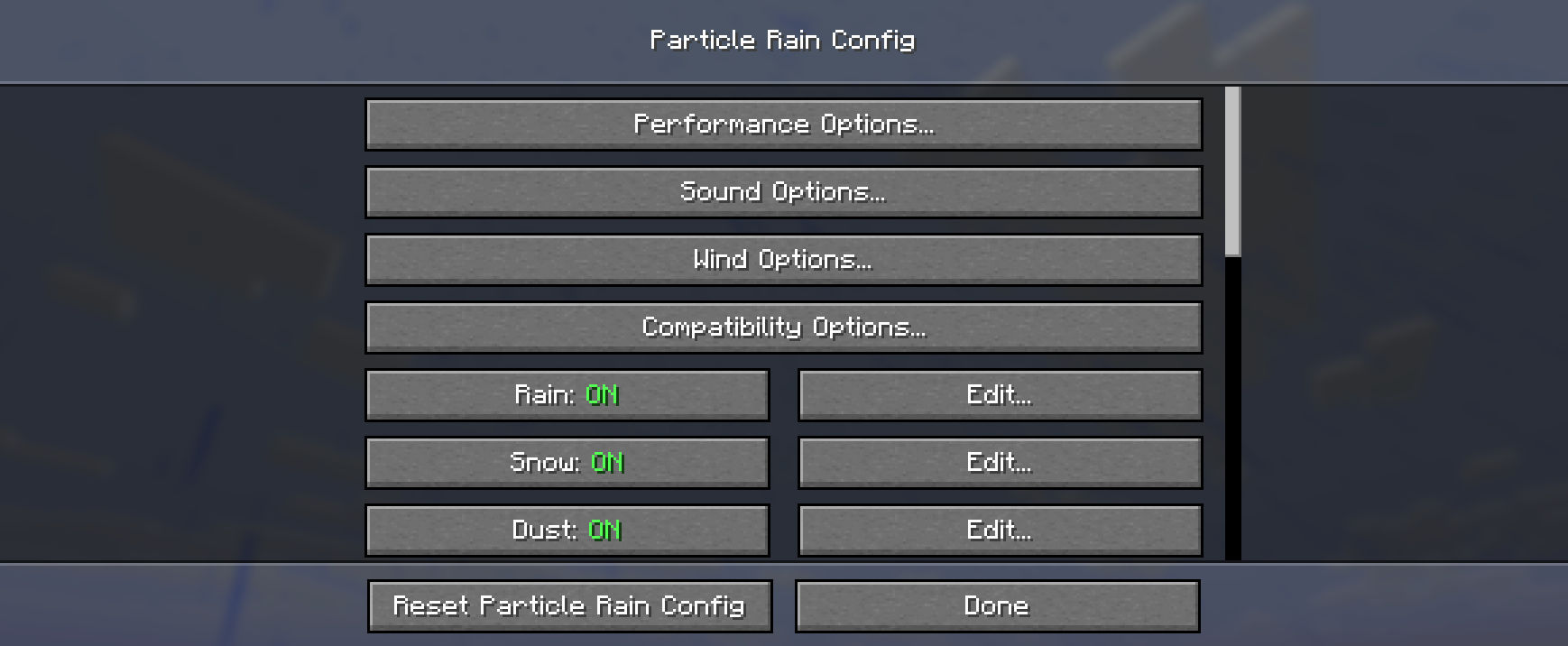
For config, use command /particlerain or your loader's mod list menu
For common mod compatibility issues, see here.
Video: (outdated, see gallery instead) https://www.youtube-nocookie.com/embed/oan4xH5RvH0

Rain Particles
Falls at an angle, blown by wind.

During stormy weather the wind is stronger and the rain looks more dense.

Snow Particles
Rotate slowly as they fall. Not strongly affected by wind, retaining the serene quality of Vanilla's snow whlie being less visually cluttered. Has a heavy variant during storms just like rain.


Sandstorms
Dust and shrubs blow through deserts and other dry biomes.

Dust matches the color of the block below, allowing for a range of biomes to be supported without additional configuration, including ones added by other mods.

Fog
Appears in biomes tagged as #c:is_spooky / #c:is_wet. This is configurable.

Sometimes fog will appear after rain. This too is configurable.

Water Ripples
Appears when rain falls onto water. Will match the resolution of your resource pack.

Water Streaks
Appears when rain hits a wall made of a hard material. (can be configured to appear on any block)

Biome Tint
Modded biomes that have a strong tint will also affect rain and other water particles.

Configuration & Custom Effects
You can create all kinds of atmospheric particle effects for specific blocks and biomes or edit the existing effects using the built in configuration menu.
Access the menu via the command /particlerain or through the mod menu.
Puddles
Puddles feature has been moved to its own mod: https://modrinth.com/mod/puddles-floods/

Mod compatibility notes
Name Issue Solution
Serene Seasons & similar mods Rain in deserts This is typically a feature of mods that add seasons, not a bug or incompatibility.
Particull Weather effects missing ¯\_(ツ)_/¯ Remove Particull
Particle Core Flickering or disappearing effects In particle core's config, set culling mode to bounding box or add particles to the blacklist.
Particle Tweaks crash in Minecraft 1.20 use particle tweaks 1.1.1 instead of the latest version.
Complementary & Astrocraft Black sun Disable 'Sun/Moon during rain' in Complementary's settings
Eureka helms Eureka helms sometimes breaks random number generation, causing incorrectly placed effects in some scenarios. ¯\_(ツ)_/¯
Other shader pack issues
Shader pack support varies by minecraft version. Some shader packs do not fully support particles.
Please check for or submit an issue if you run into other problems!
Resource pack support
Particle Rain generates its snow and rain textures using the game's weather textures, so it remains compatible with resource packs without them needing to include extra particle textures.
Including custom weather effects
Resource packs can include custom weather effects, or override existing effects, by providing a file at assets/particlerain/particles.json. See here the default version of this file.
Particle effects can use any texture provided in the particles folder in your pack (or in other mods and packs).
You can create or edit particles with the in-game menu, and copy-paste the particles.json from config/particlerain into your resource pack once you're done!
Jak zainstalować Particle Rain
With Millida Launcher
Install Millida Launcher
The launcher is free: download it at millida.net/launcher and sign in with any nickname.
Click “Install” on this page
The launcher opens and installs the mod for Minecraft 1.20–26.3 on Fabric, Forge or NeoForge automatically, together with its dependencies: Cloth Config API, Fabric API.
Launch the game
A profile with it appears in the launcher: click “Play”.
Manually
Install Fabric, Forge or NeoForge
The loader must match the game version of the mod file, for example Minecraft 26.3. After installing it, a separate profile appears in your launcher.
Download the file for your version
In the version list above, pick the file particlerain-4.0.2+26.3-fabric.jar (612 KB) for your game version and loader.
Put it in the mods folder
The folder is inside .minecraft (Windows: %appdata%\.minecraft\mods). If it does not exist, create it. Required dependencies go there too: Cloth Config API, Fabric API.
Launch the loader profile
Open “Mods” in the main menu: Particle Rain should be in the list.
Particle Rain works on the player’s side only: there is no need to install it on a server.
Wersje
Z zależnościami
| Minecraft | Loader | Plik | Data | Akcje |
|---|---|---|---|---|
| 1.20.1 | Forge | 1.20.11.2 MB 13 | ||
| 1.21.1 | NeoForge | 1.21.1609 KB 20 | ||
| 1.20.1 | Fabric | 1.20.1612 KB 8 | ||
| 1.21.10 | Fabric | 1.21.10611 KB 5 | ||
| 26.3 | Fabric | 26.3612 KB 90 | ||
| 26.2 | Fabric | 26.2612 KB 29 | ||
| 26.1.2 | Fabric | 26.1.2612 KB 10 | ||
| 1.21.11 | Fabric | 1.21.11611 KB 84 |
Co jest potrzebne do działania
- Dependencyopcjonalne
- Cloth Config APIwymagane
- Fabric APIwymagane
- Mod Menuopcjonalne
Materiały, które tego wymagają
Opinie
Oceń Particle Rain jako pierwszy


