

Oritech Mod do Minecraft 1.21.1, 1.21
Mod skupiony na technologii, z animowanymi maszynami, różnorodnymi opcjami przetwarzania oraz mnóstwem nowych mechanik i sprzętu
 NeoForge
 Fabric
O modzie Oritech
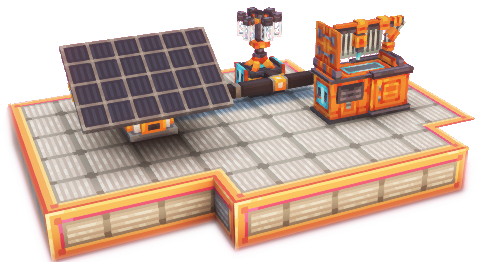


Oritech is an open-source tech mod (currently for Minecraft 26.1.2), featuring many new machines and tools. Content ranges from processing machines, world interaction machines, logistical parts, new features integrated into world generation, equipment, and more. Machines are mostly animated multiblocks, with upgrades being implemented using addon blocks.
A wiki is available online on moddedmc.org or via the Oracle Index mod. Includes JEI, REI and EMI compatibility. Works best with EMI.

Features include ✨
- Multiple ore processing chains / variants
- Automated farming machines
- Electric tools and armor
- Item, fluid and energy pipes
- Drones to transport items across vast distances
- Lasers to automatically mine blocks
- Colorable machines
- Cybernetic Player augmentation
- Particle Accelerators!
- New decorative content, included connected textures and animated doors
- Diverse energy generation methods, from burning fossil fuels to creating sustainable farms for biofuel
- Extensive configuration options, and Mod Menu integration
Extra mod compatibilities (allowing metals and other components to be processed in Oritech machines, and vice-versa) for the following mods are included:

Fabric
- Alloy Forgery
- Clutter
- Energized Power
- Mythic Metals
- Tech Reborn
Neoforge
- Actually Additions
- Applied Energistics 2
- Create
- Ender IO
- Energized Power
- Immersive Engineering
- Industrial Foregoing
- Mekanism (and Mekanism Generators)
- PneumaticCraft: Repressurized
- Powah!
- Productive Metalworks
The following translations are available:
- English
- Chinese (by PlatinumOak)
- Brazilian Portuguese (by RenanEuzebio)
- Russian (by nuchohent)
- Ukrainian (by nuchohent)
- Spanish (by Seyronh)
- Turkish (by RuyaSavascisi)
- French (by kikipunk)
- German (by Wolkensteinchen)
- Polish (by plhappylemonpl & Przemol)
Small showcase 🎥
Additional information ℹ️
One of the main design ideas is to have multiple ways to get things in the mod. For example, plastic can either be produced using farming items or via oil processing. The same philosophy is applied to most of the mod. The goal is to avoid annoying roadblocks where you need one rare and specific item to proceed. Instead, there are usually multiple ways to get something done (although in this test release this isn't always the case).
Another design goal is to have renewable sources for most things. This includes fuel and items, which can be gained by building large automated farms. Metals can be gained by using the bedrock extractor and gaining "renewable" metals in the late game. Getting those up and running requires players to set up large bases and processing chains. The naturally spawned resource nodes for the bedrock extractors, and also the oil wells are there to incentivize players to build auxiliary bases and then transport items to a central hub.
All parts of Oritech are heavily designed with simplicity and performance in mind. Pipe blocks only have entities where needed (e.g. when connecting to machines), and all networks are cached. Network updates are only sent when needed. Where possible, everything is precomputed or cached.
Pipes are generally pretty fast, and there is only 1 pipe tier for each type.
Credits 🙏
This mod is heavily inspired by the original Techarium mod, which sadly hasn't been released in a playable version yet. A lot of the machine names and models were taken or strongly inspired by Techarium. Huge thanks to the original techarium devs (YCar and Gecko and everyone else involved) for creating the assets and ideas, and also for making them available under the CC BY-NC 4.0 DEED license.
Some blocks and item textures are also from malcolmriley's unused-textures repository. Huge thanks to him for making those available as well (under the CC BY 4.0 DEED license).
In detail, these are the following items that are from the above-mentioned sources:
- From ArtOfTecharium (animations and textures were slightly modified, e.g. addon ports added, etc.)
- Assembler Model
- Foundry Model
- Laser Arm Model
- Powered Furnace Model
- Energy Acceptor Model
- Machine Extender Texture
- Exosuit Model
- Deep Drill Model
- Ceiling Lights
- Tech Door, Lever, Button
- From malcolmriley's unused-textures repo
- Oil fluid textures (the dark gas texture)
- Most of the crafting component textures
Acknowledgements
- Arky the PizzaRaccoon, for creating most of the metal ingot textures
- Ridanisaurus Rid, for creating almost all the non-metal component textures
- Kekie6, for creating the energy pipe and big solar panel models
- glisco, the creator of owo-lib, for creating this awesome library and supporting in its usage
- unilock, for providing most of the work on the EMI integration
- The creators and maintainers of Geckolib for creating the great animation engine, and helping out in their discord
- Ycar, for creating all tiers of the machine core textures
- BBoldt and BLOKBUSTR, for providing most of the metal item variant textures
- jshipley, for a lot of contributions with new features, block, mechanics and bugfixes
- CrazyMiner34, for improvements to item rendering in 3rd person & the wrench texture
- NovaKatt, for creating most of the metal / compacted block textures
- Armen, for making the pipes configurable with the wrench and some more improvements
- Relentless, for migrating the project to Mojang mappings and help with Maven publishing
Jak zainstalować Oritech
With Millida Launcher
Install Millida Launcher
The launcher is free: download it at millida.net/launcher and sign in with any nickname.
Click “Install” on this page
The launcher opens and installs the mod for Minecraft 1.21–26.1.2 on Fabric or NeoForge automatically, together with its dependencies: Geckolib, Fabric API, Athena, Architectury API, Forge Config API Port.
Launch the game
A profile with it appears in the launcher: click “Play”.
Manually
Install Fabric or NeoForge
The loader must match the game version of the mod file, for example Minecraft 26.1.2. After installing it, a separate profile appears in your launcher.
Download the file for your version
In the version list above, pick the file oritech-2.0.0-exp12.jar (11 MB) for your game version and loader.
Put it in the mods folder
The folder is inside .minecraft (Windows: %appdata%\.minecraft\mods). If it does not exist, create it. Required dependencies go there too: Geckolib, Fabric API, Athena, Architectury API, Forge Config API Port.
Launch the loader profile
Open “Mods” in the main menu: Oritech should be in the list.
On a server
A server on Fabric or NeoForge
The mod only works on a server with the same loader and game version, for example 26.1.2.
File goes into the server’s mods folder
Stop the server, put the mod file into the mods folder and start the server again.
Or use the “To hosting” button
On Millida Hosting, the button at the top of the page uploads the file to your server and restarts it for you.
Wersje
Z zależnościami
| Minecraft | Loader | Plik | Data | Akcje |
|---|---|---|---|---|
| 26.1.2 | NeoForge | 26.1.210.7 MB | ||
| 26.1.2 | NeoForge | 26.1.210.7 MB | ||
| 26.1.2 | NeoForge | 26.1.210.7 MB | ||
| 26.1.2 | NeoForge | 26.1.210.7 MB | ||
| 26.1.2 | NeoForge | 26.1.210.7 MB | ||
| 26.1.2 | NeoForge | 26.1.210.4 MB | ||
| 1.21.1 | Fabric | 1.21.110.3 MB 1 | ||
| 1.21.1 | NeoForge | 1.21.110.5 MB |
Co jest potrzebne do działania
- Geckolibwymagane
- Oracle Indexopcjonalne
- Fabric APIwymagane
- Athenawymagane
- Architectury APIwymagane
- Forge Config API Portwymagane
FAQ
Which Minecraft versions does Oritech work on?
There are files for 26.1.2, 26.1, 1.21.1, 1.21. The newest is 26.1.2.
What does Oritech need to work?
Required: Geckolib, Fabric API, Athena, Architectury API, Forge Config API Port. Without them the mod will not start: dependencies go into the same mods folder. Optional: Oracle Index.
Does Oritech work on a server?
Yes. Oritech works both in singleplayer and on a server.
Where can I download Oritech safely?
On this page: the file oritech-2.0.0-exp12.jar (11 MB) is stored on Millida’s server, with no link shorteners. SHA-1 checksum: 5309981f47c8ee19f3b2bb50976c3fce0ec978fb.
Opinie
Oceń Oritech jako pierwszy


