
No Night Vision Flashing Mod do Minecraft 1.20.1, 1.12.2
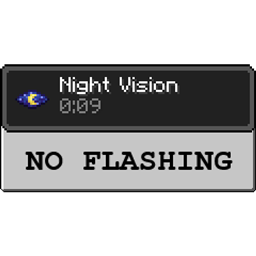
Nie znosisz migania Night Vision, gdy zostało mniej niż 10 sekund? My też, więc ten mod to usuwa - koniec z miganiem!
 NeoForge
 Forge
ForgeO modzie No Night Vision Flashing
Active Development: Minecraft 1.18.2
Website: Team CoFH
Discord: Team CoFH Discord
This is a pretty straightforward mod and it does a couple of things:
- Removes the flashing effect when night vision effects have less than 10 seconds left.
- The night vision effect can be configured to fade over time. Default is 1 second.
- Base night vision brightness can be adjusted.
Configuration
- Client: no_nv_flash-client.toml file located in /config
Compatibility
This mod does use a mixin (ASM) as of 1.16 and may have some compatibility issues, but it is very unlikely.
This mod is completely standalone and has no dependencies. It can safely be included in modpacks.
Jak zainstalować No Night Vision Flashing
With Millida Launcher
Install Millida Launcher
The launcher is free: download it at millida.net/launcher and sign in with any nickname.
Click “Install” on this page
The launcher opens and installs the mod for Minecraft 1.12.2–1.20.1 on Forge or NeoForge automatically.
Launch the game
A profile with it appears in the launcher: click “Play”.
Manually
Install Forge or NeoForge
The loader must match the game version of the mod file, for example Minecraft 1.20.1. After installing it, a separate profile appears in your launcher.
Download the file for your version
In the version list above, pick the file no_nv_flash-1.20.1-1.6.0.4.jar (8 KB) for your game version and loader.
Put it in the mods folder
The folder is inside .minecraft (Windows: %appdata%\.minecraft\mods). If it does not exist, create it.
Launch the loader profile
Open “Mods” in the main menu: No Night Vision Flashing should be in the list.
Minecraft 1.20.1 runs on Java 17: with a different Java version the game may close right after launch.
Wersje
Z zależnościami
| Minecraft | Loader | Plik | Data | Akcje |
|---|---|---|---|---|
| 1.20.1 | NeoForge, Forge | no_nv_flash-1.20.1-1.6.0.4.jar7.7 KB 2 | ||
| 1.12.2 | — | NoNVFlash-1.12.2-1.2.0.3-universal.jar7 KB 6 |
FAQ
Which Minecraft versions does No Night Vision Flashing work on?
There are files for 1.20.1, 1.12.2. The newest is 1.20.1.
Is No Night Vision Flashing for Forge or Fabric?
There are files for Forge: 1.20.1 and for NeoForge: 1.20.1. There are no files for Fabric: a mod for another loader will not start.
Does No Night Vision Flashing need other mods?
The author lists no required dependencies: the Forge or NeoForge loader is enough.
Which Java does No Night Vision Flashing need?
Minecraft 1.20.1 runs on Java 17. If the game closes right after launch, the usual cause is the wrong Java version in the profile settings.
Where can I download No Night Vision Flashing safely?
On this page: the file no_nv_flash-1.20.1-1.6.0.4.jar (8 KB) is stored on Millida’s server, with no link shorteners. SHA-1 checksum: cc3b48da1d463b11b16bf19c7d075d4942f25e94.
Opinie
Oceń No Night Vision Flashing jako pierwszy


