
Luggage Mod do Minecraft 1.20.1, 1.21.1
Odtworzenie OpenBlocks Luggage dla nowoczesnych wersji
 NeoForge
 Forge
Forge Fabric
 Quilt
QuiltO modzie Luggage
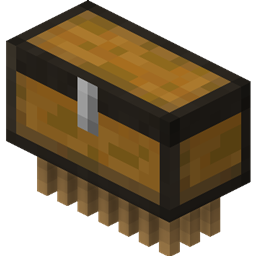
A simple mod to recreate the Luggage entity from OpenBlocks in modern MC versions.
- Just like in OpenBlocks, Luggage follows you around and picks up items on the ground and storing them in its inventory. You can open its inventory by right clicking it.
- Shift right clicking the Luggage will allow you to pick up the entity as an item, allowing you to easily store them away. The inventory, charged state, and name are saved in the item.
- Luggage is immortal, so you don't have to worry about losing your items.
- If your Luggage gets struck by lightning in some way, it will become charged and double its inventory space. This change is reflected in the texture for both the entity and the item.
- Is your Luggage not following you anymore? Did you lose track of where your Luggage ran off to, and it won't teleport back to you? Did it get stuck down in a deep cave and you can't easily retrieve it? Well, look no further than the whistling function! Simply press the whistle key, (bound to ` by default) and as long as Luggage is in loaded chunks, it will teleport back to you.
Forge builds are labeled as releases, Fabric builds are labeled as betas. This is only so both are visible to everyone.
Please report any issues you may find to the issue tracker (it's linked above). Thank you!
Jak zainstalować Luggage
With Millida Launcher
Install Millida Launcher
The launcher is free: download it at millida.net/launcher and sign in with any nickname.
Click “Install” on this page
The launcher opens and installs the mod for Minecraft 1.19.2–1.21.1 on Fabric, Forge, NeoForge or Quilt automatically.
Launch the game
A profile with it appears in the launcher: click “Play”.
Manually
Install Fabric, Forge, NeoForge or Quilt
The loader must match the game version of the mod file, for example Minecraft 1.21.1. After installing it, a separate profile appears in your launcher.
Download the file for your version
In the version list above, pick the file luggage-1.21-1.6.12.jar (166 KB) for your game version and loader.
Put it in the mods folder
The folder is inside .minecraft (Windows: %appdata%\.minecraft\mods). If it does not exist, create it.
Launch the loader profile
Open “Mods” in the main menu: Luggage should be in the list.
Minecraft 1.21.1 runs on Java 21: with a different Java version the game may close right after launch.
Wersje
Z zależnościami
| Minecraft | Loader | Plik | Data | Akcje |
|---|---|---|---|---|
| 1.21.1 | NeoForge | Luggage 1.6.12 - NeoForge 1.21166 KB | ||
| 1.20.1 | Forge | Luggage 1.6.1 - Forge 1.20172 KB | ||
| 1.19.2 | Fabric, Quilt | Luggage 1.5.2 - Fabric296 KB |
FAQ
Which Minecraft versions does Luggage work on?
There are files for 1.21.1, 1.20.1, 1.20, 1.19.2. The newest is 1.21.1.
Is Luggage for Forge or Fabric?
There are files for Fabric: 1.19.2, for Forge: 1.20–1.20.1, for NeoForge: 1.21.1 and for Quilt: 1.19.2.
Does Luggage need other mods?
The author lists no required dependencies: the Fabric, Forge, NeoForge or Quilt loader is enough.
Which Java does Luggage need?
Minecraft 1.21.1 runs on Java 21. If the game closes right after launch, the usual cause is the wrong Java version in the profile settings.
Where can I download Luggage safely?
On this page: the file luggage-1.21-1.6.12.jar (166 KB) is stored on Millida’s server, with no link shorteners. SHA-1 checksum: 83db4b12f9c673b9a1990531d3a0d182d46301e4.
Opinie
Oceń Luggage jako pierwszy


